Lead score and rating
How the 0 to 100 lead score is worked out, how admins tune it, and how it differs from the Hot and Cold rating you set by hand.
Updated 9 October 2026 · 5 min read
When you have more leads than time, you need to know which ones to call first. Salesfresh helps in two ways:
- The lead score is a number from 0 to 100. Salesfresh works it out for you from the lead's details. The higher the score, the better the lead fits the kind of customer you want.
- The rating is your own view of the lead, from Very Cold to Very Hot. You set it yourself, usually after you talk to them.
For example, you have twenty new leads and time for five calls today. Open each lead and check its score. Call the ones that score 80 or more first. After each call, set a rating so your team knows how it went.
| Lead score | Rating | |
|---|---|---|
| What it is | A number from 0 to 100 | From 0 Unrated to 5 Very Hot |
| Who sets it | Salesfresh, using rules your admin sets up | You, on the lead form |
| Where you see it | The lead's Overview tab, and the browser extension | The lead's Account Details |
See a lead's score
Open the lead. On the Overview tab, the Lead Score card shows a gauge with the score "of 100 points". The colour goes from red to orange, then blue, then green as the score goes up.
Want to know why a lead scored high or low? Click Show more insights. You see:
- a short summary of where the lead is strong and where it is weak,
- the Factor-wise Breakdown, with the points each factor added and how good it was (Excellent, Good, Average or Poor).
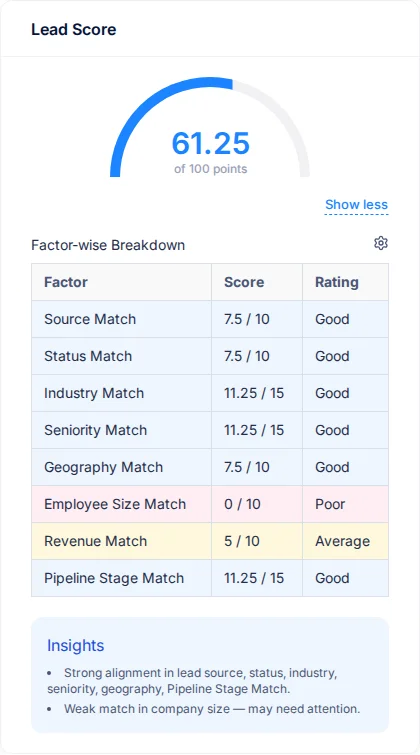
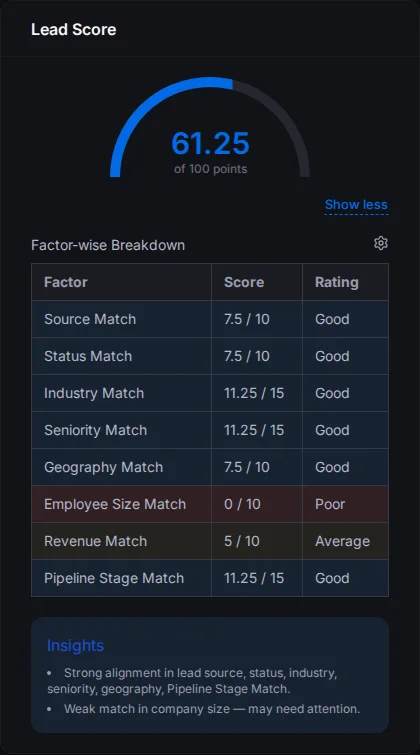
In this example the factors add up to 95, not 100. That's because the Language factor (5 points) only counts for leads added with the browser extension, which knows what languages a person speaks. For every other lead, Language isn't shown in the breakdown, so the highest score they can get is 95. Your admin can turn Language off in the weights and give its 5 points to another factor. See Configure lead scoring.
A lead that scores 80 or more is usually a strong fit, so call it first. A lead below 50 usually needs more time. Keep in touch with it before you try to sell.
The score is worked out again each time you open the lead, so it always matches the lead's latest details. Because of this, you can't sort or filter the leads list by score.
How the score is worked out
The score is made of nine parts, called factors. Each factor can add up to a set number of points, called its weight. All the weights add up to 100.
| Factor | What it looks at | Weight to start with |
|---|---|---|
| Source | The lead's Lead Source | 10 |
| Status | The lead's Lead Status | 10 |
| Industry | The lead's Industry | 15 |
| Seniority | The lead's Title. For example, a title with "Director" in it | 15 |
| Language | The languages the lead speaks. Only known for leads added with the browser extension | 5 |
| Geography | The lead's Country, or a region that includes it | 10 |
| Employee Size | The lead's Total Employees | 10 |
| Revenue | The lead's Annual Turnover | 10 |
| Pipeline Stage | The lead's Stage | 15 |
For each factor, your admin lists the values that matter to your business and gives each one a grade. The grade decides how many of the factor's points the lead gets:
| Grade | Points the lead gets |
|---|---|
| Excellent | All of the factor's weight |
| Good | 75% of it |
| Average | 50% of it |
| Poor | 25% of it |
If the lead's value isn't on your admin's list, that factor adds nothing. If more than one value matches, the best grade counts.
Here is an example. Industry has a weight of 15. Your admin has graded "Manufacturing" as Good. A lead in Manufacturing gets 75% of 15, which is 11.25 points for Industry.
Values match even if the lead's value has more words in it. So a lead with the title "Senior Director" matches a seniority level called "Director". Matching isn't case-sensitive either, so "director" and "DIRECTOR" match too. Languages are different. They must match exactly.
Set up lead scoring (admins)
Admins choose the values for each factor, and the weights, in Settings > Lead Score Configurations. See Configure lead scoring.
Until your admin sets it up, every lead scores 0.
Rating
The rating is how warm you think the lead is. Set it on the lead form, under Account Details.
| Rating | Meaning |
|---|---|
| 0 | Unrated: you haven't judged it yet |
| 1 | Very Cold |
| 2 | Cold |
| 3 | Warm |
| 4 | Hot |
| 5 | Very Hot: ready to convert |
The rating doesn't change the lead score. They are separate. When you convert the lead, the rating is copied to the new account.
Related
- The lead detail page
- Create, edit and clone a lead
- Lead status and lead stages
- Configure lead scoring
Still stuck?
Tell us what you were trying to do and we will help.