Put a web form on your website
Put your web form on your website with an embed code, or share its own page, and see which campaign each visitor came from.
Updated 28 October 2026 · 3 min read
Once your form is ready, put it on your website or share its link.
For example, a real estate agency has one "Book a site visit" form. It puts the form on its Contact page, shares the link in a Facebook post, and prints the link as a QR code on flyers. People fill in the same form from all three places, and every enquiry comes into Salesfresh. With a different campaign tag on each link, the agency can see which place brought each enquiry.
Before you start
- Permission: View Forms.
- Plan: Your plan sets how many forms can be Active at once. See Plans and limits.
- Set up first: The form must be Active, and an embedded form needs a website. It loads only on that website's domains, with or without
www.. To add a domain, edit the website, not the form. See Websites.
Iframe forms: put it on a page
- Go to Settings → Marketing → Forms and select ⋮ on the form.
- Select View Embed Code. The Embed Code window opens.
- Select Copy to clipboard.
- Paste the code into your website's page, where the form should show.
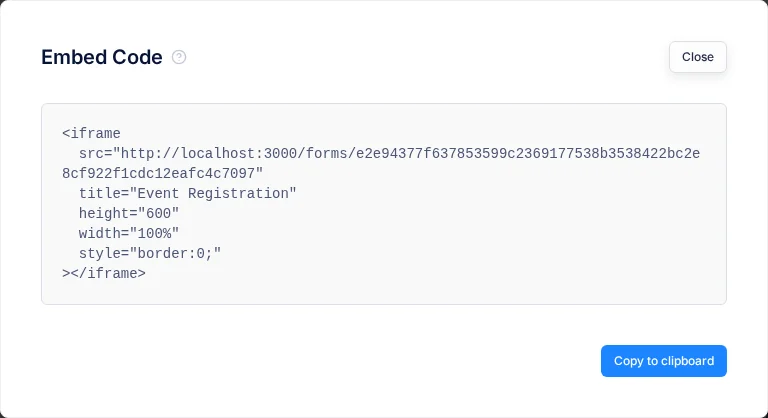
The code looks like this:
<iframe
  src="https://your-crm-address/forms/your-form-code"
  title="Contact Us"
  height="600"
  width="100%"
  style="border:0;"
></iframe>
If the form is longer or shorter, change height.
Opening the form's own link always works. The domain check only applies when the form sits inside another page.
Standalone forms: share the link
A Standalone form, shown as a page, has a page of its own, with your logo at the top and links to your privacy and terms pages at the bottom. Select ⋮ on the form, then Preview. Copy the address from your browser and put it in emails, ads or social posts.
See where visitors came from
Add campaign tags to the form's address, such as ?utm_source=facebook&utm_campaign=diwali. Each submission saves the source, medium, campaign and content tags. See Form submissions.
- For a Standalone form, add the tags to the link you share.
- For an Iframe form, add them to the
srcaddress in the embed code. Tags on your own website's address don't reach the form.
Troubleshooting
| Visitor sees | Why | What to do |
|---|---|---|
| "This website is not allowed to show this form." | The page isn't on one of the form's website's domains | Add the domain to the website. See Websites |
| "Access denied. Domain '…' is not in the allowed domains list." | An older form without a website opened on an address it doesn't allow | Edit the form, pick its website and save |
| "Form is not active" | The form is switched off | Activate it in Settings → Marketing → Forms |
| "Form not found" | The form was deleted or switched off, or the code belongs to another form | Check the form, then copy the embed code again |
Related
Still stuck?
Tell us what you were trying to do and we will help.