Close your company's account
Close your company's account, what happens to your users, subscription and data, and how long you have to change your mind.
Updated 12 October 2026 · 3 min read
Deleting your company account closes it for everyone in your company. It's different from deleting just your own profile, which you do from your profile.
For example, the owner of a small consultancy is retiring and closing the business. They download the reports they want to keep, then delete the company account. Everyone loses access straight away. A week later, a former partner asks for some old records. Because the data is kept for a while, the owner contacts support, who restore the account.
Before you start
- Only the account owner, the person who created the company, can delete it. They also need the Delete Company Settings permission.
- Download anything you need first. See Download a report.
- If your subscription has a commitment period, you can't delete the account until the early-closing fee is paid. Contact support to get the invoice.
Delete the account
- Go to Settings > Company Settings > Delete Account.
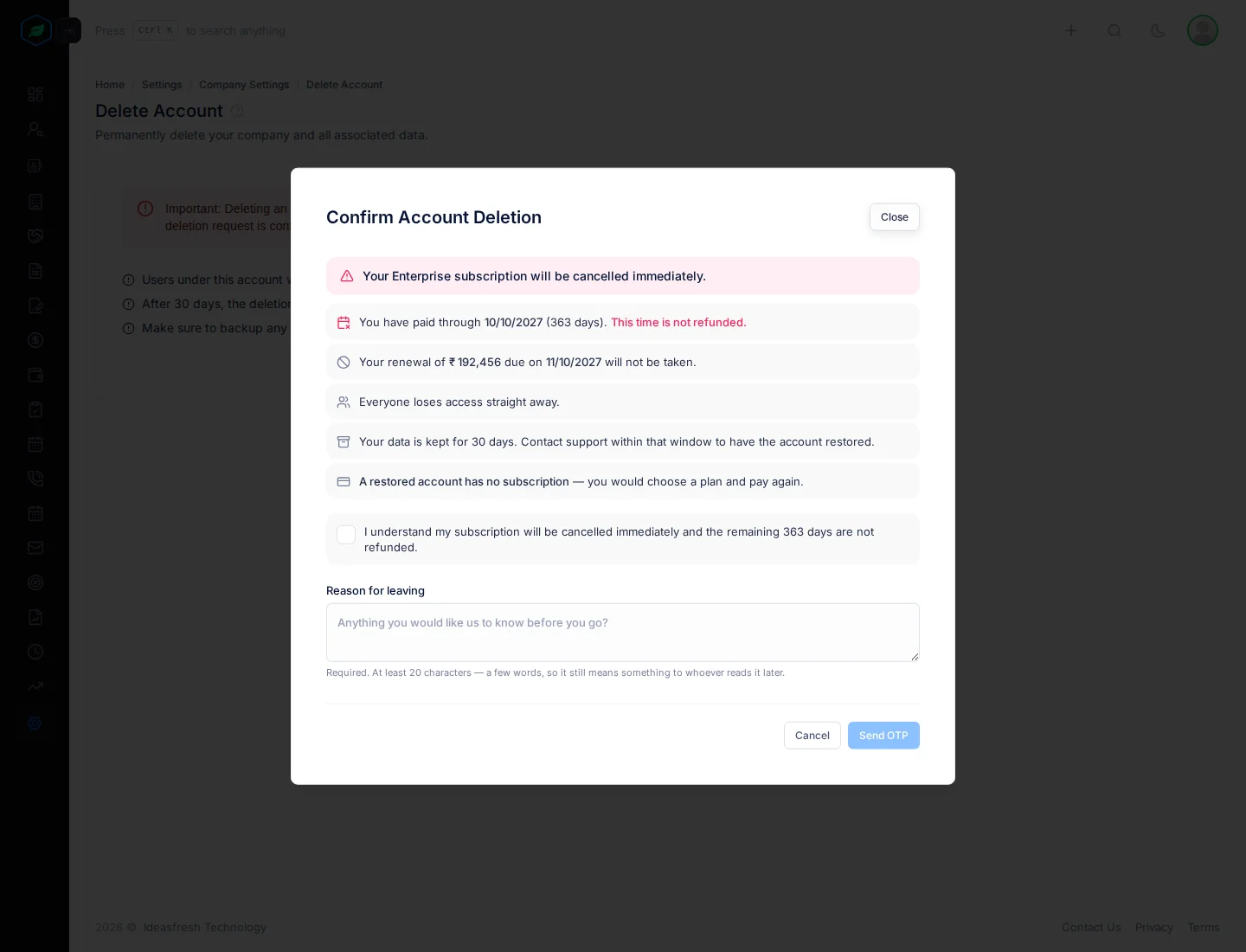
- Click Delete Account. The Confirm Account Deletion window opens.
- Read what will happen to your subscription and data, and tick the box to say you understand.
- Under Reason for leaving, write why you're leaving.
- Enter the email you sign in with, and click Send OTP.
- Enter the 6-digit code from your email. It works for 5 minutes. To get a new one, wait 60 seconds and click resend.
- Click Confirm. You're signed out 2 seconds later.
| Field | What to enter |
|---|---|
| I understand… | Tick to confirm you've read what happens to your subscription. Only shown if you have one |
| Reason for leaving | Why you're leaving, 20 to 500 characters |
| The email you sign in with, typed exactly the same, including capital letters | |
| OTP | The 6-digit code from your email |
The email step only shows once the box is ticked and the reason is long enough.
What happens
| When | What happens |
|---|---|
| Straight away | Everyone loses access. Your subscription is cancelled, and time already paid for isn't refunded. The account owner gets an email |
| For the number of days shown in the window | Your data is kept. Contact support in this time to have the account restored |
| After that | Your data is erased for good |
A restored account has no subscription. You choose a plan and pay again.
Troubleshooting
| You see | Why | What to do |
|---|---|---|
| "Only the account owner (…) can delete this company. Please ask them to do it from their own account, or contact our support team." | You didn't create the company | Ask the account owner |
| "This account cannot be closed yet" | An early-closing fee or an unpaid invoice is due | Click View billing history and pay it, or contact support |
| "Please provide the email you are currently logged in with" | The email doesn't match your sign-in email | Type your sign-in email exactly |
| "The OTP you entered is not valid." | The code is wrong | Check the email and type it again |
| "OTP has expired. Please request a new OTP." | More than 5 minutes passed | Click resend and use the new code |
| "Access denied" | You don't have the Delete Company Settings permission | Ask your admin |
Related
Still stuck?
Tell us what you were trying to do and we will help.