Delete and restore a record
Delete records you no longer need, see what goes with an account, and bring any record back from Trash before it is erased.
Updated 28 October 2026 · 6 min read
You can delete records you no longer need. A deleted record goes to Trash, and if you deleted it by mistake, you can bring it back until it is erased. Deleted records are kept for 30 days.
For example, a teammate deletes the wrong lead. You open Trash, find the lead and select Restore. It comes back with its comments, files and activities, as if nothing happened.
Before you start
- Permission: The delete permission for that kind of record, such as Delete Leads. For leads, contacts, accounts, deals, quotes and tasks, you must also be the record's owner, or the person who created it. For calls, you must be the person who created it.
- Plan: Every plan. See Plans and limits.
- Set up first: The record must not be locked. See Lock and unlock a record.
If you don't have a permission you need, ask your admin.
Delete a record
Open the record, or find it in the list. Select ⋮, then Delete, and confirm. The record goes to Trash.
You can't delete:
- a locked record,
- a converted lead,
- a meeting that is completed, cancelled or missed.
Delete an account
Deleting an account also deletes the records that belong to it, such as its contacts and deals.
For example, you have two accounts with similar names, and you delete the wrong one. The next day, a teammate asks where the client went. Open Trash, find the account and select Restore. It comes back with its contacts, deals, quotes and contracts, just as it was.
Before you confirm a delete, read the numbers in the Delete window. They tell you how many contacts and deals will be deleted too.
- Open the ⋮ menu on the account's page, or the menu at the start of its row on the list. Select Delete.
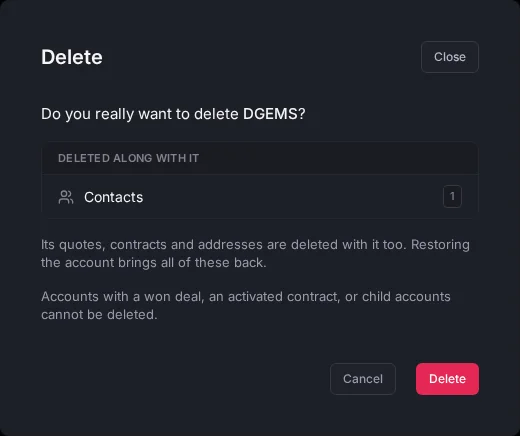
- The Delete window opens. It names the account and lists the contacts and deals that will be deleted with it. Check them.
- Select Delete.
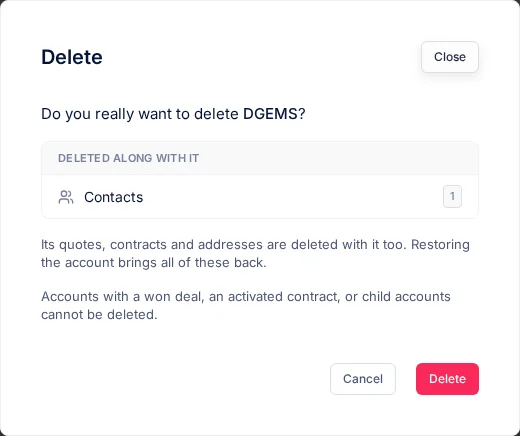
What is deleted with an account
| Deleted with the account | Kept |
|---|---|
| Its contacts | Leads linked to the account. They stay, but are no longer linked to it |
| Its deals | Customer subscriptions and assets |
| Its quotes | |
| Its contracts | |
| Its addresses |
What stops an account being deleted
Salesfresh won't delete an account that has any of these:
| What it has | Why | What to do |
|---|---|---|
| A won deal | A won deal is the record of a sale, so it must be kept | Keep the account |
| An active contract | An active contract is a signed agreement | Keep the account, or sort out the contract first |
| Child accounts | They would be left without a parent | Delete the child accounts first, or give them a different parent |
Can you bring it back?
| Record | After you delete it |
|---|---|
| Leads, contacts, accounts, deals, quotes, contracts, subscriptions, assets, tasks, meetings, calls and products | You can restore them from Trash until they are erased |
| Contacts | Also, if you add a new contact with the same email, Salesfresh offers to restore the old one |
| An account's contacts, deals, quotes and contracts | They come back when you restore the account, if they were deleted with it |
Restore a record
- Select Trash under Data in the menu on the left. Each deleted record shows how many days are left to restore it.
- Select Restore on the record, and confirm.
You can also open the deleted record. A banner says when it was deleted and when it will be erased. Select Restore, or Restore Lead or Restore Account. You can't change anything on the page until you restore it.
A restored record comes back with its comments, files and activities. A restored account also brings back the contacts, deals, quotes and contracts that were deleted with it. If you deleted a contact or deal on its own before that, it stays in Trash.
To restore a record, you need its edit permission, such as Edit Leads. You must also have its delete permission, or be the record's owner or the person who created it.
When its days run out, a deleted record is erased for good. See Trash.
Delete a record for good
To erase a deleted record now, instead of waiting, find it in Trash and select Delete permanently. Empty Trash erases everything you can see in Trash.
To do this, you need Permanently Delete from Trash and the delete permission for that kind of record, such as Delete Leads.
You can't undo this. A deleted account goes for good with its contacts, deals, quotes and contracts.
Troubleshooting
| Message | Why | What to do |
|---|---|---|
| Delete is missing | The record is locked, or you don't own it and didn't create it, or you don't have the delete permission | Ask the owner, or ask your admin for the permission |
| An account can't be deleted because it has a won deal, an active contract or child accounts | Those records must be kept | See What stops an account being deleted |
| "Account not found" | You don't own the account and didn't create it, the account is locked, or it no longer exists | Ask the account's owner, or unlock it first |
| A restore says the record was deleted too long ago | Its days to restore have run out | Add the record again |
| "Permanently deleting a lead needs the Delete Leads permission." | You don't have the Delete Leads permission | Ask your admin for the permission |
| "Permanently deleting an account needs the Delete Accounts permission." | You don't have the Delete Accounts permission | Ask your admin for the permission |
| "Only its owner, its creator or someone who can delete it can restore this record." | You don't own it, didn't create it and can't delete it | Ask the owner, or ask your admin for the permission |
Related
Still stuck?
Tell us what you were trying to do and we will help.