
Give Your Team a Number to Chase
Set specific, measurable targets for every rep — calls, meetings, deals, revenue, and more. Progress updates in real-time from CRM data they're already entering. No spreadsheets. No manual check-ins.
Managers see who is on pace and who needs help while there is still time to act, and every rep can check their own number without asking anyone. Set it up in minutes and let your CRM keep score.
Start exploring with instant access. No payment required.
Without targets, performance is just a guess
Managers guess who's performing. Reps don't know where they stand. Revenue forecasts are built on gut feel. By a time anyone realises a rep is off track, their period is almost over.
With targets, reps see their progress in real-time, managers spot risk early, while CRM data you're already capturing becomes a performance measurement system at no extra cost.
A target turns a vague ambition such as bringing in more leads into a specific commitment: fifteen new leads this month, eight Demo meetings this quarter, a revenue figure by year end. A manager sets it, a rep owns it, while Salesfresh keeps score from calls, meetings, deals or quotes already being recorded.
Clear numbers are also fairer. Every rep knows in advance what good looks like, reviews rest on figures both sides can see, while people quietly doing work that moves deals forward get recognition for it. Targets make effort visible — visible effort is far easier to reward.
Set it once. Tracked automatically.
No manual updates. No syncing. Progress moves as soon as a rep logs a matching activity in your CRM. Four steps — only one takes any effort.
Manager Sets Target
Choose a metric, a target value, a period plus any outcome or purpose filters, then assign it to one rep or several
Rep Works in CRM
Rep logs calls, books meetings, sends quotes, closes deals in their normal workflow, with nothing extra to fill in
Progress Updates Live
Every matching activity moves its progress bar, while a projected finish is recalculated from pace so far
Alerts Fire Automatically
Manager notified when at risk, rep notified when achieved, so nobody has to keep checking a report
There is no import step, no end-of-week roll-up. A target only reads data your team already keeps in this CRM, so whatever figure a rep sees is exactly what their manager sees, worked out identically, at one moment. When a period ends, its result is recorded while a recurring target simply starts counting again for its next one. Managers spend their time on reps who need help; reps spend theirs selling rather than reporting.
Target every part of your sales process
From first call to signed contract — every major activity or outcome your team records in this CRM can become a target.
Activity
5 metricsThe day-to-day work that fills a pipeline. Call and task metrics also accept outcome filters, so you can count results rather than attempts.
- Meetings Booked
- Meetings Completed
- Calls Made
- Calls Completed
- Tasks Completed
Leads
4 metricsNew leads, conversions, leads held at a chosen stage, and leads that reach a lead score you set, so qualification work is measured as well as volume.
- Leads Created
- Leads Converted
- Leads in Stage
- Leads with Score ≥ X
Deals
4 metricsCount targets for deals won and created, and value targets for revenue closed and pipeline added.
- Deals Closed (Won)
- Revenue Closed
- Deals Created
- Pipeline Value Added
Commercial
4 metricsThe paperwork after the handshake: quotes going out and coming back accepted, contracts and subscriptions.
- Quotes Sent
- Quotes Accepted
- Contracts Signed
- Subscriptions Created
Each metric is read straight from records your team creates, credited to whoever owns each one. Pick one per target, and give a rep as many targets as their role needs: a BDR might carry calls, meetings booked and leads converted, while an account executive carries deals won and revenue closed. Customer success teams can be measured on subscriptions created and quotes accepted, so every revenue-facing role has numbers that reflect what it actually does.
Measure quality, not just volume
Raw activity counts only tell part of a story. Filter any call or task metric by the outcome recorded — a specific outcome, any outcome of a certain nature (Positive, Neutral, Negative), or a minimum quality rating.
Outcomes are those your team already records when it logs a call or completes a task, so there is nothing new for reps to learn. Choose one exact outcome, every outcome of one nature, or a minimum rating; only engagements meeting it count towards that number.
In practice this changes what reps chase. Two reps can each make forty calls in a week; whoever has twelve Interested outcomes is having better conversations, while an outcome-filtered target makes that figure count. Managers can then coach on conversation quality with evidence rather than impressions.
- "10 calls with outcome Interested this month" — not just any 10 calls
- "15 calls with a Positive outcome" — rewards quality conversations
- "8 tasks with outcome rating ≥ 7" — focuses reps on high-quality follow-ups
Target activity types that matter
Filter targets by engagement purpose — Demo, Discovery, Follow-up, Proposal Review. Ensures reps are doing specific activities that matter, not just logging any activity to hit a number.
Purposes come from a list your company already uses to label engagements. A purpose filter can sit alongside an outcome filter, while a rep can hold filtered plus unfiltered targets on one metric at once, because they measure different things.
It also keeps a pipeline balanced. A team short on early-stage conversations can be given a Discovery target for a month, while a team with plenty of interest but few closes can be pointed at Proposal Review meetings instead.
- "5 meetings with purpose Demo per month" — not just any 5 meetings
- "8 calls with purpose Discovery" — ensures reps are prospecting, not just chatting
- Combine purpose with outcome filters on one target for maximum precision
Match each cadence to your team
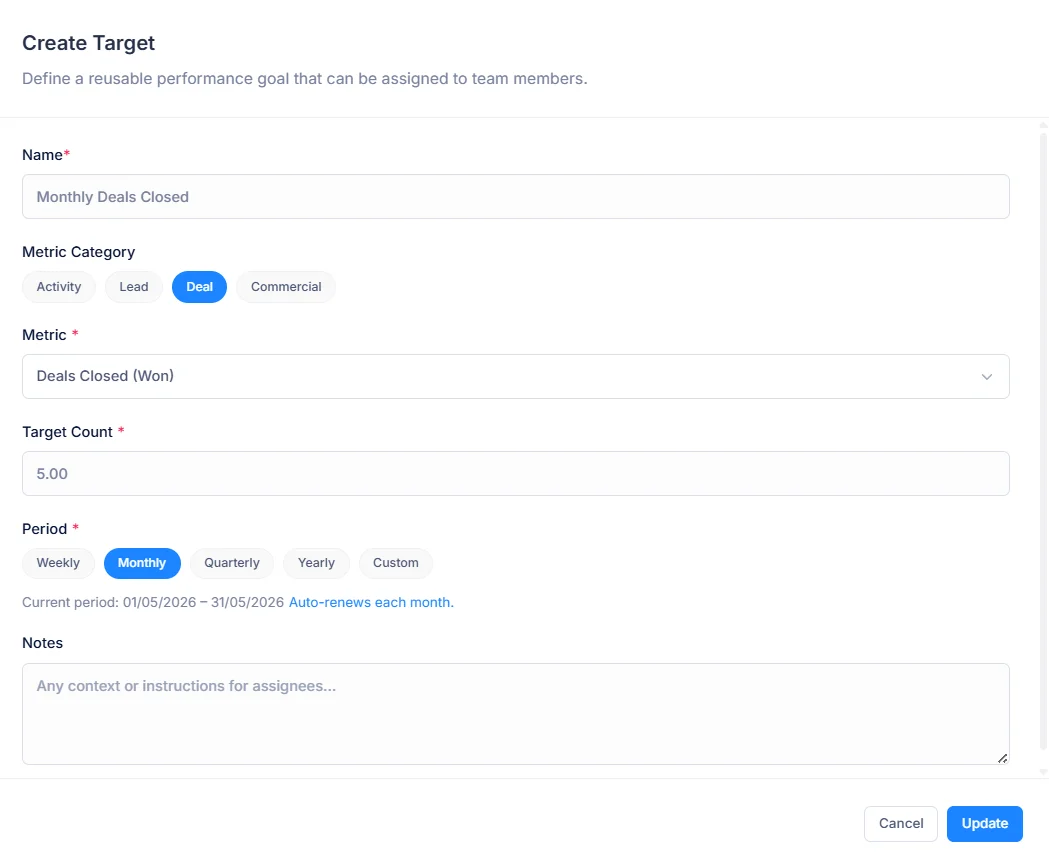
Five time-bound period options. Recurring periods carry forward automatically — no manual renewal needed.
Resets every Monday
For high-velocity teams where monthly feedback is too slow, such as call and meeting targets for BDRs
Resets on the 1st
The most common cadence for quota-carrying reps, and the easiest to line up with commission cycles
Resets Jan, Apr, Jul, Oct
For revenue and pipeline targets tied to calendar quarters and quarterly business reviews
Resets January 1st
Annual targets for long-cycle enterprise accounts and company-wide revenue goals
You define the dates
Set specific start plus end dates for one-off campaigns, product launches or sprints
A recurring target is set up once and moves to its next period by itself, keeping its value until you change it. When a period closes, its final figure is saved as a snapshot, so a history of every rep's results builds up in the background and stays accurate even if records are edited later.
Mixing cadences is normal. A rep can have weekly call and meeting targets that keep daily habits honest, a monthly deals target, and a quarterly revenue target, all visible side by side, each with its own days remaining. Weekly periods start on Monday, while quarters follow a calendar, so every rep or manager is always reading one window.
Assign to one rep or your whole team
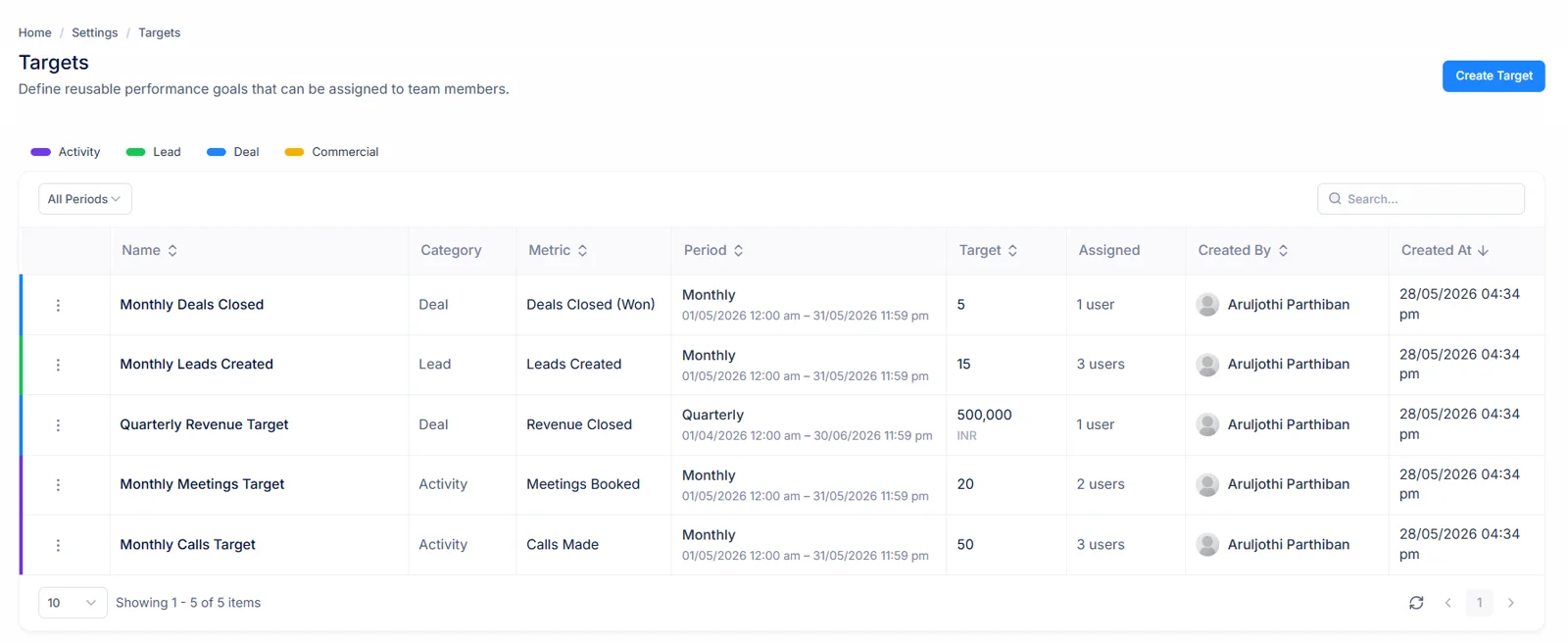
Define the goal once — metric, value, period, filters — save it as a Target Spec, then assign it to multiple team members in a single action. Each rep gets their own independent target.
Change the spec and every assignment on it follows, so a new quota for a quarter is one edit rather than fifty. Each person still owns their own progress plus status, while a rep is never given one metric with identical filters twice for overlapping dates.
When somebody joins, add them to an existing spec so they are measured on identical terms to everyone else. When a rep is away, pause just their assignment. Either way the spec, and every other rep's target on it, carries on untouched. Setting up a new quarter for a whole sales floor takes minutes, not an afternoon of spreadsheets.
- One target spec, assigned to 50 reps in a single click
- Each assignment is independent — pause one rep without affecting others
- Assign new hires mid-period without recreating a spec
- Overlap protection prevents duplicate targets automatically
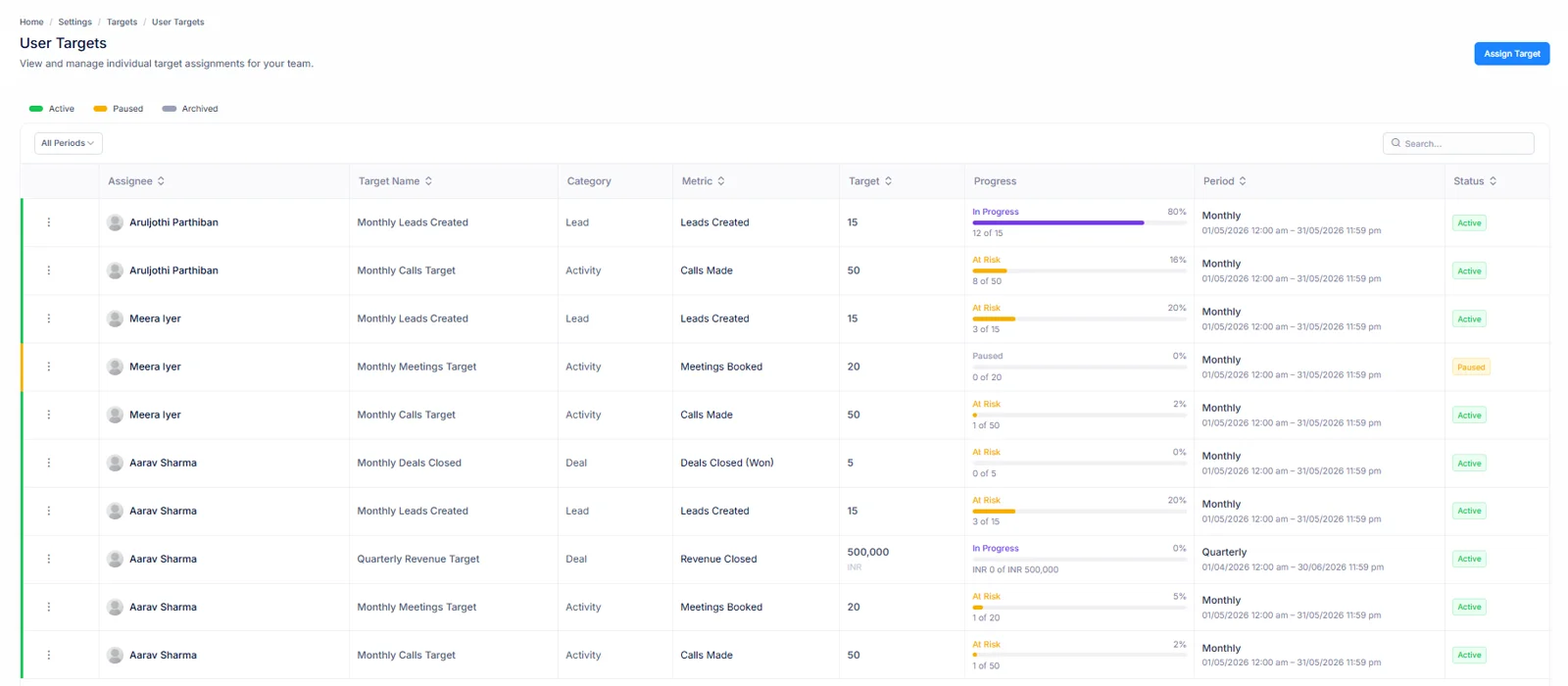
Know exactly where every rep stands — right now
Progress updates live from CRM activity. As soon as a rep books a meeting or closes a deal, their progress bar moves. No manual updates, no syncing delays.
Each state is worked out from pace, not just a total. A rep at or above a pro-rated share of their number for days gone reads On Track. Once more than 70% of a period has passed with less than half its target reached, it turns At Risk. Hit that number to read Achieved straight away; finish a period short to close as Missed.
Next to each bar sits a projected finish: a rep's daily rate so far, carried to a period's final day. It is the early warning that matters most, because a rep can be on track today while their pace is slowing, while its projection shows that shortfall coming well before a period runs out. Days remaining sit alongside, so everyone can see how much time is left to recover.
- Live progress bar with current vs. target value
- Pro-rated "on track" threshold calculated daily
- Projected end-of-period value shows where they'll finish
- State transitions trigger notifications automatically
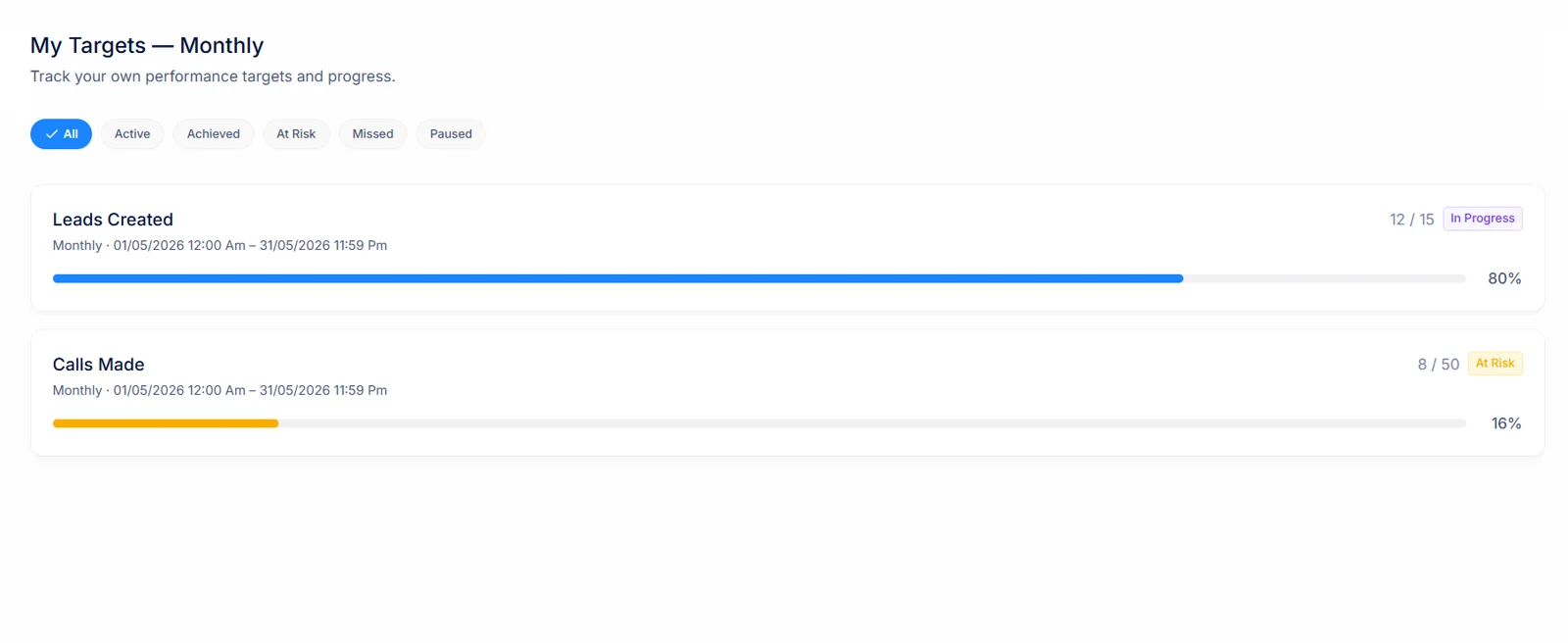
Targets stay visible where reps work
For targets to motivate, reps need to see their progress in their daily workflow — not buried in a settings page. Two places keep every number in view: a full page for detail plus a summary on your home screen for a quick look.
My Targets Page
A dedicated page reachable from main navigation. Shows all active targets for this period — with progress bars, projected values, and days remaining. A rep can see at a glance which number needs attention this week, how far each one has left to go, without opening a report or asking their manager.
Dashboard Widget
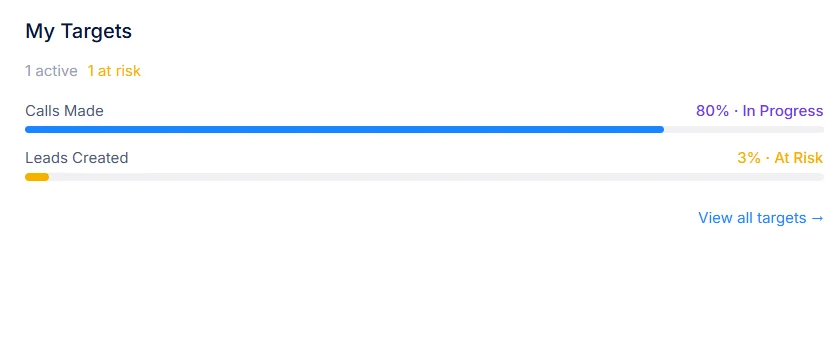
A compact summary card on your CRM home page. Visible to any rep with at least one active target — no navigation needed. It is what they see first when they log in, keeping that number in mind as every working day starts.
Managers work from identical figures. A targets list shows every assignment they are allowed to see, filterable by rep, metric, period or status, so a one-to-one can start with numbers already on screen. A rep sees only their own targets, a manager sees people in teams they manage, and company-wide visibility is reserved for roles given it. Because reps can already see where they stand, a weekly check-in no longer has to begin with reading numbers aloud; it can go straight to deals or conversations that will close a gap.
The Benefit in Plain Terms
See exactly what changes when every rep has a clear target with live progress, while everyone works from one set of numbers.
Without User Targets
With User Targets
Performance feedback comes after a period ends
Managers see who is at risk with days left to act
Reps guess whether they're on track
Every rep sees their own live progress in the CRM
Activity targets focus on volume only
Outcome or purpose filters measure quality, not just count
Setting up team targets takes hours
One target spec assigned to a whole team in seconds
Notifications require manual monitoring
Automated alerts fire for every key milestone
Timing changes most. A missed number used to show up in a month-end review, when nothing could be done about it. With a live target, that shortfall shows up as At Risk while days remain in its period, so conversation turns to closing a gap rather than explaining why it happened.
It also settles arguments about numbers. Every figure comes from one set of records under one set of rules, so reps plus managers look at a single version of events, while time that used to go into building spreadsheets goes back into selling.
Everything Else Worth Knowing
Short answers to what sales leaders ask before rolling targets out.
What can actually be measured?
Seventeen metrics across four groups: activity (meetings booked or completed, calls made or completed, tasks completed), leads (created, converted, sitting in one stage, or above some score), deals (closed won, revenue closed, created, pipeline value added), plus commercial (quotes sent or accepted, contracts signed, subscriptions created).
How often do targets reset?
Five cadences ship ready: weekly from every Monday, monthly from each 1st, quarterly from January, April, July or October, yearly from January 1st, plus custom windows where you pick both dates yourself for one-off campaigns or sprints.
Does chasing a number just reward busywork?
Not once outcome or purpose filters are applied. Rather than counting any ten calls, count ten that ended Interested, or five meetings whose purpose was Demo. Quality conditions sit on any activity metric, while both filter kinds combine on one target.
Who updates progress?
Nobody. Progress reads live from CRM activity, so booking a meeting or closing a deal moves its bar immediately. No spreadsheet export, no weekly roll-up, no syncing delay. If a record is corrected, its figure corrects itself too.
What does assigning in bulk actually create?
Independent targets, one per rep. Define metric, value, period, filters once as a Target Spec, then push it across several people in one action — each of whom owns their own copy afterwards, rather than sharing one pooled number.
How do I tell trouble from success at a glance?
Every target shows a state, while four of them tell you almost everything: On Track, At Risk, Achieved or Missed. At Risk is what makes this useful mid-period, surfacing reps who still have time to recover instead of reporting a miss once nothing can be done.
Can reps see their own numbers?
Yes — that visibility is half its point. Each rep watches their own progress without asking anybody, which removes check-ins whose only purpose was reading out a figure already recorded. Reps who can see a gap early tend to close it without being asked.
How is At Risk decided?
By a fixed, visible rule rather than a hunch. Once more than 70% of a period has gone by while a rep is still under half of their number, that target turns At Risk. Before then, a rep level with or ahead of pro-rated pace reads On Track, while one behind it reads In Progress, so nobody gets flagged on day two of a month for not having closed anything yet.
What is a projected value?
It takes a rep's average daily rate so far, running it to a period's end. Ten meetings in a thirty-day month's first ten days projects to thirty. It is a simple straight line on purpose, so a rep can check its arithmetic themselves, telling a manager whether someone who looks fine today is slowing down before a gap becomes impossible to close.
What happens to a lead or deal that changes owner mid-period?
Progress follows its current owner. If a deal moves from one rep to another before it closes, that win counts towards its new owner's target, because that is who owns it when its figure is read. Once a period has ended its result is frozen, so reassigning records afterwards never rewrites a target already closed.
Can a rep hold two targets on one metric?
Yes, as long as they measure different things. A rep can carry one target for all completed calls plus a second for calls that ended Interested, or one for all meetings with another for Demo meetings. What is blocked is an exact duplicate: one metric with identical filters for one person over overlapping dates is rejected when you try to assign it.
What if a rep goes on leave?
Pause their assignment. A paused target shows as Paused whatever its numbers say, so an empty progress bar is not mistaken for a performance problem, while pausing one rep leaves everybody else on that Target Spec running as normal. Resume it when they are back; it picks up where it was.
Who can see whose targets?
Every user sees their own targets without needing any permission. Managers see targets for people in teams they manage, nobody else's. Only a role granted view-all permission sees targets across a whole company, keeping individual performance numbers limited to people with a reason to see them.
Is past performance kept once a period ends?
Yes. Shortly after a period closes, each target's final figure is captured as a snapshot: value achieved, goal it was measured against, whether it was met. Records edited or deleted later do not change that result, so last quarter's numbers stay identical when you look at them next year.
Can I target leads at a particular stage or score?
Yes. Leads in Stage counts leads sitting in a pipeline stage you pick, while Leads with Score at or above X counts leads whose lead score meets a threshold you set. Both suit teams whose job is to qualify leads rather than simply create them, because they reward moving leads forward instead of adding more to a funnel’s top.
What exactly is a Target Spec?
It is a reusable definition behind a target: a name such as Standard BDR Monthly, its metric, value, period, any filters, plus optional notes explaining why that number was set. Assignments point back to their spec, so each rep can also carry a note of their own where their situation differs from everyone else’s.
Can I change a target in mid-period?
Yes. Because progress is worked out whenever it is read rather than stored as a running total, a new value takes effect immediately, with every rep on that spec measured against it straight away. Periods already ended keep whatever result they were frozen with, so an adjustment this month never changes last month.
How do revenue targets differ from activity targets?
Activity, lead or most commercial metrics count records, so a target is a number such as twenty calls. Revenue Closed or Pipeline Value Added add up deal values instead, so its target is an amount in a currency you choose. Both kinds share periods, progress states, projections — both can sit side by side on one rep.
What does Exceeded mean?
A target that finishes its period above goal closes as Exceeded rather than just Achieved, so reps who went beyond their number stand out from those who landed exactly on it. During a period, a target reads Achieved as soon as its value is reached, then keeps counting.
Do reps have to do anything differently?
No. Targets read calls, meetings, tasks, leads, deals, quotes, contracts or subscriptions reps already record in this CRM. Their only visible change is a progress bar that moves when they do their job, plus a clear view of how far they have left before a period ends.
Do targets replace sales reports?
They answer a narrower question: is each person on course for their goal? Reports remain a place to explore trends or slice a pipeline in different ways. Targets give managers plus reps one agreed number per goal, updated continuously, so a weekly meeting can start from gaps instead of from gathering figures.
How is pro-rated pace worked out?
It is a share of a target matching how much of its period has gone. A monthly target of twenty deals, fifteen days into a thirty-day month, expects ten. Pace runs on calendar days rather than working days, so its figure is identical whoever looks at it, never depending on a holiday calendar.
Does a paused target keep counting?
Yes. Pausing changes how a target is shown, not what it measures. Its underlying value carries on accumulating from CRM activity, so if a rep does some work while their target is paused, nothing is lost when it resumes, with its figure still correct when that period closes.
Can I run a target for a short campaign?
Use a Custom period. Pick a first plus last day — for example a two-week push on Demo meetings around a product launch — so it runs for exactly those dates with an identical progress bar, states or projection to any recurring target. It does not repeat once it ends.
Where do I set targets up?
Managers or admins create Target Specs, assigning them from a User Targets screen under Settings. Reps never need to go there: their targets appear on a My Targets page in main navigation, plus in a widget on their CRM home page, where they spend their day anyway.
Does every call or meeting count, whoever logged it?
Activity is credited to whoever owns each record — a rep that call, meeting or task belongs to in this CRM. That keeps figures honest when a colleague logs something on behalf of a rep, meaning a target measures work that rep is accountable for rather than whoever happened to click save.
What happens when a recurring period ends?
Its closing figure is frozen as that period's result, while an identical target starts again from zero for next week, month, quarter or year. There is nothing to copy forward, nothing to reset by hand; each rep sees a fresh progress bar on a new period's first day.
Why does a target say Not Started?
A Custom target whose first day is still in future has nothing to measure yet, so it reads Not Started instead of showing a rep as behind before a campaign has begun. It switches to a live state automatically on its start date, with no action needed from any manager.
How many targets should one rep have?
Usually three to five. Enough to cover activity that builds pipeline plus an outcome that pays for it — for example calls with a Positive outcome, Demo meetings booked, revenue closed — but few enough that each one still gets attention. Each target is independent, so you can add or pause one without touching others.
Can a whole team share one goal?
Yes. A team goal is one number for everybody on it — a team of three or thirty on a value of 100 both owe 100. It is deliberately not multiplied by headcount, so a new joiner never lowers anyone’s percentage. Members are shown by what they contributed, plus what share of that goal it represents.
Can a deal count twice when it moves between teammates?
No. A team figure is worked out once across all members together, so a record passed from one colleague to another inside that team is counted exactly once.
Do deactivated or removed members still count?
No. Records owned by people deactivated or taken off a team drop out of its figure, so a team is measured on who is actually there.
What does a team goal show with nobody assigned?
It keeps its number — that belongs to a team, not to individuals — but reports No Members instead of Missed, so an empty team never reads as a failure somebody could have prevented.
Can a manager explain why a number was set?
Yes. Every Target Spec has an optional notes field for its reasoning, such as a territory being new or a quota rising for peak season, while each assignment can carry its own note where one rep is on different terms. Context stays attached to a target instead of living in an email thread.
Set your team's first target today.
Define a goal, assign it to your team, and watch progress track itself — live, from CRM activity they're already logging.
Start with one metric that matters most to your team this month. Add outcome or purpose filters when you want to reward quality, and extend it to a weekly, quarterly or custom period when you are ready. Your reps keep working exactly as they do today. Within a week you will know who is ahead of pace, who is falling behind, and exactly which number each of them needs to move.
- 17 metrics across Activity, Leads, Deals, and Commercial
- Outcome and purpose filters for quality measurement
- Real-time progress with automated notifications
My Targets — May 2026
4 active · 1 achieved · 2 at risk
Calls · Interested
On TrackMeetings Booked
At RiskRevenue Closed
At RiskLeads Created
Achieved ✓Manager Digest — Every Monday
3
On Track
2
At Risk
1
Achieved