
Know Which Leads Are Worth Your Time
Lead Scoring automatically calculates a quality score for every lead based on the attributes that actually matter to your business — so your reps spend their time on the leads most likely to convert, not the ones that just look busy. You decide what good looks like once, and every lead is measured against it the same way.
Start exploring with instant access. No payment required.
Not all leads are equal — but your CRM treats them like they are
A VP at a 500-person SaaS company who came in through a referral is worth a lot more of your team's time than an intern who filled out a form. But without a scoring system, both show up in one list, getting equal attention.
Every rep ends up with a private idea of what a good lead is. One chases company size, another chases job titles, and a third works whatever arrived most recently. None of them is wrong, but nobody is working to one standard, so your best prospects wait their turn.
Lead Scoring changes that. You define what a great lead looks like for your business. Our system scores every lead against that definition — automatically, consistently, for every rep on your team. Open any record to find its score there, with a breakdown showing exactly which attributes earned its points.
Scoring also removes a quieter cost: arguments. When a manager asks why a prospect sat untouched for a week, a number with a visible breakdown answers it — this one scored 38 because its industry sits outside your focus, not because somebody forgot.
Scoring Happens in Two Steps
Every lead gets evaluated against your configuration and receives a clear, comparable quality score from 0 to 100, with a breakdown of where each point came from.
Score each attribute
For each dimension you enable — source, industry, seniority, company size — scoring reads each lead's value and assigns one quality category: Poor, Average, Good, or Excellent. Each tier translates into a point value automatically — 25, 50, 75 or 100 — and a value you have not rated earns nothing for that dimension.
Weight the dimensions
Not every attribute matters equally. Assign a weight to each dimension — the more important it is to your qualification process, the higher the weight. Weights must add up to 100, combining into a single score from 0 to 100 for every lead. An Excellent rating on a dimension weighted 30 contributes the full 30 points; a Good rating on the same dimension contributes 22.5.
Matching is forgiving by design. Each rated value is compared without regard to capitals, so “linkedin” matches LinkedIn, while a value only needs to appear inside a field to count — rate “Referral” once, then “Partner Referral” or “Customer Referral” both pick it up. Scores are not rounded either: a prospect can finish on 53.75, so two close contenders never tie by accident.
A worked example, using weights shown above: a referral rated Excellent adds 25 points for source; a SaaS company rated Good adds 15 for industry; a Director title rated Good adds 15; a 300-person company in a band rated Average adds 10; a country rated Excellent adds 15. That prospect scores 80 out of 100, with every one of those five lines visible on its record.
Score Leads Across What Matters Most
Enable only the dimensions relevant to your business. Disabled dimensions are ignored in the calculation — no dead weight. Nine are available, each drawn from a field your leads already carry.
Source
Where the lead came from — referral, web form, cold outreach, LinkedIn
Matched against your source field, so one rated value can cover several campaign variants.
Status
How engaged they are — new, contacted, qualified
A record with no status yet earns nothing here, without being marked Poor.
Industry
Which verticals are highest value for you — SaaS, manufacturing, healthcare, and more
Rate only verticals you sell into; anything unrated earns nothing here.
Seniority Level
Read from the job title — weight C-suite and VP leads above individual contributors
A title containing “Director” matches Director, whichever department follows it.
Language
Markets sales can effectively serve — score up leads who share that language
Prospects can list several languages; whichever one you rate highest is what counts.
Geography
Regions and countries in scope — a country rating wins, otherwise the lead’s region counts
Regions expand into their countries automatically, so one rating covers a whole market.
Employee Size
Headcount bands you define — from lean startups to enterprise accounts
Band edges are inclusive, so a company of exactly 50 fits a 1–50 band.
Revenue Range
Annual revenue bands that indicate deal potential — align scoring to your ACV targets
Read from annual turnover, using bands you set to match your pricing tiers.
Pipeline Stage
How far a lead has progressed in your pipeline — reward momentum and forward movement
Rewards records that are moving; one with no stage yet earns nothing here.
Every dimension reads a field your records already carry — source, status, industry, job title, languages, country, headcount, annual turnover, pipeline stage. Nothing new has to be captured before scoring starts; better data simply earns more accurate scores.
Define what "good" looks like for every attribute
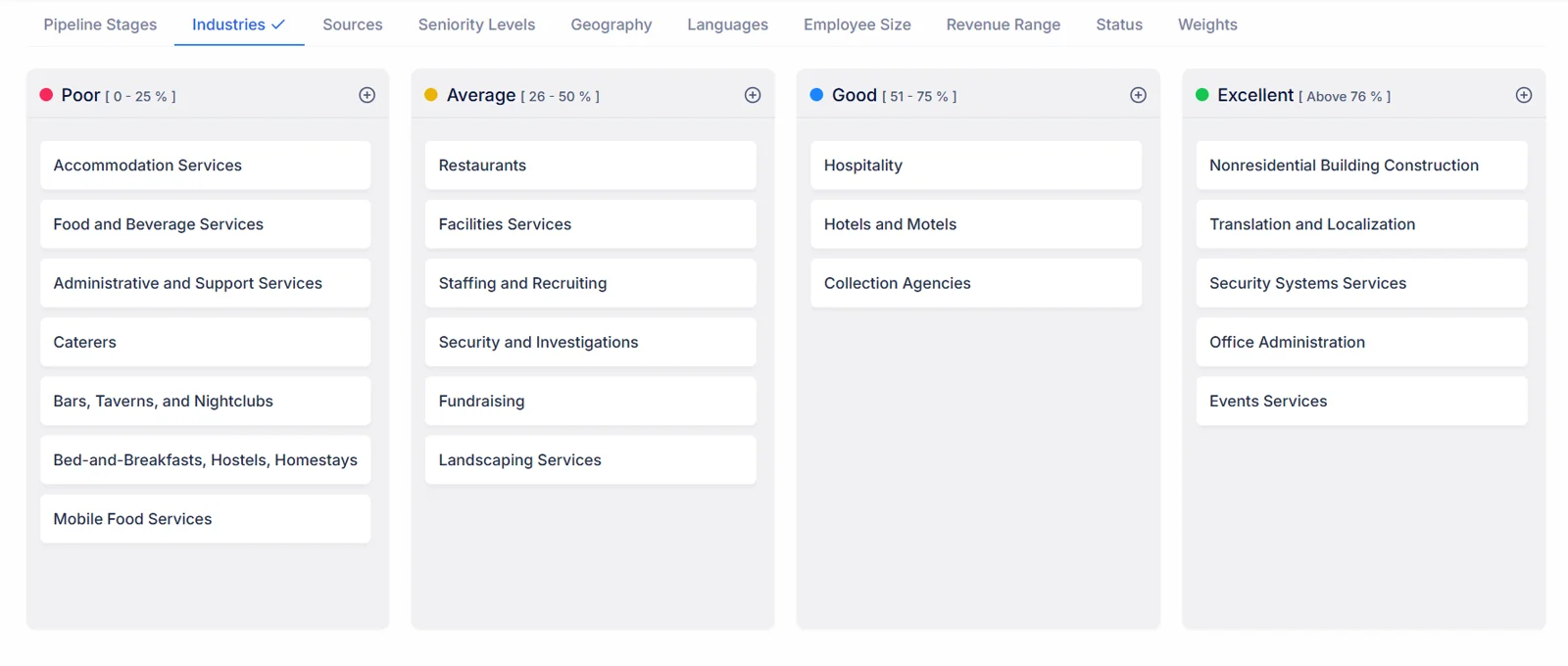
For each dimension, assign each possible value to a quality tier: Poor, Average, Good, or Excellent. A referral gets Excellent. A cold outbound lead gets Average. The system translates those tiers into points automatically — no manual math required. When a lead matches several values, the highest-rated one counts.
- Assign Poor / Average / Good / Excellent to each value
- Tier-to-point conversion handled automatically
- Reconfigure anytime as your ICP evolves
Every tier carries a fixed value — Poor 25, Average 50, Good 75, Excellent 100 — so nobody debates whether “Good” means 70 or 80. Your judgement goes into which values belong in which tier; arithmetic stays out of it.
Weight the dimensions to match your priorities
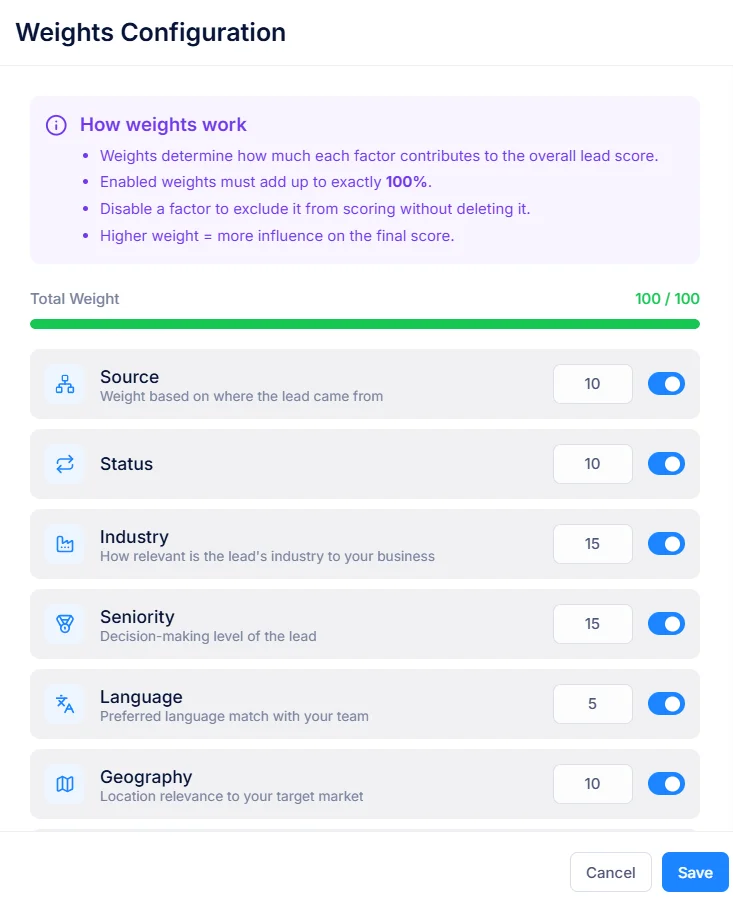
Use weights to reflect what matters most in your market. If you only sell to enterprise, give Employee Size a high weight. If you're industry-agnostic, lower it. Weights must add up to 100 — every point you give one dimension is a point taken from another. Forces clear prioritization. Only enabled dimensions count towards the 100, so switching one off means handing its share to the others.
- Set a weight for each enabled dimension
- Weights must total 100 — no ambiguity
- Instantly see scoring balance before saving
Each dimension takes any weight from 0 to 100, as long as enabled ones add up to exactly 100. A save that falls short, or overshoots, is refused with its actual total shown, so an unbalanced configuration can never go live.
See the score, and the reasons behind it
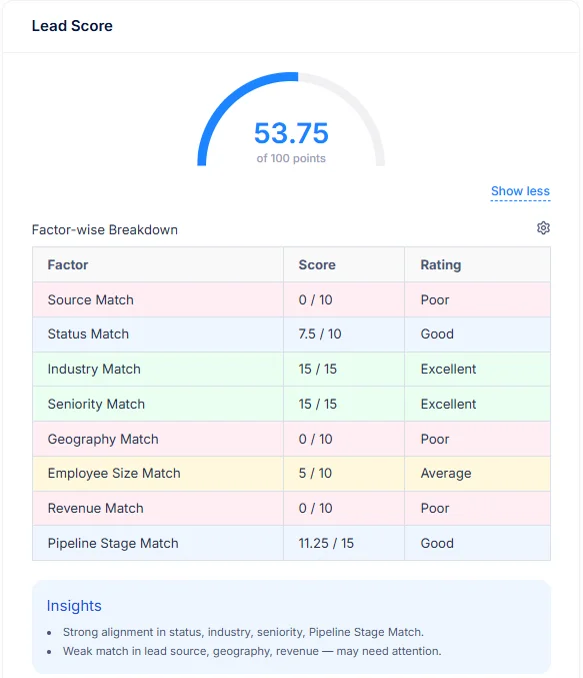
Every lead detail page carries a Lead Score card: a gauge from 0 to 100, then a line for each enabled dimension showing the rating the lead earned, the weight behind it and the points it contributed. A rep can see at a glance not just that a lead scores 54, but that seniority carried it and company size held it back.
- Score gauge on every lead detail page
- Rating, weight and points for each dimension
- Worked out from the latest configuration each time
Scores respect your Data Share Policies too. Nobody can open a score for a prospect their policy hides, so scoring never becomes a back door into records someone was not meant to see.
Update configuration as priorities evolve
An ICP changes over time. Update scores and weights anytime — full replacement, partial tweak, or weights-only adjustment. Each save raises the configuration’s version number, and because a score is worked out from the current configuration, the next lead anybody opens already reflects the change.
- Edit tiers or weights at any time
- New rules apply to every lead straight away
- A version number that rises with each save
Changing a single dimension — say, re-rating industries after entering a new market — leaves every other rating untouched. Adjust weights on their own as well, without reopening a single tier.
Benefits in Plain Terms
See exactly what changes when every lead has a score your whole team trusts, worked out the same way for every rep.
Without Lead Scoring
With Lead Scoring
Reps pick leads by gut feel
Every lead has an objective quality score
High-value leads buried mid-list
Top leads surface automatically
Inconsistent follow-up across the team
Everyone prioritizes the same high-quality leads
Hard to measure lead quality over time
One written definition of quality, applied to every lead
No way to define your ICP in the CRM
Scoring configuration is your ICP made explicit
A score does not replace a rep's judgement; it gives that judgement a head start. Reps still qualify, call, decide. They simply begin each morning with a ranked list instead of a random one, while managers can coach from one shared definition of quality rather than five private ones.
Up and Running in Five Steps
From zero to a fully scored pipeline in minutes — no training, no IT, no integration required. Scoring reads fields your leads already have, so there is nothing to import first.
Go to Settings → Lead Score Configuration
Open that configuration panel from CRM settings. No setup required — every dimension is ready immediately, and one configuration covers your whole company, with an optional description of up to 255 characters explaining its thinking.
Enable the dimensions relevant to your business
Turn on only those attributes that matter for an ICP. Disabled dimensions are excluded from score calculation entirely, so they neither help nor hurt a lead. Start with three or four; add more once reps trust what they see.
Assign quality categories to each value
For every enabled dimension, mark each possible value as Poor, Average, Good, or Excellent. For employee size and revenue, define the bands first, then rate each band. Tiers convert into points automatically. Values you leave unrated earn nothing, so cover whichever ones appear most often first.
Set weights across enabled dimensions
Distribute 100 weight points across enabled dimensions, reflecting what matters most during qualification. A save is refused until enabled weights total exactly 100, showing what they currently add up to.
Click Save
Every lead, old or new, is scored against the saved configuration from then on. Open any lead to see its score plus a breakdown behind it. Revisit your configuration each quarter, once you know which high scorers actually closed.
Your leads are scored. Your reps know where to start.
Keep a short note in its description explaining why each weight is what it is, so whoever revisits it next quarter inherits your reasoning, not just your numbers.
Everything Else Worth Knowing
Short answers to what sales teams ask before switching scoring on.
How is a score actually calculated?
Two steps. Each enabled dimension places a prospect's value into one of four quality tiers — Poor, Average, Good or Excellent — which converts into points automatically. Those points are then combined using weights you set, producing one comparable figure from 0 to 100.
Why must weights total 100?
Because every point handed one dimension is one taken from another. Nothing can be quietly inflated all at once, which forces an honest ranking of what actually predicts a win.
Which attributes can feed scoring?
Nine dimensions ship ready for use: source, status, industry, seniority level, language, geography, employee size, revenue range, pipeline stage. Enable only what fits — disabled dimensions are skipped entirely, never counted as zero.
What happens when we change scoring rules?
A score is worked out from your current configuration whenever it is shown, so existing records reflect new rules immediately — no batch job to wait for, nothing to re-run. Each save also raises its version number, making it easy to tell that rules changed since you last looked.
Where do scores show up?
On each detail page, in a Lead Score card. It shows an overall score as a gauge from 0 to 100, then underneath, every enabled dimension with its earned rating, its weight, its points — so a rep can see why a prospect scored as it did, not just a number.
Can different teams score prospects differently?
Configuration is company wide, by design. One shared definition of quality means an 82 from one rep means exactly what an 82 from another does — precisely what makes scores comparable across one pipeline.
How many points is each tier worth?
Poor is worth 25, Average 50, Good 75, Excellent 100. That figure is then scaled by its dimension’s weight: an Excellent rating on a dimension weighted 40 adds 40 points, while an Average rating on it adds 20.
What if a value is not in my configuration?
Then that dimension adds nothing, with its breakdown line marked Poor. Rate whichever values you see most often, so a common source or industry is not quietly costing good prospects points.
What if a record matches more than one value?
Its highest-rated match counts. A prospect from a region you rate Good, in a country you rate Excellent, scores Excellent for geography. Country is checked first; region only counts when that country has no rating of its own.
How does seniority scoring work?
Seniority is read from a job title. List titles or words that signal seniority for you — Chief, VP, Director, Head of — then rate each one. A title containing one of them picks up that rating, so “VP of Sales” or “VP Marketing” both match VP.
How are employee size or revenue scored?
Both use bands you define with a minimum plus a maximum — 1 to 50 employees, 51 to 500, 501 upwards, for instance — each band getting its own rating. A company whose headcount or annual revenue falls inside a band earns that band’s points.
Can I turn a dimension off without losing its setup?
Yes. Each dimension has an on/off switch next to its weight. Switching one off removes it from calculation but keeps its ratings, so it can come back later exactly as it was. Remember to share its weight out among those still enabled.
Who can change scoring configuration?
Viewing, creating, editing: each is a separate permission on a user’s role. Most companies let everyone see it, so reps understand their scores, while keeping editing to sales leadership or operations.
Does scoring require data science help?
None at all. Assigning tiers is picking Poor, Average, Good or Excellent from one dropdown; weights are typed in as percentages. No formulas, no models, no engineering ticket.
Is matching case-sensitive?
No. “linkedin”, “LinkedIn” or “LINKEDIN” all match a value rated as LinkedIn. A rated value also only needs to appear somewhere inside a field, so rating “Referral” once covers “Partner Referral” or “Customer Referral” too.
What if a record has no status or pipeline stage yet?
That dimension earns nothing for it, but is left out of its breakdown rather than shown as Poor, because there was no value to judge. Once a status or stage is set, it is scored on its next view.
How is language scored when someone speaks several?
Every language recorded against a prospect is checked, with whichever one you rate highest counting. Somebody who speaks English plus German, where you rate German Excellent, scores Excellent for language.
Are band edges inclusive?
Yes. A band from 1 to 50 includes both 1 and 50, so a company of exactly 50 people fits it. Should two bands overlap, a figure inside both earns whichever rating is higher.
Do I need to rate every country in a region?
No. Rate a region once, such as Europe or APAC, then every country inside it inherits that rating. Rate an individual country only when it should differ from its region — a country rating always wins.
Are scores rounded?
No. Weighted points are added exactly, so a prospect can finish on 53.75 or 67.5. Two close contenders are therefore rarely tied, which keeps a sorted list meaningful near its top.
Why might a strong prospect score below 100?
Any enabled dimension with no matching rating adds nothing, so a gap in data costs points. A perfect score needs every enabled dimension filled in, each with an Excellent value — deliberately rare.
Can a weight be set to zero?
Yes, any weight from 0 to 100 is accepted, though an enabled dimension weighted 0 contributes nothing. Switching it off says so more clearly, while keeping its ratings for later.
Can we keep several scoring configurations?
One active configuration per company. That is intentional: two definitions of quality would make scores incomparable. To try an idea, adjust weights, watch a week of results, then keep or revert.
Can I change weights without touching any ratings?
Yes. Weights save separately from tiers, as does each dimension’s ratings, so re-rating industries after entering a new market leaves sources, seniority or geography exactly as they were.
What does a version number tell me?
It rises by one with every save — a full edit, a single dimension, or weights alone. If a score looks different from last week, a higher version confirms somebody changed its rules.
Do scores respect Data Share Policies?
Yes. A score can only be opened for a prospect you are allowed to see, so scoring never exposes records your company’s share policy keeps private.
What shows before any configuration exists?
No score at all. Scoring switches on once a configuration is saved, so nobody sees half-finished numbers while an admin is still setting tiers.
Is scoring included on every plan?
Lead scoring depends on your plan; our pricing page lists which plans include it.
How should we choose our first weights?
Look at your last twenty won deals. Whichever attribute they share most strongly — a source, an industry, a company size — deserves most weight. Attributes that vary widely among winners deserve little, because they are not telling you much.
Should status carry much weight?
Usually a modest share. Status reflects what your team has already done with a prospect, so a heavy weight tends to reward activity rather than fit. Most companies keep fit-based dimensions — industry, size, seniority — doing most of its work.
How should revenue bands be set?
Mirror your pricing. If your plans suit companies turning over one to ten million, make that a band rated Excellent, with bands either side rated lower. Bands that match how you sell make scores easy for reps to explain.
What makes a good seniority list?
Short words that appear inside real job titles: Chief, VP, Head, Director, Manager, Founder. Because matching looks for a word anywhere in a title, “Director” covers Sales Director, Director of Operations, Regional Director alike.
Our data is patchy. Is scoring still useful?
Yes, as long as you know what it means. Missing values earn nothing, so a low score can signal missing data rather than a weak prospect. Its breakdown shows which, and filling in a missing field is often a quick win.
How do we explain a score to a rep?
Open its Lead Score card together. Every enabled dimension is listed with its rating, weight, points — so a conversation moves from “why is this 42?” to “our industry rating for manufacturing is Average; should it be Good?”.
Does scoring replace qualification calls?
No. A score measures fit against attributes you already hold; a call uncovers budget, timing, pain. Scoring decides who gets called first, not whether a call is needed.
How do we test a change safely?
Note your current weights in its description, adjust one thing at a time, then compare a handful of familiar records before and after. Because scores are worked out on view, reverting is as quick as changing.
How often should configuration be reviewed?
Quarterly suits most teams, plus whenever you enter a new market, launch a product or change pricing. Each review should start from deals actually won, not from opinions about which prospects feel promising.
Should pipeline stage be scored at all?
Only if stages mean progress for you. Rating later stages higher rewards momentum, but it also double-counts effort already visible elsewhere. Many teams leave stage disabled at first, adding it once fit-based scoring feels right.
Why is Poor worth 25 rather than zero?
So a value you judged weak still differs from one you never rated. Poor earns a quarter of its dimension’s weight; an unrated value earns nothing. Both lines can read Poor on a breakdown, so check its points column to tell them apart.
What does a score of 50 actually mean?
Roughly “average across everything you care about” — every enabled dimension rated Average would produce exactly 50. In practice a 50 is usually a mix, which is why its breakdown matters more than its headline number.
Does a disabled dimension still need ratings?
No. Its ratings are kept but ignored while it is switched off, so you can prepare a dimension fully before enabling it, then switch it on alongside a fresh set of weights.
What happens to a score when a record is edited?
Its next view reflects new values straight away. Change a job title from Manager to Director, or correct an industry, then reopen that record to see its score move accordingly.
Who can see a score?
Anyone whose role allows viewing leads, for records their share policy lets them open. Seeing a score needs no extra permission; changing how scores are worked out does.
Does geography look at city or state?
No — country, plus any region that country belongs to. Rate countries individually where they matter most, then let regions cover everywhere else, keeping your configuration short.
Can industries be added in bulk?
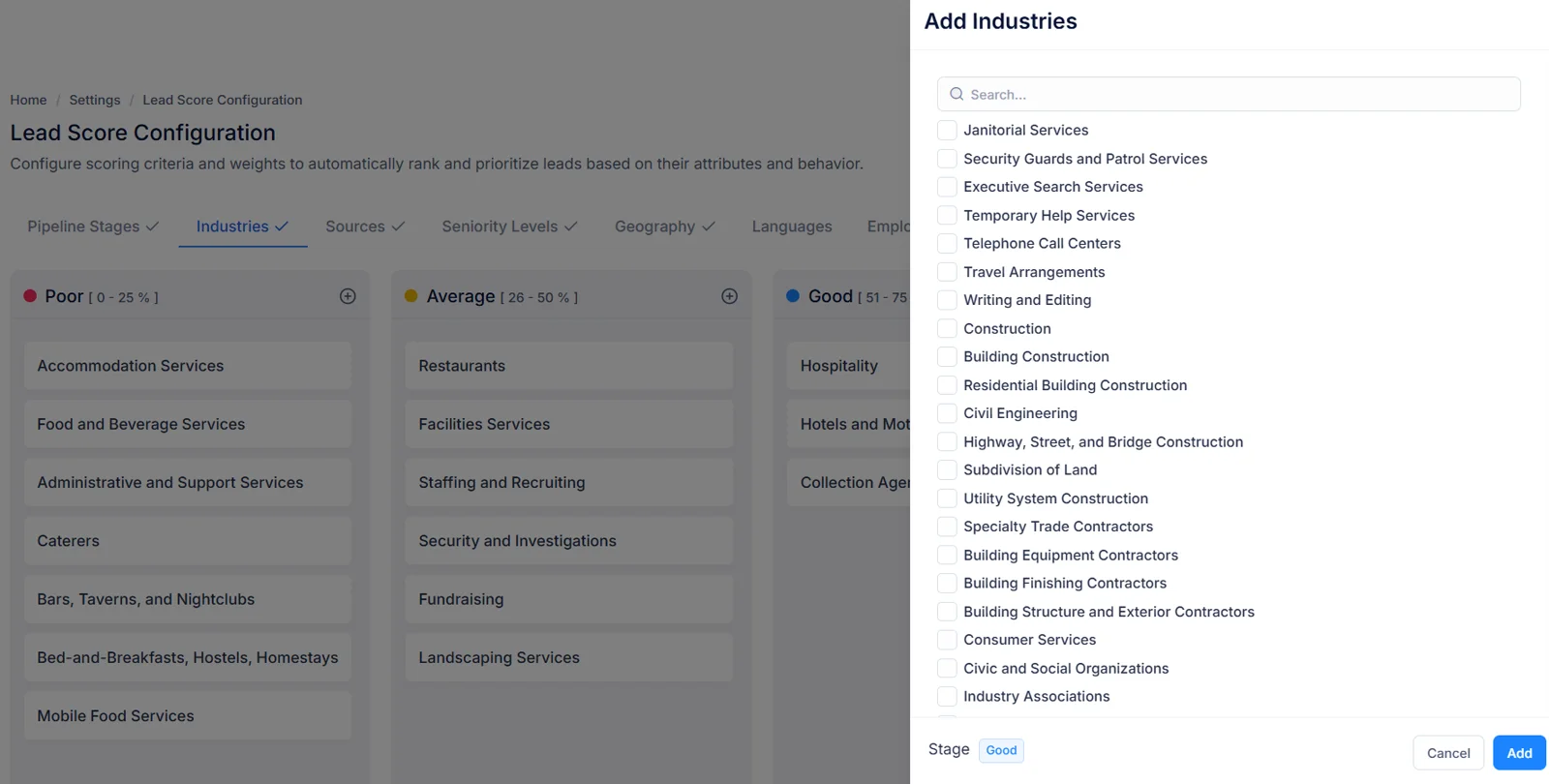
Yes. An Add Industries panel offers a searchable checklist, so you can tick every industry that belongs in one tier together instead of rating them one at a time.
How should source values be written?
Match whatever your team records as a source, keeping each rated value short. Because a rated value only needs to appear inside a source, “Webinar” covers “Webinar – March” or “Partner Webinar” without separate entries.
Can one dimension dominate a score?
Only if you let it. A dimension weighted 60 can move a score by up to 60 points by itself, which usually drowns out everything else. Keeping each weight under about 35 lets several signals agree before a prospect reaches your top tier.
Are scores stored, or worked out each time?
Worked out each time a record’s score is opened, from its current field values plus your current configuration. Nothing is cached, so a score is never out of date with either.
Should language be scored if we sell in one language?
Probably not. If every prospect you can serve shares one language, rating it adds no information, only weight taken from dimensions that do separate good fits from weak ones. Leave it switched off until you add a second market.
How do seniority and industry work together?
Independently, then added up. A Director at a company in an industry you rate Poor earns seniority points yet loses industry points, so its final figure reflects both — exactly what a rep would weigh up by instinct, made consistent.
What is a sensible first configuration?
Pick three or four dimensions you already trust — often source, industry, seniority — weight them by conviction, rate your ten most common values each. Review after a month against deals actually won, then add more.
Start scoring your
leads today.
Give every lead an objective quality score. Help your reps focus on the right opportunities — automatically, every time. Set your tiers and weights once, and every lead is measured identically from then on — refine either whenever your market shifts.
Get Started for FreeAlready using Salesfresh? Sign in here
Sarah Mitchell
Acme Corp
James Okafor
Vertex Solutions
Priya Nair
BlueWave Inc
Tom Bergmann
Dune Analytics
Lucia Ferrara
NovaScale
Scores recalculate automatically on every save