
Capture Leads Without Leaving Your CRM
Build, publish, and manage lead capture forms directly inside your CRM. Every submission lands exactly where your team needs it — automatically. No third-party tools, no manual imports, no data falling through the cracks.
Start exploring with instant access. No payment required.
Your Form, Anywhere You Need It
Stop juggling third-party form tools. Build exactly what you need and publish it wherever your audience is — all from one place.
Put a Form Anywhere Your Audience Is
Publish a form as a standalone page you can share via email, social media, or a QR code — no website required. Or embed it directly into any page on your site with a simple copy-paste snippet. Either way, it looks like yours and works seamlessly.
Share as a standalone page via email, social, or QR code — no website required
Embed directly into any page on your site with a simple copy-paste snippet
Control which domains are allowed to display your embedded form
Every form looks like yours — fully branded and seamlessly integrated
Build Forms That Match Your Process
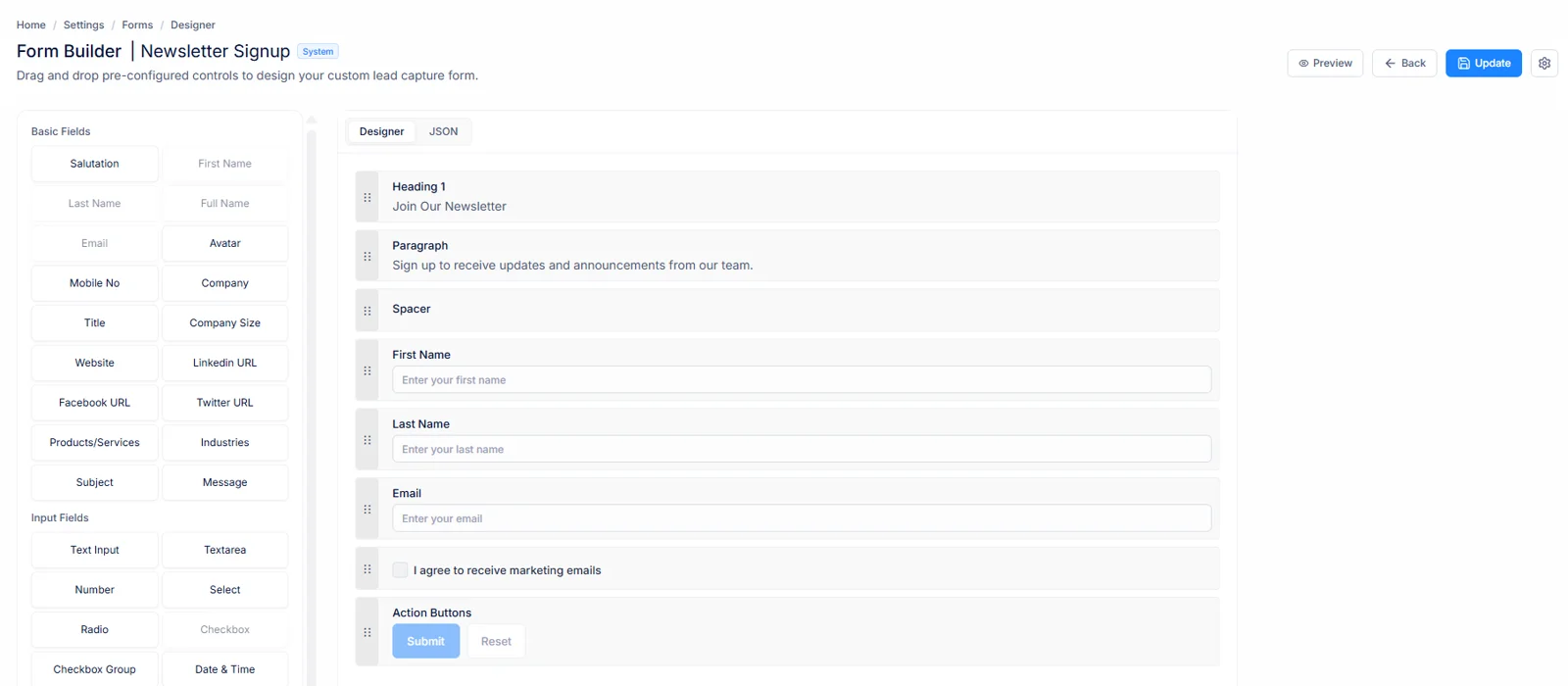
You're not limited to a name and email field. Build forms with the exact fields your team needs. Show or hide fields conditionally based on what a visitor answers, so the form always feels relevant and never overwhelming.
Text inputs, dropdowns, phone numbers, dates, multi-select, and more
Show or hide fields conditionally based on what a visitor answers
Set validation rules, placeholders, and labels per field
Drag to reorder fields — the form always renders in the sequence you set
You're In Control, Every Step of the Way
From where your forms appear to what happens after a submission, every detail is configurable — so your forms work exactly the way your business needs.
Control Where Your Forms Appear
For embedded forms, you decide exactly which domains are allowed to display them. Your form will never appear on a site you do not own — keeping your brand and data secure.
Allowlist specific domains per form
Embedded forms blocked on unauthorized sites
Secret token validation on every load
Protect Your Pipeline From Spam
Set a daily submission limit, enable CAPTCHA, or require OTP verification. You stay in control of what comes into your CRM so your pipeline stays clean.
Configurable daily submission cap
CAPTCHA and OTP verification options
Inactive forms stop accepting submissions instantly
Stay On Brand
For standalone forms, add your logo, link to your privacy policy and terms of service, and customize the message a visitor sees after they submit. Small details that build trust.
Upload your logo or link an external image
Custom success message after submission
Add home page, privacy, and terms links
Reuse What Works
Spot a form that is performing well? Clone it in one click and adapt it for a new campaign, a different audience, or a seasonal offer — without rebuilding from scratch.
One-click clone of any form
Clones are fully editable Organization forms
System forms can be cloned and customized
The Benefit in Plain Terms
See exactly what changes when your forms live inside your CRM.
Without Forms
With Forms
Form tool → export CSV → import to CRM
Submissions land straight in your CRM
Manually remap fields every single time
Fields set up once, always consistent
No idea which form a lead came from
Every lead tagged to its source form
Paying for separate form software
Built in — nothing extra to pay
Spam and bots pollute your pipeline
CAPTCHA, OTP, and daily limits block them
Rebuilding forms for every new campaign
Clone any form and edit in seconds
Forms That Work for Everyone on Your Team
Forms come in two flavours. Your admin controls who can create and manage forms, so there is no risk of someone accidentally breaking a live form.
Ready-Made Starting Points
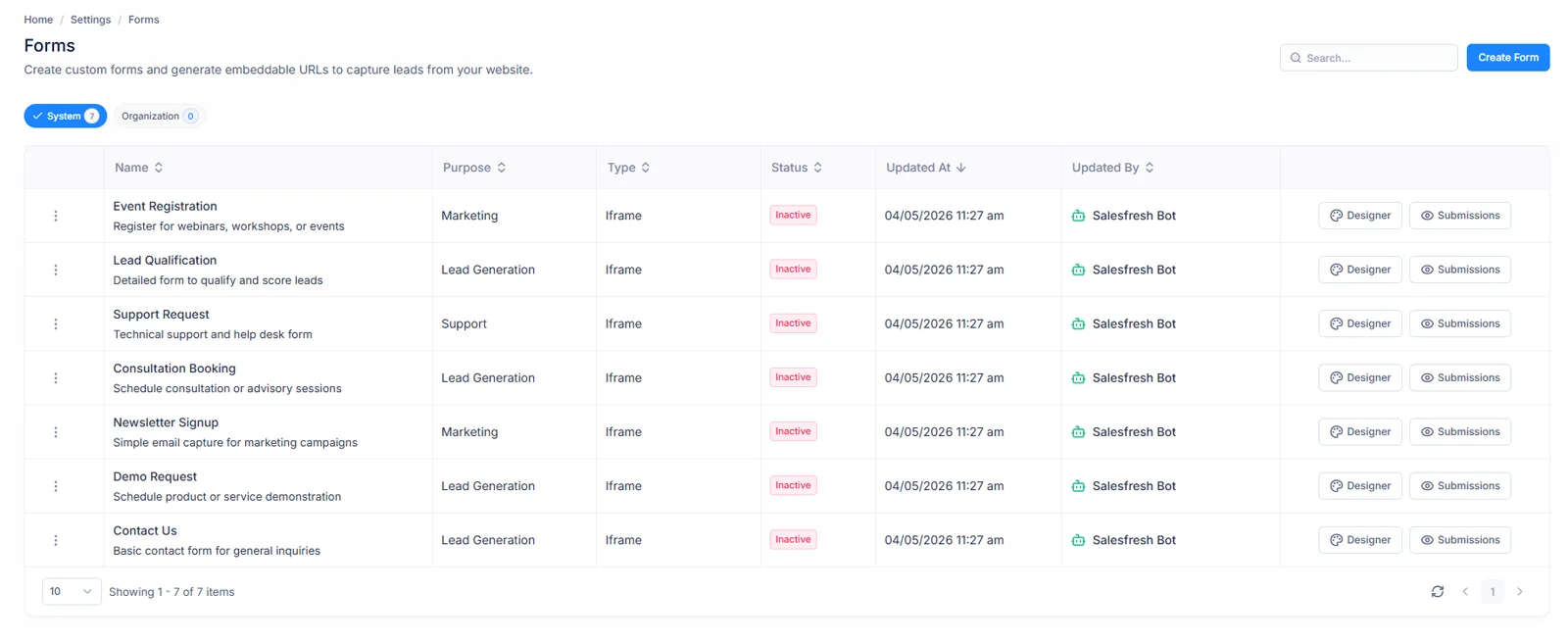
Pre-built forms provided by the platform — ready to use out of the box. A great starting point for common use cases like contact requests, demo bookings, or newsletter sign-ups.
Read-only · Clone to customize
Fully Yours to Build and Own
Forms created by your team. Fully editable, fully customizable, and only visible to your organization. Clone a System Form to get started, or build from scratch.
Editable · Shareable within your org
Your Admin Stays in Control
Role-based permissions determine who can create, edit, and delete forms. System Forms are always read-only — clone them to make your own editable copy. No one can break a live form without the right permissions.
From Zero to Live Form in Under 5 Minutes
No developer needed. No third-party accounts. No waiting. Just four steps and your first form is collecting leads.
Create a New Form
Go to Settings → Forms and click New Form. Give it a name, pick the type — Iframe for embedding or Standalone for a hosted page — and save.
Configure Your Settings
For Iframe forms, add the domains allowed to embed it. For Standalone forms, upload your logo and add your privacy and terms links.
Build Your Fields
Add the fields your team needs. Set labels, validation rules, and conditional visibility. Drag to reorder. Every field is fully configurable.
Publish and Go Live
Copy the embed snippet onto your site, or share the standalone link via email or social. Set the form to Active — you are live.
From first click to published form in under five minutes.
Start for free · No credit card needed
Your first lead is
one form away.
Build it in minutes. Publish it anywhere. Watch submissions arrive directly in your CRM — no tools, no imports, no waiting.
Already using Salesfresh? Sign in to your account