
Your CRM Inbox. Not Just Another Email Tab.
Every lead conversation, synced from Gmail and Outlook, with the automated noise filtered out — plus AI sentiment, sent email tracking, and full CRM context right next to every message.
Start exploring with instant access. No payment required.
Every Lead Conversation. One Inbox.
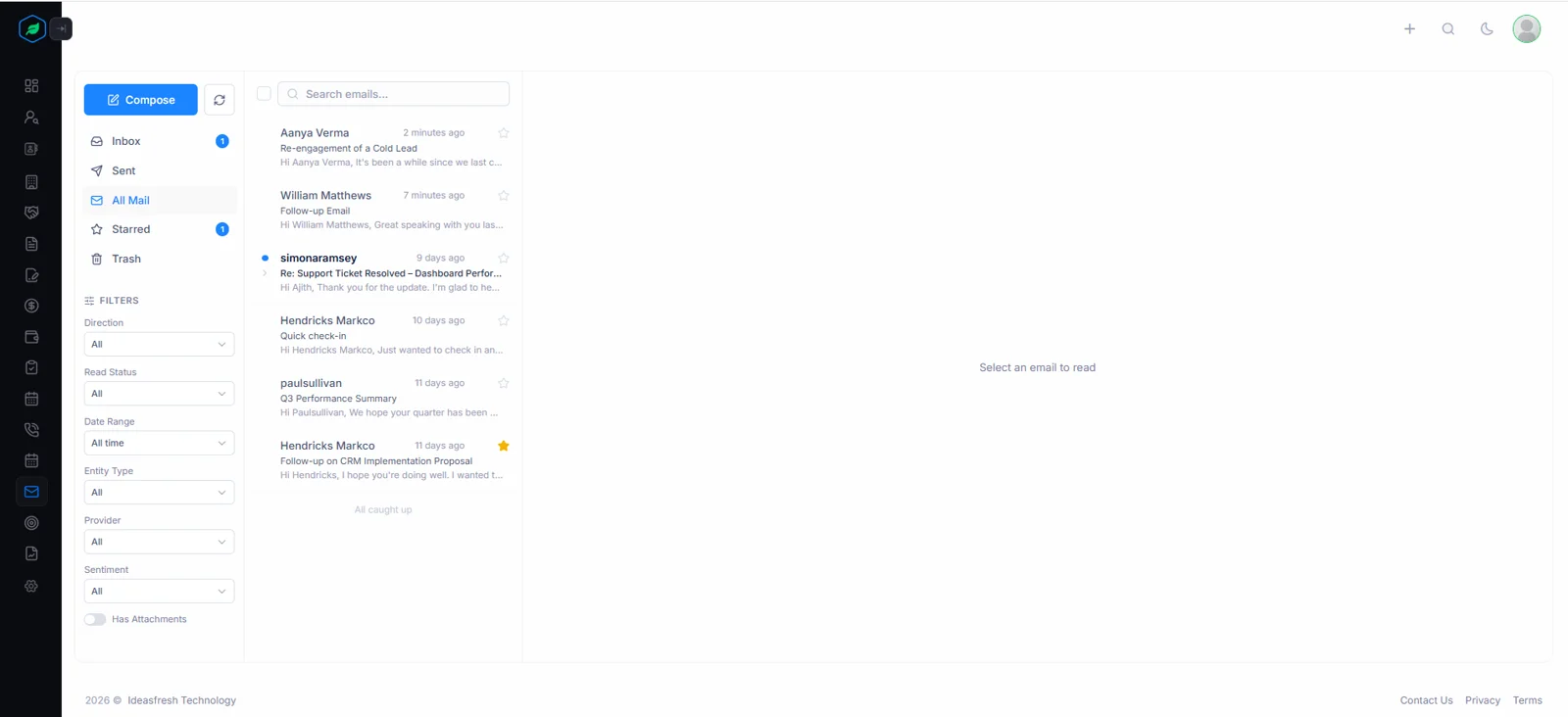
Stop switching between Gmail and your CRM. Salesfresh syncs your inbox, drops automated noise, links every message from a lead or contact to that record — so conversations that matter are one filter away.
All Your Lead Conversations, in One Inbox
Connect your Gmail or Outlook and your mail lands in Salesfresh's inbox automatically, checked every five minutes through a working day. Newsletters, no-reply senders, bulk mail, promotions are left out, while every message from a lead or contact is linked to their record as it arrives. Attachments come across too, ready to preview without downloading.
- Connect Gmail or Outlook once — every lead conversation syncs automatically
- Newsletters, no-reply senders and promotions filtered out before they arrive
- Inbox, Sent, All Mail, Starred, and Trash — same folders you already know
- Search, star, and filter by unread, date, attachments, or leads vs contacts
Only Inbox plus Sent are synced, so archive folders stay out of your CRM. Gmail’s Social, Promotions or Forums tabs are skipped while Updates is kept; on Outlook, only Focused mail comes across. Need something sooner? A manual sync runs any time, outside working hours too.
AI sentiment scored on every synced email
Know the Tone Before You Open the Email
Emails from your leads and contacts are read by AI and marked Positive, Neutral, or Negative — a coloured marker on its row, plus a badge showing detected intent when you open it — so reps can triage their inbox and prioritise warm conversations at a glance. For sent mail, a tracking badge shows exactly where each conversation stands without opening it.
- Positive, Neutral, or Negative colour marker on every scored message row
- Sentiment, emotion, and intent each read from the email content by AI
- Sent emails show Delivered, Opened, Clicked, or Replied tracking status
- Filter by sentiment to prioritise warm leads in a busy inbox
Intent is read as one of ten labels — Purchase Intent, Book Meeting, Request Information, Churn Risk, Complaint, Urgent Request, Refund Request, Escalation, Greeting, General Inquiry — so a rep can spot a buying signal or an unhappy customer before reading a word.
Reply With the Full Picture
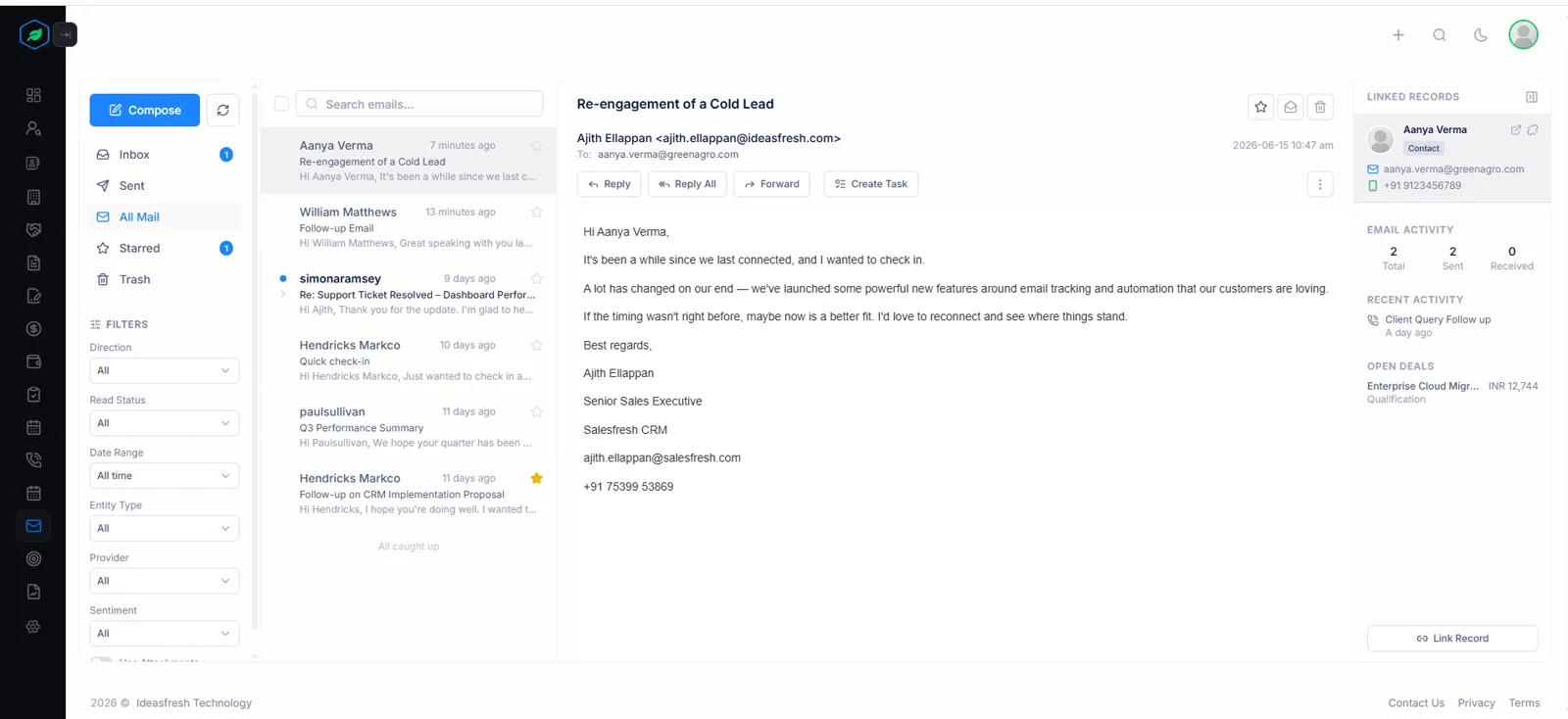
Open any message to find CRM context right beside it — no tab-switching, no lookups. Open anything you sent to see its full delivery timeline too, from departure to reply.
See Every Conversation in the Context of the Deal
Open a message and a CRM panel on its right shows who sent it, how to reach them, their five most recent calls, tasks or meetings, up to three open deals with stage plus value, alongside an AI read of its tone — all without leaving your inbox. Reps reply with full context, every time.
- The lead's or contact's name, email, and phone — right next to the email
- Last 5 activities: calls, tasks, and meetings — full context before replying
- Up to three open deals for the record, with stage and value
- AI sentiment and intent classification for the email
Up to five keywords are pulled from each analysed message too, alongside its primary emotion — joy, optimism, surprise, anger, sadness, fear or disgust among them — so a rep knows whether a reply calls for speed, reassurance or simply a thank-you.
→ example.com/pricing
⚠ Open tracking accuracy ~60% — image blocking in some clients
Know Exactly What Happened After You Hit Send
Open anything you sent to see a full delivery timeline: when it was delivered, when it was first opened, which links were clicked, whether that prospect replied. Opens are counted by a tracking pixel added at send time and clicks by tracked links, so you see how many times a message was opened, not just whether it was.
- Delivery, open, click, and reply status — tracked per sent email
- Open count and click count go up with every open and every click
- Every clicked link listed, so you know which page caught their eye
- No downgrade rule: higher-value events never overwrite lower ones
A message counts as Delivered once its sent copy shows up during sync. Bounces are recognised from mailer-daemon or postmaster replies, so a mistyped address surfaces quickly instead of leaving a rep waiting on an answer that can never come.
Send from the CRM. Never Miss a Reply.
Compose, reply, forward without leaving deal context. When a hot lead writes back, you hear about it as soon as that reply syncs, wherever you are in Salesfresh.
Reply Without Leaving the CRM
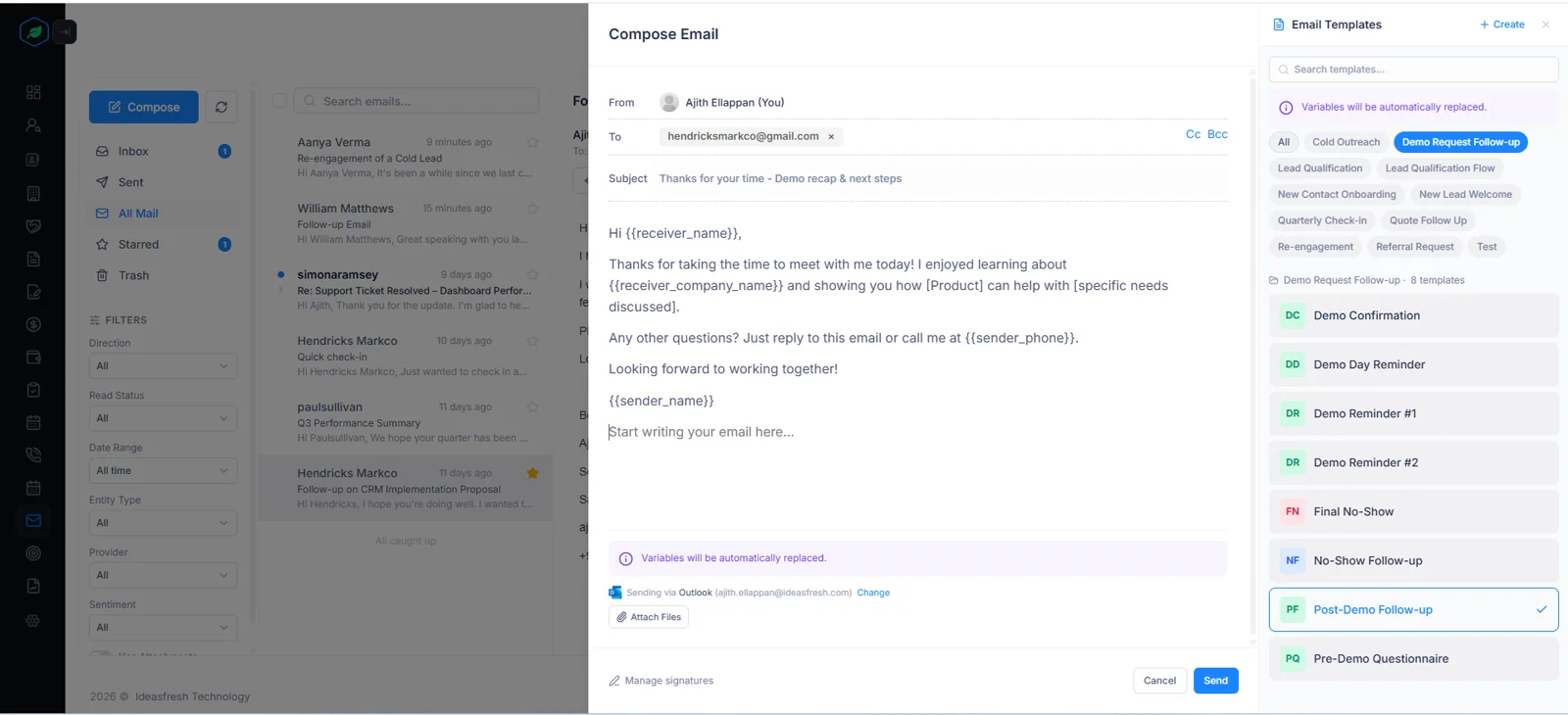
A compose window slides in beside your page, while replies open right under each message — no full-page navigation, no lost context. Use saved email templates with one click, search across all template folders, and let template variables like {{receiver_name}} auto-fill from the CRM record. Your default signature is added for you, and files up to 10 MB can go along as attachments.
- To, CC, and BCC fields, with the recipient pre-filled from the record
- Pick a saved email template — subject and body inserted with one click
- Reply and forward threads correctly in Gmail and Outlook via headers
- Replies and forwards save as drafts every few seconds, so nothing is lost
Messages go out through Gmail’s or Outlook’s own service, not a separate mail server, so each one also appears in your usual Sent folder. Template variables fill in from whichever lead or contact sits first on its To line.
Know the Moment a Hot Lead Replies
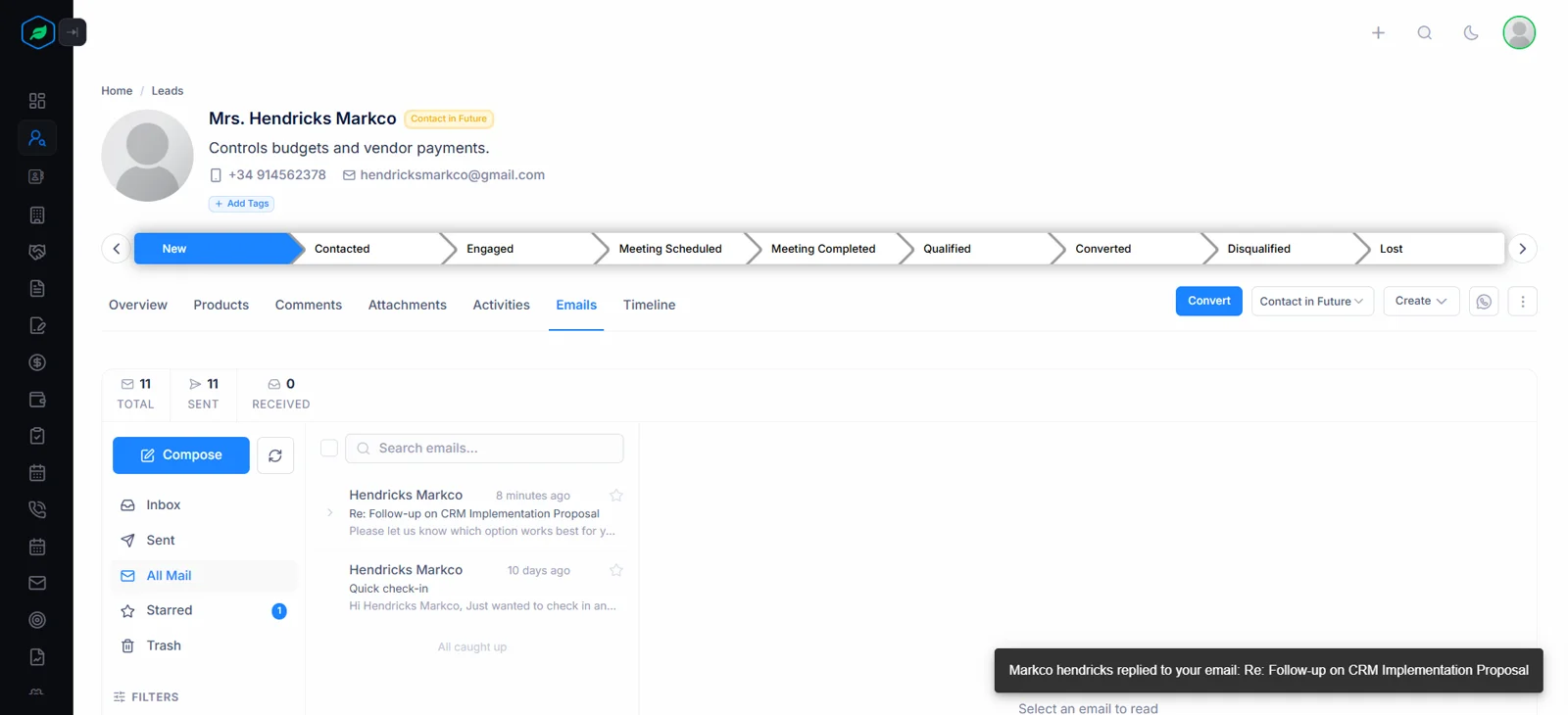
When a lead or contact replies, syncing picks it up, matches it to its thread, then shows a notification to that rep wherever they are in Salesfresh. No manual refresh, no checking Gmail in another tab. Your sent message is marked Replied, while an unread count on your inbox menu keeps track of what is still waiting.
- Toast notification fires the instant a lead replies — no manual refresh
- Alerts only for replies from your leads and contacts, not every email
- Reply is matched to its thread, so the sent email is marked Replied
- Works the same for connected Gmail and Outlook accounts
Notifications arrive over a live connection, so nobody has to refresh a page to see them. Unread counts cover Inbox plus Starred, giving each rep a quick measure of what still needs an answer before lunch.
The Full Email History on Every Lead Page
Every lead and contact detail page has an Emails tab. Full two-way history, engagement stats, and compose — all scoped to that one relationship, so anyone picking up the account sees exactly what has already been said.
The Emails Tab Alongside Activities, Calls, and Notes
Every lead and contact has an Emails tab in the detail page tab bar. It shows a complete history with that person — sent plus received — with tracking badges on what you sent, a compose button pre-filled with their address, plus an engagement summary on top showing counts, open rate, prevailing sentiment, latest intent.
- Available on every lead and contact detail page alongside Activities and Calls
- Engagement summary bar gives instant relationship health at a glance
- Compose with To pre-filled — no copy-pasting email addresses
- Full CRM actions available without leaving the lead page
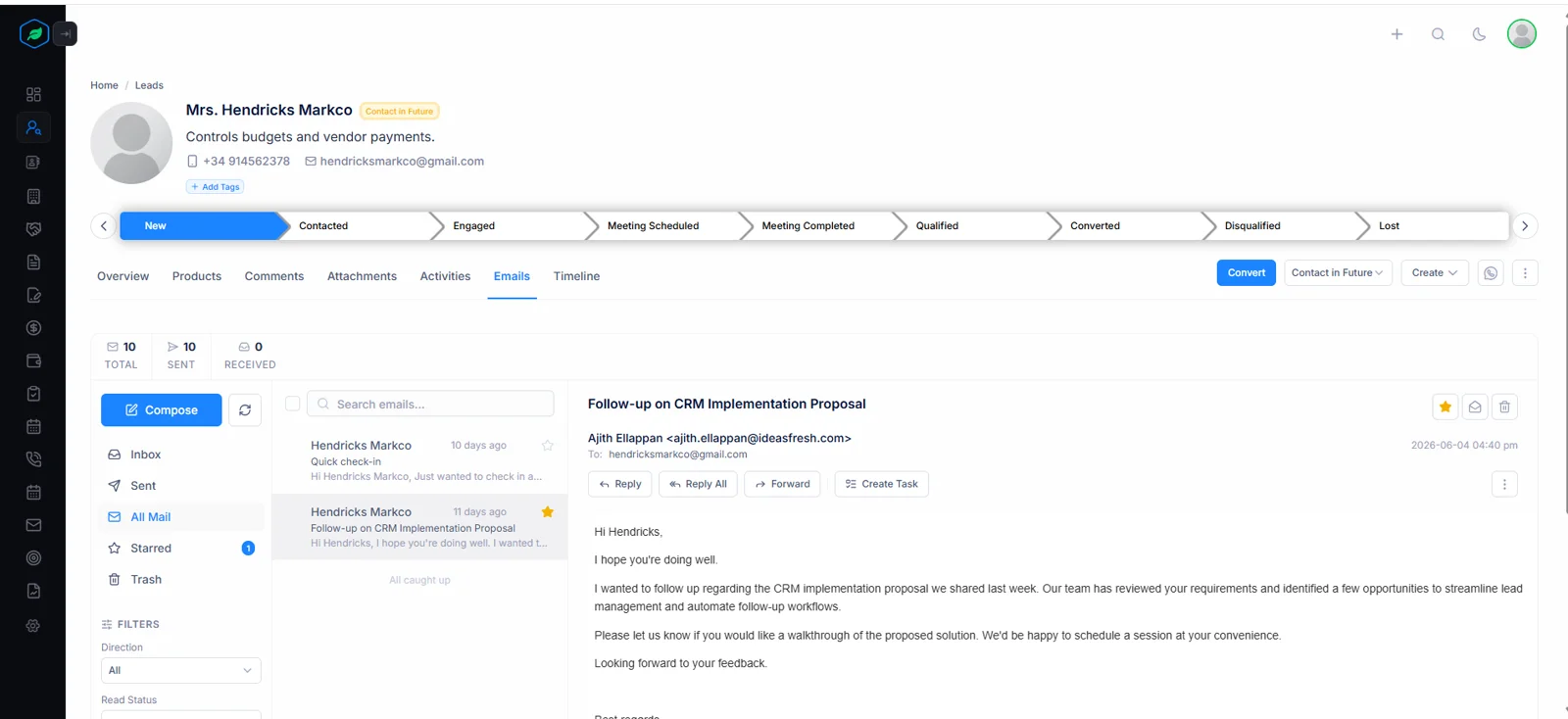
Engagement Summary at the Top
A compact bar at the top of the Emails tab shows total email count, sent vs received split, open rate, and the date of the last reply — instant relationship health before composing.
- Total emails, sent, and received counts
- Open rate derived from outbound tracking
- Last reply date — how warm is the relationship right now
Open rate counts sent messages opened at least once, so a single enthusiastic reader cannot inflate it by opening one message ten times.
Complete Two-Way History
The tab defaults to All Mail — sent and received in one view, with tracking badges on the emails you sent. No folder sidebar needed; the rep sees the complete picture of the relationship.
- Defaults to all mail — both directions in one view
- Tracking status badge on every sent email
- Compose button pre-fills recipient from the lead or contact
An average analysis score plus most common sentiment sit beside those counts, turning a long thread into a quick read on how a relationship feels.
CRM Actions from Within the Email
Reply, reply all, forward, create a follow-up task, or schedule a call or meeting — all from the email detail toolbar without navigating away from Salesfresh.
- Reply and forward directly within the entity tab
- Create follow-up task linked to the email thread
- Schedule a call or meeting from the email detail
Each follow-up stays attached to its thread, so whoever opens that task later can jump straight back to whatever prompted it.
Manually Link Unmatched Emails
Emails sent before a lead was added to the CRM won't be auto-linked. A quick "Link to Lead / Contact" action links every email with that person's address to the record — no re-sync needed.
- Link past emails to the right lead or contact
- Email appears in entity history immediately on link
- Retroactively associates historical conversations
Linking matches messages where that address is a sender or a To recipient, so older threads join a record in one step once someone becomes a lead.
The Benefit in Plain Terms
See exactly what changes once your sales inbox lives inside your CRM, next to leads or contacts it is about.
Without Email Client
With Email Client
Switch between Gmail and CRM to track conversations
Full lead and contact inbox inside the CRM — no tab switching
No signal when a hot lead replies — check Gmail manually
A notification the moment the reply syncs to the CRM
Guess whether the prospect opened your email
Delivery, open, click, and reply tracking per sent message
Manual context lookup before every reply
CRM context panel right next to every email — contact, deals, activity
Compose from Gmail with no CRM autocomplete or templates
Compose with the recipient pre-filled and a template picker
No email history visible on the lead or contact page
Emails tab with full two-way history and engagement summary
AI sentiment data collected but never surfaced to reps
Sentiment marker on every scored email — tone at a glance
None of this asks reps to abandon Gmail or Outlook. Their mailbox keeps working as before; this CRM simply reads from it, sends through it, adds what a sales team needs on top — context, tone, tracking, reminders.
Everything Else Worth Knowing
Short answers to what sales teams ask before connecting a mailbox.
Which mailboxes can be connected?
Gmail or Outlook, through each provider’s secure sign-in, so no password is ever stored here. Every user connects their own mailbox — one per person — using a CRM login address that matches it.
How often does syncing run?
Every five minutes from 8:00 to 18:00 in your company’s time zone. Outside those hours automatic syncing rests, though anyone can start a manual sync whenever they like.
How far back does a first sync reach?
By default, to the start of this month. After that, each run fetches only what changed since last time, so later syncs stay quick however large a mailbox grows.
Which folders come across?
Inbox plus Sent. Archive, spam or custom folders stay where they are, which keeps a CRM inbox focused on live conversations instead of years of storage.
Which Gmail tabs are skipped?
Social, Promotions, Forums. Updates is deliberately kept, since receipts, invoices or order confirmations from customers often land there.
What about Outlook’s Focused inbox?
Only Focused mail is synced; anything Outlook files under Other is left out. Train Outlook’s sorting once, then this CRM follows it automatically.
Which senders are filtered out?
Addresses whose name part contains no-reply, noreply, do-not-reply, notification, notify, newsletter, automated, mailer or unsubscribe, among close variants. Real people rarely use any of those.
Are auto-replies or bulk mailings filtered?
Yes. Messages flagged by their sender as bulk, list or junk, marked auto-submitted, or carrying auto-response suppression headers are skipped — so out-of-office replies never clutter a thread.
Does an unsubscribe link hide a message?
No. An unsubscribe header on its own is not enough, because plenty of genuine customers send from tools that add one. Only clear signals of automation remove a message.
Is outgoing mail ever filtered?
Never. Everything you send from a connected mailbox is kept, so tracking, replies or follow-ups always have a complete record to work from.
Is only lead mail stored?
No — everything that passes filtering lands in your inbox here. Messages involving a known lead or contact are also linked to that record, which is what an entity-type filter uses.
How are messages matched to records?
Every From, To, Cc or Bcc address is compared with lead or contact addresses, ignoring capital letters. Deleted records are skipped, so a message never attaches to someone removed from your CRM.
What does Link to Lead / Contact do?
It joins every message in your mailbox where that person is a sender or a To recipient to their record, in one step. Older conversations appear in their history straight away.
Which messages get AI analysis?
Any message linked to a lead or contact with readable text, whichever direction it travelled. Unlinked mail is not analysed, keeping attention on sales conversations.
Which intents can AI detect?
Ten: Purchase Intent, Book Meeting, Request Information, Churn Risk, Complaint, Urgent Request, Refund Request, Escalation, Greeting, General Inquiry. Each analysed message gets one.
Which emotions can it recognise?
Joy, optimism, love, surprise, anger, sadness, fear, disgust. Only a primary emotion is shown, so a busy rep sees one clear signal rather than a chart.
What models power sentiment?
Open-source language models — RoBERTa for sentiment, a DistilRoBERTa model for emotion, BART for intent — rather than a general-purpose chatbot.
Are reply suggestions offered?
Yes. Incoming messages can carry three short suggested replies, a head start a rep can edit before sending.
Which tracking statuses exist?
Sent, Delivered, Opened, Clicked, Replied, Bounced, Failed. A badge on each sent message shows its latest one, while a timeline lists when each happened.
How are opens counted?
By a tiny invisible image added when a message is sent. Some mail apps block images, so opens can be undercounted — treat a missing open as unknown, not as ignored.
Which links are tracked?
Every web link, except mailto, phone, in-page anchors or unsubscribe links. Each click is counted, with its destination recorded, so you know which page caught somebody’s eye.
Can a status ever move backwards?
No. An open never overwrites a click, so a message that was clicked stays Clicked even if it is opened again later — progress only moves forward.
How are bounces spotted?
From mailer-daemon or postmaster responses, plus typical bounce wording in a subject. A bounced message is marked so, prompting someone to check that address.
Can tracking be switched off?
Not today — every message sent from here carries open plus click tracking, so every rep’s figures are gathered consistently.
Does a sent message appear in Gmail or Outlook?
Yes. Sending goes through each provider’s own service, not a separate mail server, so messages sit in your normal Sent folder with correct threading.
How large can attachments be?
Up to 10 MB per file. Larger documents are best shared as a link, which also lets click tracking show when somebody follows it.
Where do template variables get their values?
From whichever lead or contact appears first on a message’s To line. Put your main recipient first, then add others to Cc if they only need a copy.
Can I keep several signatures?
Yes. Save as many as you need, each with a name of up to 100 characters. Your first becomes a default, inserted into new messages automatically.
Are drafts saved automatically?
Every ten seconds, for new messages, replies, reply-all or forwards alike. Close a draft by accident, reopen it, carry on where you stopped.
What can inbox search find?
Subjects, message previews, sender names or addresses, plus To recipients. Combine a search with filters for read status, date range, provider, attachments, sentiment or record type.
How do reply notifications work?
When a lead or contact replies, a pop-up reading “{name} replied to your email” appears wherever you are, over a live connection. Nobody needs to refresh a page.
What does an unread badge count?
Unread messages in Inbox plus Starred, shown on your sidebar menu. It updates as mail syncs, giving a quick sense of what still needs attention.
Does starring or reading sync back to Gmail?
No. Stars, read status or trash here apply inside this CRM only, so organising a sales inbox never rearranges your personal mailbox.
Can trashed messages be restored?
Yes. Trash is reversible — restore a message to bring it straight back with its links intact. Moving items to trash needs delete permission on your role.
Who can see my inbox?
Only you. Inbox views are limited to your own connected mailbox; colleagues see nothing from it there.
Which plans include mailbox sync?
Starter allows ten synced mailboxes, Professional twenty, Enterprise unlimited. Free plans do not include mailbox sync.
How are mailbox credentials protected?
Access tokens are encrypted at rest with AES-256-GCM, decrypted only at a moment of syncing or sending. Expired tokens renew automatically without asking anybody to reconnect.
What happens if I disconnect a mailbox?
Its stored credentials are deleted immediately, stopping further syncing or sending. Messages already synced stay, so record histories remain complete.
What fills an engagement summary?
Total, sent or received counts, open rate, last reply date, average analysis score, most common sentiment, latest intent — a relationship at a glance.
Why is a message missing from my CRM inbox?
Usually one of five reasons: it arrived before your sync start date, it sits outside Inbox or Sent, Gmail filed it under Social, Promotions or Forums, Outlook put it in Other, or its sender looks automated.
Why is a message not linked to a lead?
Its addresses do not match any lead or contact on record. Correct that record’s address, or use Link to Lead / Contact to attach past conversations in one step.
Can I sync right now instead of waiting?
Yes. A manual sync runs straight away, even outside working hours — handy just before a call when you expect a reply to have landed.
Can one connection cover a shared team mailbox?
Each connection belongs to one user, tied to their own login address. Team members connect their own mailboxes, so every rep’s conversations stay with them.
How should a rep triage a busy inbox?
Filter to unread, then sort attention by sentiment: Negative first, since a complaint left waiting gets worse, then Positive, where a buying signal may be cooling.
When should a rep call instead of replying?
When intent reads Urgent Request, Escalation or Complaint. A short call often settles in minutes what a long thread would drag out over days.
What should happen after Purchase Intent appears?
Act while it is warm: reply promptly, create a follow-up task from that message, or schedule a meeting straight from its toolbar without leaving your inbox.
Why does Churn Risk matter to account managers?
It flags customers hinting that they may leave — cancellation questions, frustration, comparisons with competitors. Spotting it early leaves time to fix whatever went wrong.
Is sentiment scored on messages I send?
Yes, whenever they are linked to a lead or contact. Reviewing your own outgoing tone can be as useful as reading a customer’s, especially during a difficult negotiation.
What does Neutral usually mean?
Factual, routine correspondence: scheduling, confirmations, simple questions. Neutral is not a warning sign; a run of Negative replies from one account is.
Which languages does analysis handle best?
English. Sentiment, emotion or intent models are trained mainly on English text, so treat scores on other languages as a rough guide rather than a verdict.
How reliable is AI sentiment?
Reliable enough to prioritise, not to replace reading. Sarcasm, very short replies or mixed messages can fool any model, so a rep should always open anything important.
What are extracted keywords for?
Quick scanning. Up to five keywords per analysed message hint at its topic — pricing, contract, renewal, demo — before anybody opens it.
Does opening a message mark it read?
Yes, by default, exactly as a mail app would. Filter for unread whenever you want to see what is still waiting.
Can attachments be previewed?
Yes. Synced attachments can be previewed without downloading, so checking a signed quote or a screenshot takes seconds.
How do I find messages with attachments?
Use an attachments filter, optionally combined with a record type or date range — quick for tracking down a purchase order someone sent last month.
Can templates be searched?
Yes. Templates live in folders, while search looks across all of them at once, so a rep finds “Quote Follow-up” without remembering where it was filed.
Are replies threaded correctly?
Yes. Gmail replies carry standard threading headers; Outlook replies use Outlook’s own reply action. Either way, conversations stay grouped for recipients as well as for you.
What does a Failed status mean?
Sending did not complete. Check recipient addresses plus your mailbox connection, then send again.
Can I reply from a lead’s Emails tab?
Yes. Reply, reply all or forward right inside that tab, keeping record context on screen while you write.
Do tracking figures appear on a record?
Yes. A lead or contact’s Emails tab shows open rate plus last reply date at its top, while each sent message carries its own tracking badge.
How long do synced messages stay?
Until someone deletes them. Disconnecting a mailbox stops future syncing, yet leaves existing history in place, so records never lose context.
Can I filter by provider?
Yes, useful where some colleagues run Gmail while others use Outlook. Combine it with read status, sentiment, attachments or date range as needed.
What is a sensible first week with this inbox?
Connect a mailbox, let a few syncs run, then link older threads for your top accounts. After that, work each morning from unread plus sentiment filters.
Can I see who opened a message?
You see how often, plus when, rather than exactly who. If a recipient forwards it, opens by whoever received that copy count too — useful context when a count suddenly jumps.
Are clicks on unsubscribe links counted?
No. Unsubscribe, mailto, phone or in-page links are left untouched, so tracking never interferes with someone’s ability to opt out or call you.
Is a link in my signature tracked?
Yes, like any other web link in a message you send from here. A click on your booking page or LinkedIn profile shows up in that message’s timeline.
Are messages from colleagues linked to records?
Only if a colleague’s address belongs to a lead or contact. Internal chatter otherwise stays in your inbox without touching any customer record.
Can search look inside attachments?
Not yet. Search covers subjects, previews, sender names or addresses, plus To recipients. Name attachments clearly to make them easy to find later.
Do messages sent from my phone appear here?
Yes, as long as they go out from your connected Gmail or Outlook account — anything in Sent is picked up on its next sync, linked to matching records.
Are messages sent outside this CRM tracked?
No. Opens or clicks are only measured on messages composed here, since tracking is added at sending time. Anything sent from Gmail or Outlook directly still syncs, just without tracking.
Does syncing change anything in my mailbox?
Syncing only reads. Nothing is moved, labelled or deleted in Gmail or Outlook, while stars, read status or trash here stay inside this CRM.
Can I copy colleagues on a message?
Yes. Cc or Bcc anyone you like; only a To recipient is required. Keep your main customer on To, since template variables read from whoever sits first there.
Do variables work in subject lines?
Yes. Variables such as {{receiver_name}} fill in across subject plus body alike, so a personalised subject costs no extra effort.
What if a lead replies from another address?
That reply still lands in your inbox, but only an address on record links it or marks a thread Replied. Add their second address to their record to keep history complete.
Does this replace a mail app?
For sales conversations, mostly. Reps still use Gmail or Outlook for everything else; this CRM handles leads or contacts, adding context their mail app cannot.
Start for free · No credit card needed
Stop switching tabs.
Your inbox is already in the CRM.
Connect Gmail or Outlook once. Every lead conversation syncs, every sent email gets tracked, and every reply from a lead reaches you as soon as it lands — inside Salesfresh. Access tokens are encrypted at rest, renewed automatically, used only while syncing or sending.
Already using Salesfresh? Sign in here