
Your Data, Shared on Your Terms
Not every record should be visible to everyone. Data Share Policies give you precise control over who can see each record in your CRM — without complex permission setups or IT involvement. Define that rule once, and your CRM enforces it everywhere.
Start exploring with instant access. No payment required.
Sensitive data reaching wrong eyes causes real problems
Sales teams deal with sensitive information — prospect relationships, deal sizes, account history. When that data spreads too widely, it creates friction: reps stepping on each other's deals, managers seeing figures they should not, or strategic accounts exposed across an entire sales floor.
The usual fixes do not hold up. Separate spreadsheets drift out of date, private notes scatter context across inboxes, and asking people to look away from records they can open is not a control at all.
Data Share Policies let you set correct visibility for every record, so each person sees exactly what their job needs — and nothing more.
The rule is chosen per record type, not negotiated record by record. That keeps it predictable: a rep knows which deals a colleague can open, an admin can explain any restriction in one sentence, and a new hire inherits the same visibility as everyone else in their role on day one.
Set It Once. Enforced Everywhere.
No manual lists. No role configurations. Your CRM checks each policy on every access — automatically.
1. Choose a policy
In Settings, pick one of four policies for each entity type — leads, deals, contracts, everything else. Until you do, every entity type is Company Wide.
2. Records carry an owner and a team
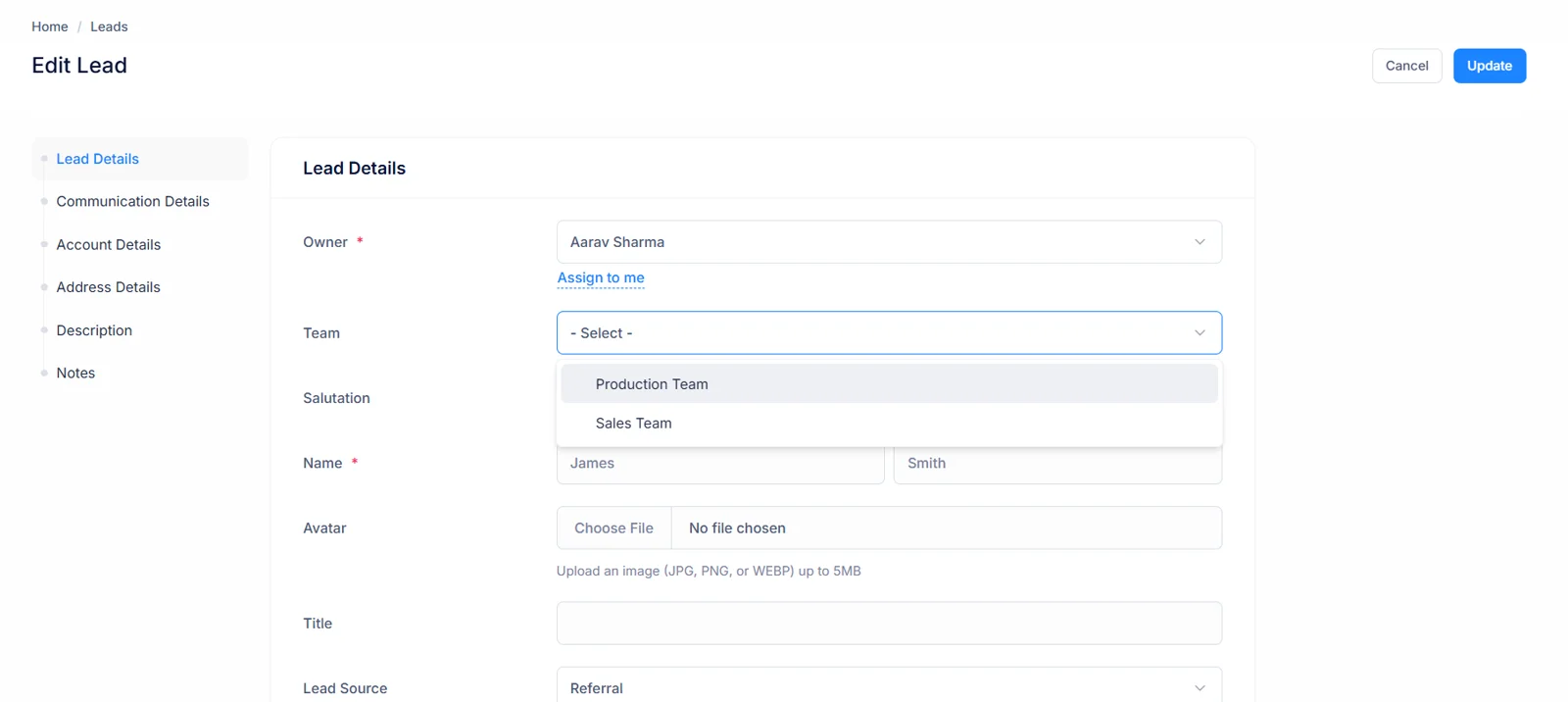
Every record already names who owns it and, optionally, which team it belongs to. Those two fields are all a policy needs; nothing extra is tagged on it.
3. Every read is filtered
Each list view, detail page, related tab, report and export is filtered by its policy inside a database query, so a hidden record is never fetched at all.
If its policy allows it, a record appears as usual. If it does not, the record is simply absent — no locked rows, no “access denied” placeholders, no counts that give it away. Whoever created a record can always reach it, whatever its policy says. Reassigning a record’s owner, or moving it to another team, changes who can see it on their very next page load.
Pick What Fits Each Record
Four options. One dropdown. Change it any time; new rules take effect immediately. Each record type keeps its own choice, so Leads and Deals never have to share a rule.
Company Wide
Anybody in your CRM can see this record. Best for shared resources such as company accounts, or common leads that a whole sales floor needs.
Good for: shared lead pools, key accounts, plus contact lists everyone works from. It is where every record type starts.
Keep in mind: everybody who can sign in sees these records, including a new hire on their first day, so reserve it for data the whole company is meant to work from.
Team Based
Anybody on the team a record is assigned to can see it, whoever owns it. Assign a team to every entry before switching this on — anything with no team stays visible only to whoever created it.
Good for: regional or product teams that share one pipeline and cover each other's accounts during leave.
Keep in mind: a user in no team sees only the records they created themselves, so add everyone to at least one team before switching an entity type over.
Owner Only
It stays visible only to whoever owns it, and to whoever created it. Nobody else on that team encounters it in list views, detail pages, or reports.
Good for: deals or contracts where pricing, discounts or negotiation notes should stay with the rep handling them.
Keep in mind: there is no reporting-line exception, so a manager sees an owner-only record only if they own or created it — or hold the View All Records permission.
Owner and Team
Visible to its owner, and to everybody on the record's team. The broadest of the restricted options: useful for deals needing collaborative visibility without opening them up across an entire company.
Good for: account teams where a rep, a solutions engineer plus a manager all work the same opportunity.
Keep in mind: visibility follows the record’s team, so when a rep moves team, reassign their open records and access moves with them straight away.
Whichever policy you pick, it only changes what each person is shown. Records keep their owner, their team and their full history, and nothing is deleted or moved — widening a policy again brings every record straight back into view. Checks run inside each query rather than as a second lookup afterwards, so a filtered list loads just as quickly as an open one.
Works Across Every Major Entity
Share policies are available on eleven record types in your CRM — not just leads — and each one is set independently.
Leads
Potential customers you are still tracking or qualifying.
Contacts
The people you nurture relationships with, prospects and customers.
Accounts
Customer companies plus everything recorded about them.
Deals
Opportunities moving through your sales pipeline.
Quotes
Pricing you have prepared, then sent to prospects.
Contracts
Signed agreements for deals you have won.
Subscriptions
Recurring plans your customers pay for.
Assets
Products sold to customers, kept for after-sale servicing.
Calls
Logged customer calls and their follow-ups.
Tasks
Work assigned to your team, with its due dates.
Meetings
Scheduled sessions with clients, leads or colleagues.
Each record type keeps its own setting, so tightening Deals leaves Leads exactly as open as before. Calls, tasks, meetings: each has a policy of its own too, separate from the records they are logged against. A contact’s Deals tab, for instance, lists only the deals the viewer may open, exactly as the Deals page does.
Configure a default policy for your organization
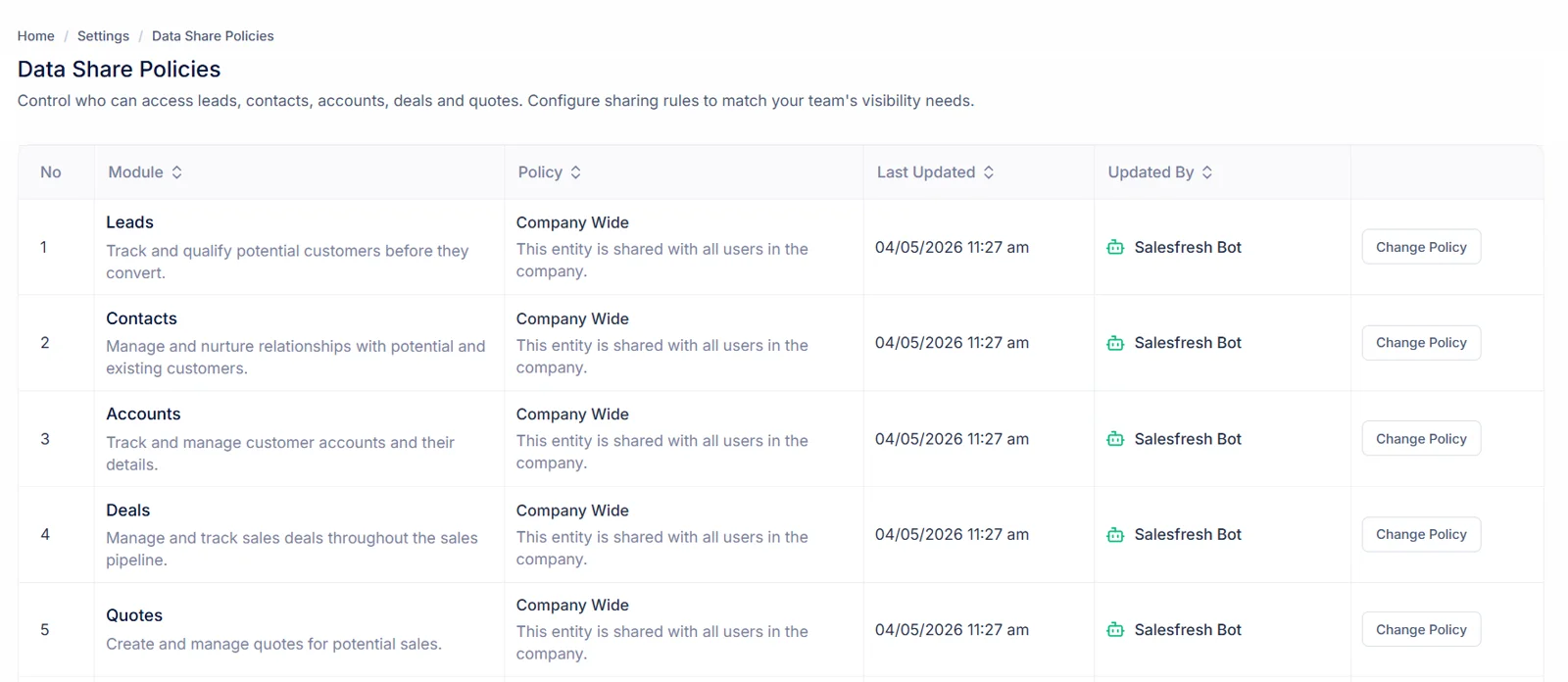
Data share policies are set once at organization level — not per record. Open Settings, choose a default for each entity type, so that rule applies across every record of that type in your CRM. Leads can stay open to your whole sales floor while contracts stay with their owners, all from one screen.
- Configured once in Settings, applied everywhere
- Set a different default policy per entity type
- No per-record configuration needed
- Every entity type starts out Company Wide
Your settings table lists every record type with its current policy, alongside who last changed it plus when, so there is never any doubt about which rule is live or who to ask about it.
Change it whenever your needs change
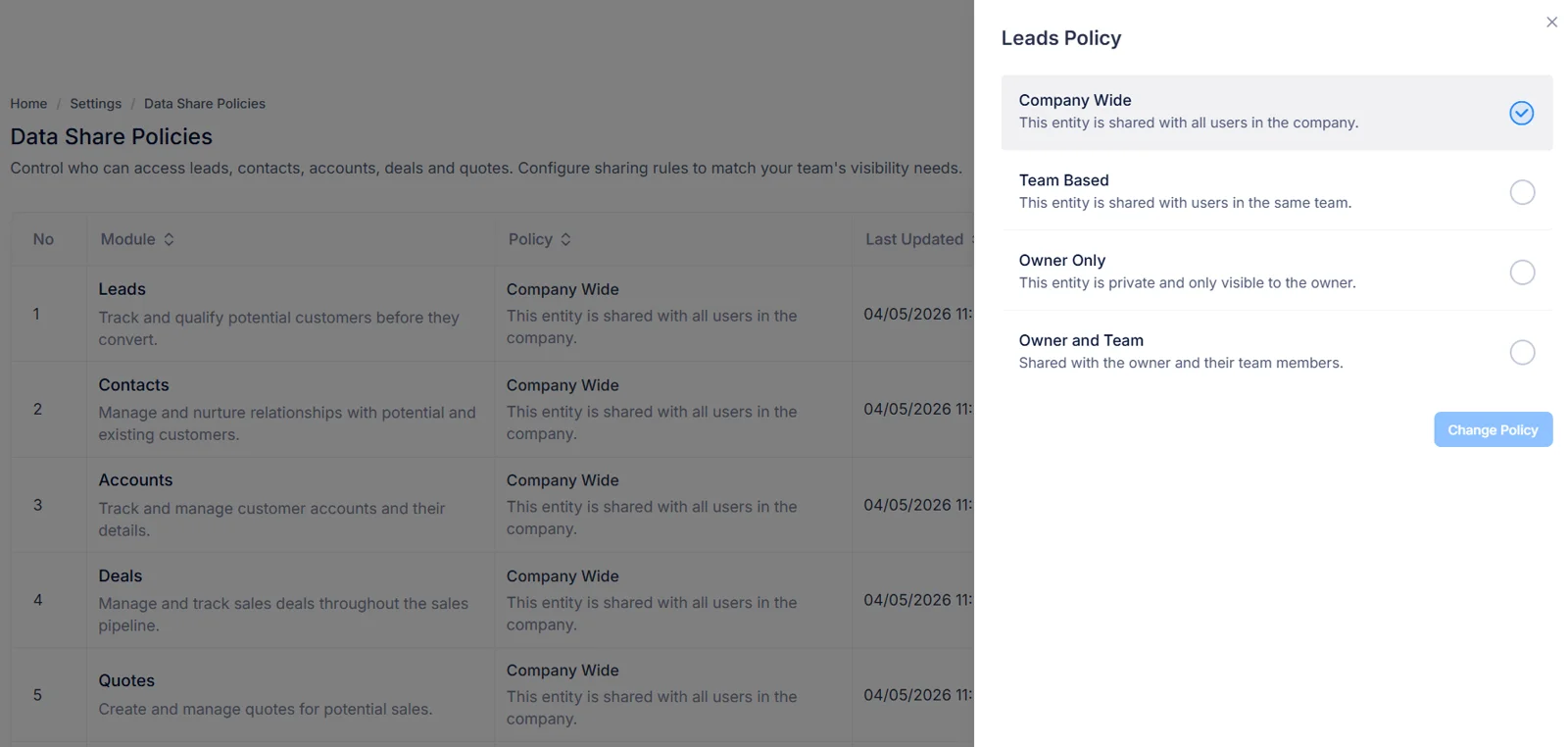
Your visibility requirements may evolve as your team grows or your processes change. Update any entity type at any time — new rules take effect immediately across existing plus future records. There is no rebuild to wait for, no batch job to run: whichever page anybody opens next already reflects your change.
- Update any entity type from Settings
- Change takes effect immediately across all records
- No migration or manual updates needed
- Loosen a policy just as easily as you tighten it
A sensible rollout is one record type at a time: start where exposure costs most, usually Deals or Contracts, check its list from a rep’s point of view, then move on to another.
Rely on it without thinking about it
Policies are enforced automatically at every access point — list views, detail pages, related tabs, reports, and exports. You never need to remember them; your CRM applies each rule for you. Because each check lives in its query, a new report or export is covered from day one.
- Enforced on list views, detail pages, related tabs
- Reports only include records a user can see
- No manual gatekeeping by admins needed
- Creators always keep access to their own records
When an admin genuinely needs a full picture, a View All Records permission lets them switch on company-wide visibility for themselves. It changes nothing for anyone else, is never saved as a setting, stopping the moment that permission is taken away.
Benefits in Plain Terms
See exactly what changes when every entity type has a share policy.
Without Data Share Policies
With Data Share Policies
Everyone can see everything by default
Each entity type follows the visibility rule you chose for it
Reps accidentally open each other's deals
Owner-only deals stay with the rep who owns them
No control over sensitive account data
Share with a team or the whole company, as each entity needs
Manual workarounds to restrict visibility
One dropdown in Settings, enforced automatically
Restricted figures leak through report totals
Reports and exports only count what the reader may see
None of this asks reps to change how they work. They keep creating and updating records exactly as before; the policy only decides who else comes across them. And because the CRM applies the rule rather than people, it holds on a rep’s first day as firmly as on their hundredth.
Everything Else Worth Knowing
Short answers to what sales leaders ask before switching visibility rules on.
Where do I set this up?
Open Settings, then choose Data Share Policies. Each entity type — leads, contacts, accounts, deals, quotes, contracts, subscriptions, assets, calls, tasks, meetings — carries its own default, picked from a single dropdown. Nothing needs configuring on individual entries, with no developer or admin involvement required.
What happens to entries created before a change?
A new rule applies immediately, retroactively too. Older entries follow it exactly as newer ones do, so nothing needs migrating, re-saving or reprocessing through a background job.
Can different entity types follow different rules?
Yes, most organisations do exactly that. Leads often stay open company wide so anybody can pick one up, while deals or contracts stay private for whoever owns them. Every entity type is configured on its own.
Does this cover reports or exports?
Enforcement happens on every read, not only in list views. Detail pages, related tabs, reports, downloaded files: each contains just what a signed-in colleague may legitimately see, so a restricted figure cannot leak out through a summary total.
How is visibility different from permissions?
Permissions decide what somebody may do — create, edit, delete. Visibility decides what they encounter at all. A colleague may hold full editing rights yet never come across a sensitive negotiation owned outside their group.
Somebody needs access to a hidden entry. Now what?
Reassign its owner, or widen visibility for that entity type. Either change lands at once, so nobody waits on an approval queue, nor does any temporary workaround need undoing later.
What is our default before we change anything?
Every entity type starts out Company Wide, so switching this feature on hides nothing by itself. Records only become restricted once you pick a narrower policy for their entity type in Settings.
Can I always see records I created?
Yes. Whoever created a record can always reach it, whatever its entity type’s policy says. A rep who logs a deal, then hands ownership to a colleague, does not lose sight of it.
What happens to records with no group under Team Based?
Team Based shows a record to members of whichever group it is assigned to, so a record without one is visible only to whoever created it. Assign groups to existing records before switching an entity type over.
Does ownership or group membership decide who sees a record?
That depends on its policy. Owner Only looks at ownership alone, Team Based looks at which group a record is assigned to, while Owner and Team accepts either one. Changing a record’s owner or its group therefore changes who can see it straight away.
Can a user belong to more than one group?
Yes. Under either team policy, somebody in several groups sees records from every group they belong to, so a sales manager who sits on two regional squads can follow both without any extra configuration.
Who is allowed to change a policy?
Only people whose role includes permission to edit Data Share Policies. Viewing current policies is a separate permission, so you can let squad leads see how visibility is set up without letting them change it.
Do policies apply to related tabs on a record?
Yes. Each related tab follows whichever policy governs what it lists, not that of its parent record. Opening a contact you can see shows only deals, quotes or tasks you are allowed to see on its tabs, exactly as Deals, Quotes or Tasks pages would.
Can an admin still see every record?
Only if their role holds View All Records permission. It lets them switch on company-wide visibility for their own requests without changing a configured policy for anybody else. This switch is never stored, so revoking that permission takes effect on their very next page load.
Do managers automatically see their reps’ Owner Only records?
No. Owner Only has no reporting-line exception: a manager sees an owner-only record only if they own or created it. Put managers in their reps’ group under Owner and Team, or grant them View All Records.
What does somebody in no group see under Team Based?
Only records they created themselves. Team Based matches a record’s group against every group a user belongs to, so a user with none has nothing to match. Add everyone to at least one group before switching an entity type over.
Can I see who changed a policy, or when?
Yes. A Data Share Policies table in Settings shows, for every record type, its policy in force, whoever last changed it, plus that change’s date.
What happens when a rep leaves or changes group?
Reassign their records to a new owner or group, so visibility follows at once. Nothing about a policy itself has to change, while a deactivated account can no longer sign in to see anything at all.
Does changing a policy delete or move any data?
No. A policy only filters what each person is shown. Records keep their owner, group assignment, full history — widening that policy again brings them straight back into view.
Which policy should we start with?
Most organisations keep Leads Company Wide so anybody can pick one up, move Deals or Contracts to Owner and Team so colleagues in that group keep sight of them, then reserve Owner Only for those few record types where even close colleagues should not look.
Will any of this slow us down?
No. Checks run inside each query rather than as a second lookup afterwards, so filtered lists load at normal speed even across large volumes of history.
Right data,
right hands — always.
Set visibility rules once and let your CRM enforce them everywhere — across every lead, contact, account, deal, quote and contract. Every entity type starts out Company Wide, so nothing is hidden until you decide it should be, and a single change in Settings tightens or relaxes access for the whole team at once.
- One default per entity type, chosen in Settings
- Applied to existing and future records the moment you save
- Enforced in lists, related tabs, reports and exports alike
James Davidson
james@acmecorp.com · Lead
Visibility Policy
Who can see this record?
Company Wide
Visible to everyone
Team Based
Everybody on that same team
Owner Only
Private to its owner
Owner & Team
Owner + the record’s team