
Find What You Need. Organize Everything Else.
Custom Views and Tags give your team two powerful tools to cut through the noise — save the filters you use every day, and label records the way your team actually talks about them.
Start exploring with instant access. No payment required.
A CRM full of unorganized data is just a very expensive spreadsheet
When your reps can't quickly find their hot leads, or your managers can't pull up a clean pipeline segment, your CRM gets in their way instead of helping.
Usual workarounds make it worse. Spreadsheets exported every Monday are out of date by Tuesday, personal notes scatter context across inboxes, and a status field stretched to cover every nuance ends up meaning nothing at all.
Custom Views and Tags give everyone on your team a way to slice, label, and navigate data exactly as their role demands — without changing a single record or affecting anyone else's view. Reps get their lists back, managers get consistent segments, and nobody has to ask for last week's export again.
Both tools sit on top of records rather than inside them. A view is a saved question; a tag is a label someone chose to add. Neither moves, copies or alters data, so one rep's way of working never disrupts a colleague's.
Stop rebuilding identical filters
How often do reps rebuild identical filters just to reach one familiar list? Custom Views let you save that exact combination — fields, conditions, match logic — reachable instantly from one sidebar click. Every time. Because a view stores the question rather than the answer, the list is current the moment you open it.
- Save any filter combination as a named view
- Access it from one sidebar click
- Shared org lists are always live for every teammate
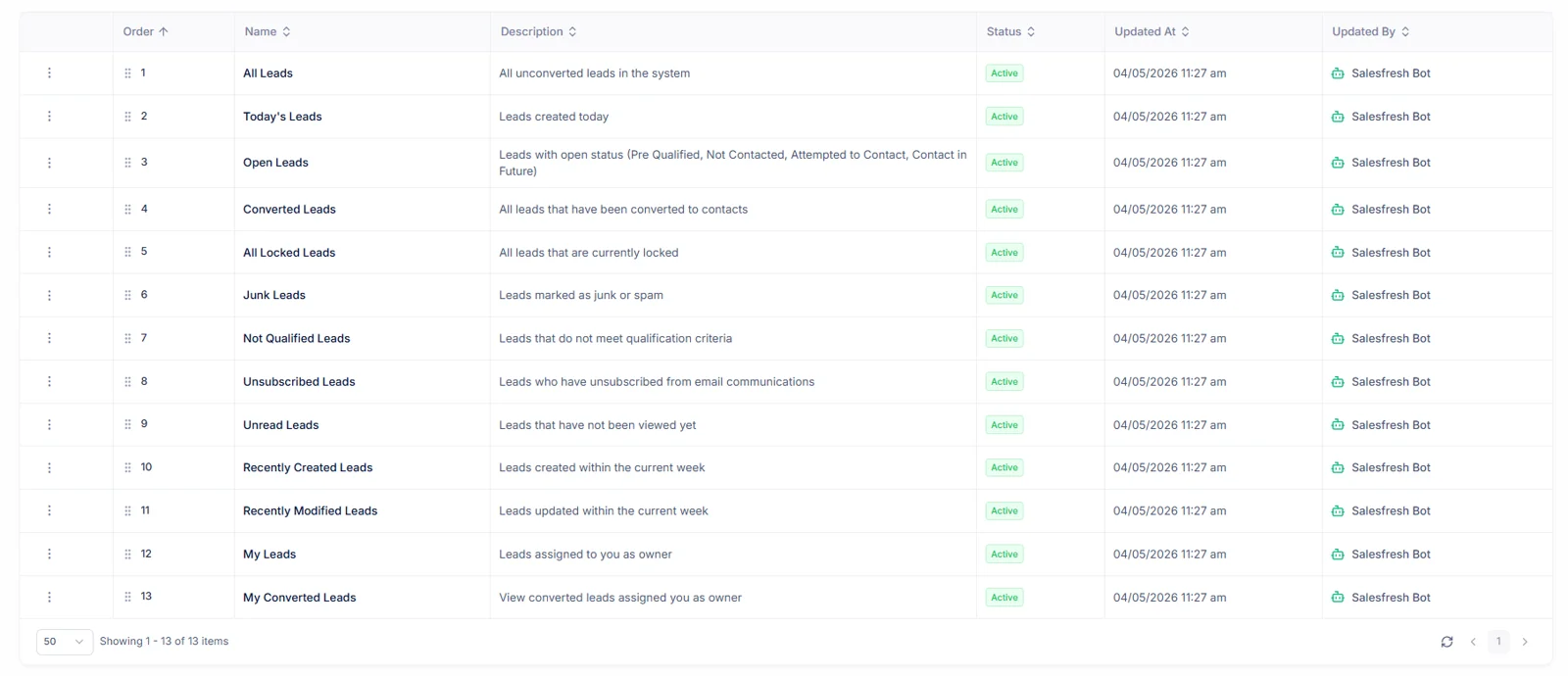
Every record type also ships with ready-made System lists — thirteen for leads, fifteen for deals, twenty-two for calls, 143 in all — so a new workspace has useful views before anybody builds one.
Filter logic that matches how you think
Build conditions using any field on any record. Combine them with AND / OR logic. Nest groups for complex rules. Whether you need "Leads from this quarter with no follow-up" or "High-value accounts in Europe that are uncontacted", our condition builder can express it. Preview the matching records as you build, so you know the view is right before anybody relies on it.
- Filter by any field on any entity
- AND / OR logic with nested condition groups
- No code or technical knowledge required
A condition can also compare ownership with whoever is signed in, so one shared list such as “my open deals closing this month” works for every rep at once, each seeing only their own records.
Views for Every Level
Personal views for your daily workflow. Organization views for everybody on your team. System views as ready-made starting points.
Everyone (read-only)
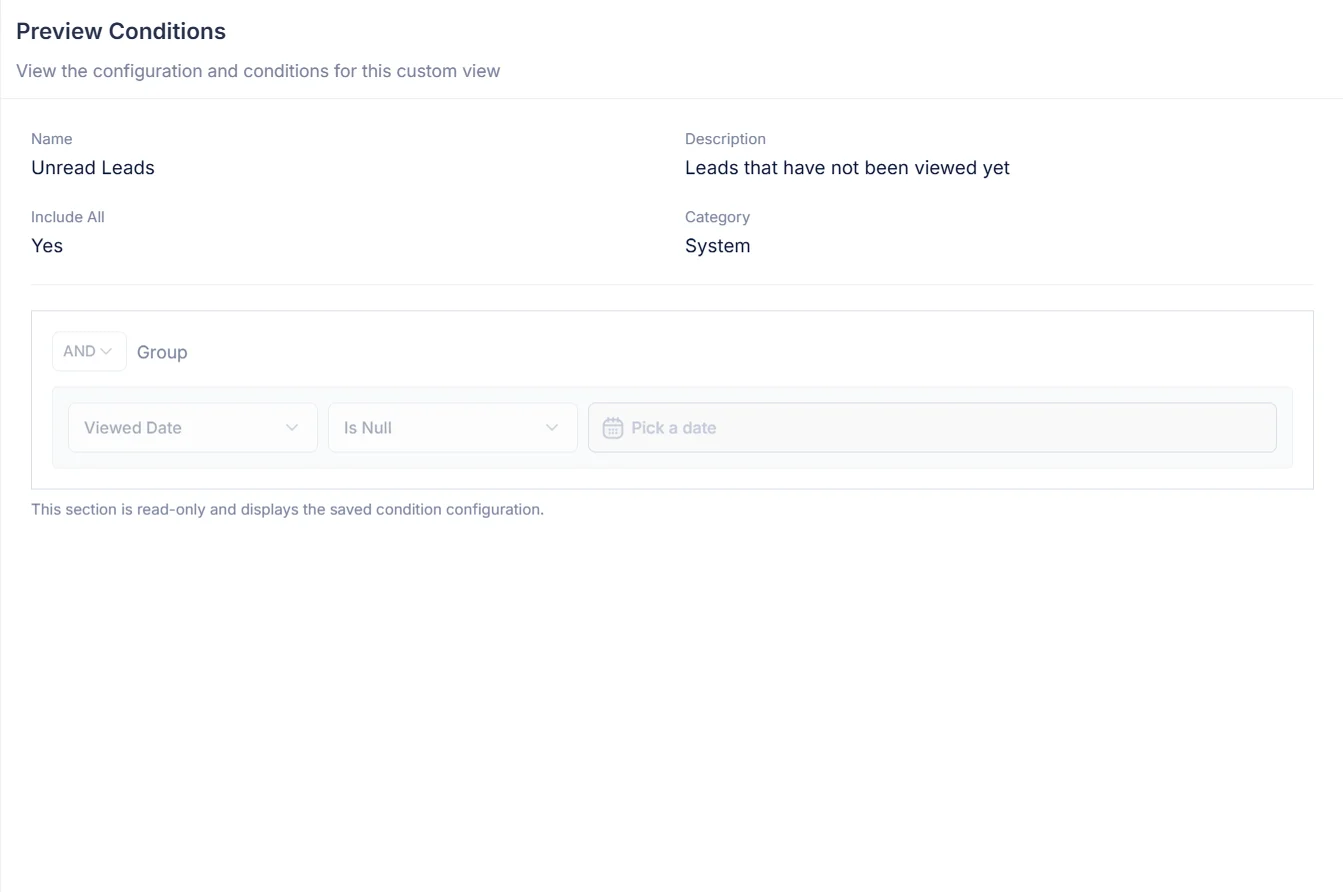
Pre-built views for common use cases, provided by the platform — lists such as open leads or unread leads that most teams want on day one. Clone any System view to create your own editable copy.
Deals, for instance, start with fifteen: All Deals, Open Deals, Won Deals, Lost Deals, Unread Deals, Closing Next Month, My Deals Closing This Month, among others.
Clone to customize
Everyone in the company
Team-wide pipeline segments and shared lists. Any org member can open it, and because it stores conditions rather than a copy of the records, it always shows live data.
Typical examples: a regional pipeline for your EMEA squad, renewals due this quarter, trade-show leads still waiting on a first call.
Editable by authorized users
Visible only to you
Your own daily workflow lists. Build the exact view you need for your role without affecting anyone else on the team; nobody else sees it in their sidebar.
Typical examples: my overdue follow-ups, deals I am closing this month, leads I have not opened yet.
Only you can edit
Works Across Every Entity
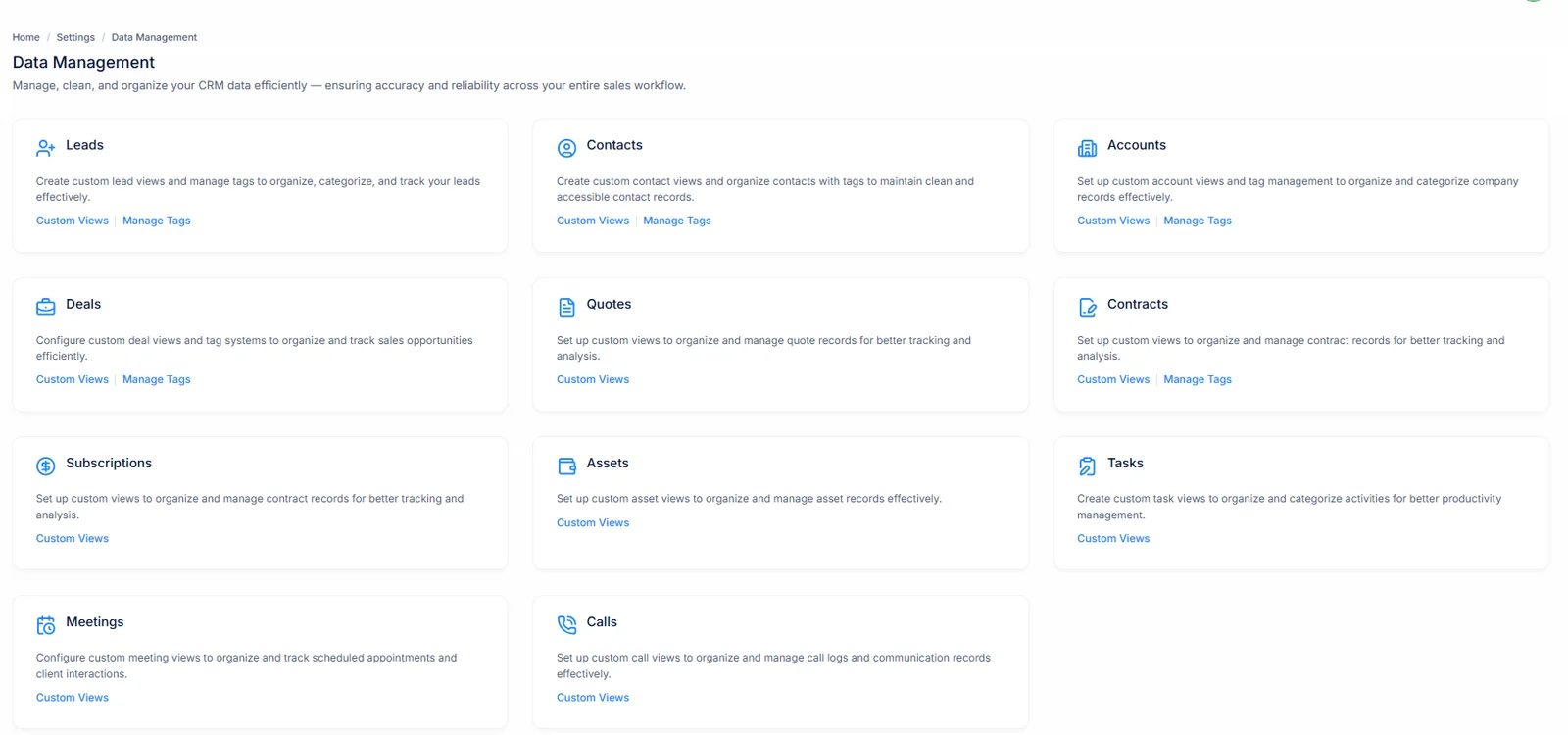
Custom Views are available on all eleven major record types in your CRM, and each record type keeps its own list of views.
Each record type has its own list of views, so a sales rep looking at deals is never scrolling past views meant for tasks or calls. Tags are available on nine of these types — all except subscriptions or assets. Whatever a list shows also respects your Data Share Policies: it can narrow what someone may see, never widen it.
Label records the way your team talks about them
Not everything fits neatly into a status field or a dropdown. Tags let you attach short, color-coded labels that reflect the language your team actually uses — Hot, Referral, Event Lead, Needs Legal Review. Put as many as you need on a record: leads, contacts, accounts, deals, quotes, contracts, tasks, meetings and calls all take tags.
- Color-coded labels applied to any record
- Use as many as needed on a single record
- Available on nine record types, from leads to calls
Five record types come pre-stocked with System tags — 272 across leads, contacts, accounts, deals or contracts — so reps can start labelling on day one, adding Personal or Organization tags as your own vocabulary settles.
Group tags to keep things tidy
As your tag library grows, groups keep things organized. Put lead temperature labels under Priority, source labels under Origin, so anybody can find one instantly without scrolling through a long list. A group is simply a name on the tag, so a label can move to a better group later without being removed from a single record.
- Organize labels into named groups
- Groups collapse for a clean tag picker
- Works for personal and organization-wide tags alike
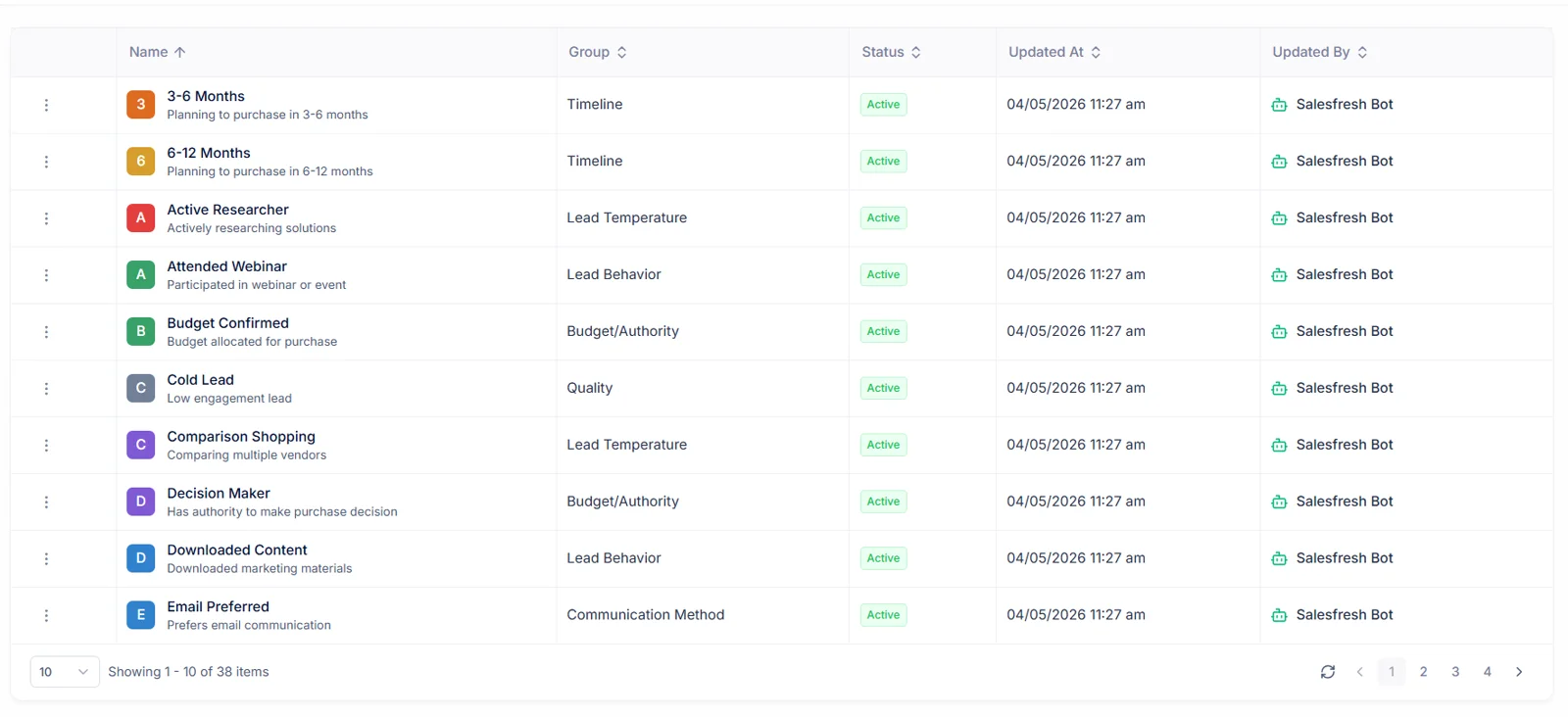
Ready-made groups show what good structure looks like: leads arrive with Quality, Timeline, Budget/Authority, Lead Behavior; contacts with Lifecycle Stage, Customer Health, Revenue Tier. Group names run to 50 characters, while colours can be anything at all.
Tags work with Custom Views
Tags aren't just labels — they're filterable fields. Build a Custom View that shows all leads tagged Hot with a deal value above a threshold, and you have a high-priority outreach list that updates itself automatically. Remove the tag when a lead is handled and it leaves the list on its own.
- Tags are fully filterable in the condition builder
- Combine tag filters with any other field condition
- Saved lists built on them stay live and up to date
Combine a tag with a signed-in-user condition, such as “my deals tagged Hot”, to give every rep a personal priority list from one shared Organization view — nobody maintains a copy for each person.
Views or Tags?
A Custom View is a saved question about data you already have. A Tag is a fact you add that no field records. Most teams end up using both; strong lists combine them.
Reach for a Custom View when…
- Your answer already lives in existing fields — owner, stage, value, created date, last activity.
- You ask one question every day, such as “my open leads with no follow-up this week”.
- A list should keep itself current as records change, without anybody maintaining it.
- A whole team needs to look at one segment, from one shared starting point.
Reach for a Tag when…
- A fact is something only a person knows — a referral, a warm introduction, a legal hold.
- A record belongs to several informal groups at once, which a single dropdown cannot express.
- A label is temporary, such as a campaign, an event or a quarter-end push.
- You want a quick visual cue on a record itself, in a colour everybody recognises.
Where both meet is where they are most useful. Tag leads that came from a trade show, then save a view for “tagged Trade Show, not contacted in seven days”. Your tag records what happened; your view keeps asking who still needs a call, while its answer shrinks by itself as reps work through it.
One sign to watch for: when a tag ends up on almost every record, or people start reading a value out of its name — Budget 50k, Budget 100k — that information has outgrown a label, deserving a proper field. Tags are at their best for exceptions, context, anything short-lived.
The Benefit in Plain Terms
See exactly what changes once your team has Custom Views plus Tags.
Without Data Management
With Data Management
Apply the same filters every session
Save it as a Custom View, open with one click
"Can you send me that list again?"
Share an Organization View — it's always live
Records labeled inconsistently across the team
Shared tags keep language consistent
Can't filter by informal categories
Tags are fully filterable inside any saved view
System views locked and unchangeable
Clone any System view and make it yours
None of this changes how records are stored. Views only ask questions of your data; tags only add context to it. Rolling either out is safe to try with a single squad first — nothing breaks for anybody who has not started using them yet.
Up and Running in Minutes
Both Custom Views and Tags take minutes to set up — no training, no configuration, no IT required.
Custom Views
3 steps to your first saved view
Open an entity list
Go to any entity (e.g., Leads) and click Views → New View. Give it a short name of up to 30 characters, plus a description so teammates know what it is for.
Build your conditions
Add field conditions, set AND / OR logic, then choose Personal or Organization. Preview matching records before you save, so nobody inherits a list that quietly misses half its deals.
Save and use it
It appears in your sidebar — one click away from now on, always current as records change. Reorder your lists so those you open most sit at top.
Tags
3 steps to your first tag
Create a new tag
Go to Settings → Data Management, open whichever record type your tag is for, then choose Manage Tags. Leads, contacts, accounts, deals or contracts already hold System tags to start from.
Name, color, and group it
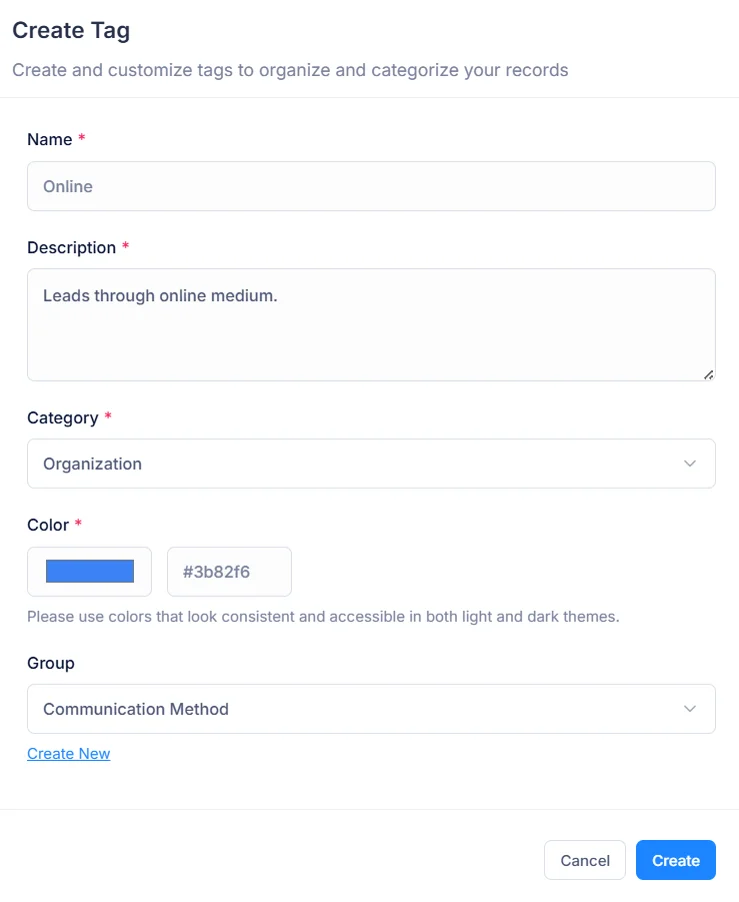
Pick a name, add a short description, assign any colour, then optionally place it in a tag group so it sits beside related labels.
Apply it to records
Use its Tags field on any record detail page to apply your tag, then filter on it from any Custom View — alongside owner, stage or value.
Everything Else Worth Knowing
Short answers to what sales teams ask before rolling this out.
How do Custom Views differ from an ordinary filter?
An ad-hoc filter disappears as soon as you navigate away. Custom Views are saved by name, pinned for reuse, so one click brings back exactly that set of conditions. They stay live too — records moving in or out of those conditions appear or vanish on their own.
Who else can see a list I create?
That depends on which type is picked when saving. Personal views stay private to whoever built them. Organization views are open to everybody in one company. System views ship with Salesfresh as read-only, though anybody can clone them into editable copies.
Which record types support views plus tags?
Custom Views work on all eleven record types — leads, contacts, accounts, deals, quotes, contracts, subscriptions, assets, tasks, meetings, calls. Tags cover nine of them: every type except subscriptions or assets.
How many tags can one record carry?
As many as make sense. Tags are not mutually exclusive, so one lead might be marked Hot, Referral, Needs Legal Review all at once — something no status dropdown could express.
Can tags be filtered on?
Yes. Tags behave as proper fields inside our condition builder, so they combine with any other condition. Filtering for everything labelled Hot above some chosen deal value produces self-maintaining outreach lists.
Does building a list affect teammates?
No. Saving a Personal list changes nothing for anybody else, alters no records, moves no data. It is purely another lens over what already exists.
How complex can conditions get?
Conditions can be grouped, with groups sitting inside other groups up to five levels deep, each with its own AND or OR. That covers rules such as “owned by me AND (tagged Hot OR created this week)” without any code.
Do date conditions keep moving, or are they fixed?
Both are possible. Pick a fixed date, or a rolling one — today, tomorrow, next three or seven days, this week, last week, this month, next month, this quarter, thirty days from now, or fifteen, thirty or ninety days ago. A list of “deals closing this month” is correct on day one of every month without anybody touching it.
Can one shared list show each person their own records?
Yes. A condition can compare ownership with whoever is signed in, rather than with a named person. One Organization list such as “my open deals closing this month” then works for everybody: each rep opens it to see only their own deals.
Which comparisons can a condition use?
Equals or does not equal, greater or less than, between or not between, is one of or is not one of, contains or does not contain, is empty or is not empty. Text, numbers, dates, yes-or-no fields plus multi-value fields such as tags each offer whichever comparisons make sense for them.
Can I check what a list filters on without editing it?
Yes. Preview Conditions shows exact rules behind any saved list, System ones included, without opening it for editing. It is a quick way to confirm that something shared by a colleague means what its name says.
Can I switch a list off without deleting it?
Yes. Mark it inactive to take it out of your sidebar while keeping its conditions, so it can come back next quarter exactly as it was. Lists can also be reordered, so those you open most sit at top.
Are tags personal or shared?
Either. When you create a tag you choose Personal, for labels only you use, or Organization, for labels everybody applies. Ready-made System tags are available to everyone.
Do saved lists include drafts or deleted records?
Deleted records never appear; they wait in a recycle bin until restored or purged. A draft appears only for whoever started it, so half-finished entries do not clutter anybody else’s lists.
Can a tag be retired without deleting it?
Yes. Tags, like saved lists, can be marked inactive instead of deleted — a gentler option for a label that has had its day, such as last year’s campaign or a category nobody uses now.
How do I find every record with a particular tag?
Build a list with a single condition on Tags, or add that tag to an existing list’s conditions. Because tags are ordinary fields to our condition builder, a tag can sit alongside owner, stage, value or any date in one rule.
Is a tag shared between record types?
No. Each tag belongs to one record type, so labels on leads stay separate from labels on deals. A deal picker never fills up with lead-only labels such as Cold Call or Webinar Signup.
Which Salesfresh plans include this?
Every plan includes ready-made System views plus System tags. Creating your own depends on your plan; our pricing page lists which plans include it.
Can I change a list after saving it?
Yes. Open it, adjust its conditions, name or description, then save — everybody who uses it sees this new version on their next visit. To experiment without disturbing something colleagues rely on, clone it first, then edit that copy.
Who can create, edit or delete views or tags?
Each action is a separate permission on a user’s role: viewing, creating, editing, deleting. An admin can let reps build their own lists while keeping deletion of shared ones for a smaller group.
How should we name views or tags?
Short, specific. Names can run to 30 characters, while every one also carries a description of up to 255 — a place to explain what it is for, when to use it, useful for anybody joining later.
Does a saved list keep a copy of records it shows?
No. It stores only its conditions, running them fresh each time it opens, so it never goes stale nor holds data of its own. Deleting one removes a lens, not a single record.
How do we keep tag libraries from getting messy?
Group related labels together — priority levels under one group, lead sources under another. Groups collapse inside every tag picker, so finding one label stays quick even after hundreds accumulate.
Do Custom Views respect Data Share Policies?
Yes. A list can only narrow what you are already allowed to see, never widen it. If your company keeps deals Owner Only, “Open Deals” shows each rep their own open deals, while a colleague opening that same list sees theirs.
What happens when I clone a System view?
You get an editable Organization copy with identical conditions, ready to rename or adjust. Its original stays untouched, so a ready-made list everybody depends on is never changed by accident.
Which System views come ready-made?
143 in total, spread over all eleven record types. Leads alone get thirteen, from All Leads, Open Leads or Unread Leads to My Converted Leads. Calls get twenty-two, including Overdue Calls plus My Scheduled + Overdue Calls for Today.
Which System tags come ready-made?
272 labels for leads, contacts, accounts, deals or contracts, already sorted into groups. Leads start with Quality (Hot Lead, Warm Lead, Cold Lead), Timeline, Budget/Authority, Lead Behavior; deals start with Risk Factors, Competition, Decision Criteria, among others.
Is there a limit on how many views we can save?
Up to 100 per category for each record type — a hundred Organization lists for deals, say, plus a hundred Personal ones. In practice teams that reach double figures usually benefit more from tidying up than from adding another.
What ready-made lists do tasks or meetings get?
Tasks start with fifteen, including Today, Tomorrow, Overdue Tasks, Next 7 Days + Overdue Tasks, My Today + Overdue Tasks. Meetings get twelve, such as This Week Meetings, Upcoming Meetings, Missed Meetings, My Upcoming Meetings — enough to plan a whole week from your sidebar.
What about quotes, contracts or subscriptions?
Quotes get fourteen, from Draft Quotes or Sent Quotes to Valid This Month, Expired Quotes. Contracts get twelve, including Expiring Soon, Pending Approval, Auto Renewal, High Risk. Subscriptions get twelve too, with Trial Subscriptions, Payment Failed, Dunning Management among them.
Why do so many System views start with “My”?
Those compare ownership with whoever is signed in. My Deals, My Overdue Tasks or My Scheduled Calls look identical for everybody, yet each person opening one sees only records they own — a pattern worth copying in your own Organization lists.
Which tag groups do accounts start with?
Seventeen, holding 67 tags: Account Health, Account Size, Risk Level, Revenue Tier, Payment Status, Support Level, Sales Channel, Compliance Status, among others. Contacts get 80 System tags, contracts 47, deals 40, leads 38.
Should reps build Personal lists or ask for Organization ones?
Start Personal. Once a list proves useful to more than one person, recreate it as an Organization list so everybody works from one definition instead of five slightly different copies drifting apart.
Can a tag belong to more than one group?
No. Each tag sits in at most one group, or none. Moving it somewhere better later is just an edit; every record keeps that tag throughout, so nothing needs re-tagging.
Can colleagues open my Personal lists or tags?
No. A Personal list or tag belongs only to whoever created it. Nobody else can open, select, edit or delete it — it is kept out of every place a colleague could reach it, not merely left off a menu.
Which ready-made lists do contacts, accounts or assets get?
Contacts get nine, including Unread Contacts, Unsubscribed Contacts, Recently Modified Contacts, My Contacts. Accounts get eight, such as Locked Accounts or New Last Week. Assets get eleven, from Under Warranty or Warranty Expiring Soon to Service Due, Critical Assets, High Value Assets.
How are ready-made contract tags organised?
Into fifteen groups covering 47 tags: Contract Status, Renewal Status, Approval Status, Legal Status, Audit Status, Payment Terms, Value Tier, Risk Level, Compliance, Duration, Vendor Classification, among others — a structure legal or finance colleagues can adopt as it stands.
Which tag groups come with deals?
Ten: Sales Process, Deal Priority, Deal Size, Timeline, Risk Factors, Competition, Decision Criteria, Engagement Level, Geographic Region, Data Quality. Together they give reps a shared vocabulary for why a deal is moving, stalling or at risk.
Which tag groups come with contacts?
Twenty, holding 80 tags — our largest set. Lifecycle Stage, Relationship Status, Customer Health, Interest Level, Referral Status, Communication Preference, Event Participation, Onboarding Stage, Support Level sit among them, so account managers can describe a relationship without inventing labels.
Do we need to use every System tag?
No. They are a starting library, not a requirement. Apply whichever labels fit your process; unused ones cost nothing, never appear on a record until somebody adds them, while your own Organization tags can sit alongside them in one picker.
Can a tag use any colour?
Yes. Pick any colour at all, not just one from a short palette, so a label can match a campaign’s branding or a traffic-light scheme your reps already know. Group names can run to 50 characters.
Start for free · No credit card needed
Get everything
organized today.
Save recurring filters. Label records. Share what matters. Start from 143 ready-made System views plus 272 System tags, then build your own the moment your process needs them. Teammates will wonder how they worked without it.
Already using Salesfresh? Sign in here