
Your CRM That Works While You Sleep
From the moment a lead lands in your CRM to the day a quote becomes a deal, the steps in between can be automated — assignments, follow-ups, stage actions, reminders, SLA alerts, and deal creation. All running in the background, all the time.
Start exploring with instant access. No payment required.
Manual processes have a silent cost
Leads that never get assigned, deals that go quiet, quotes that expire because no one sent a follow-up. These failures don't announce themselves — they just show up as lost revenue at the end of the quarter.
Automation eliminates the gaps between steps. Rules you configure once run continuously in the background, so nothing slips through no matter how busy your team gets.
Category 1
Lead Automation
Four automation rules work together to manage the full lifecycle of a prospect — from the moment it's created to the day it converts or goes stale.
Assign every new lead to the right rep, automatically
When a new record comes in, the system evaluates your assignment rules in order and routes it to the right person — no manual triage, no inbox pile-up, no rep wondering who owns it. Configure what happens when no rule matches and keep assigned reps notified the moment something lands in their queue.
- Rules evaluated in priority order — first match wins
- Email notifications sent to assigned reps instantly
- Fallback behavior when no rule matches
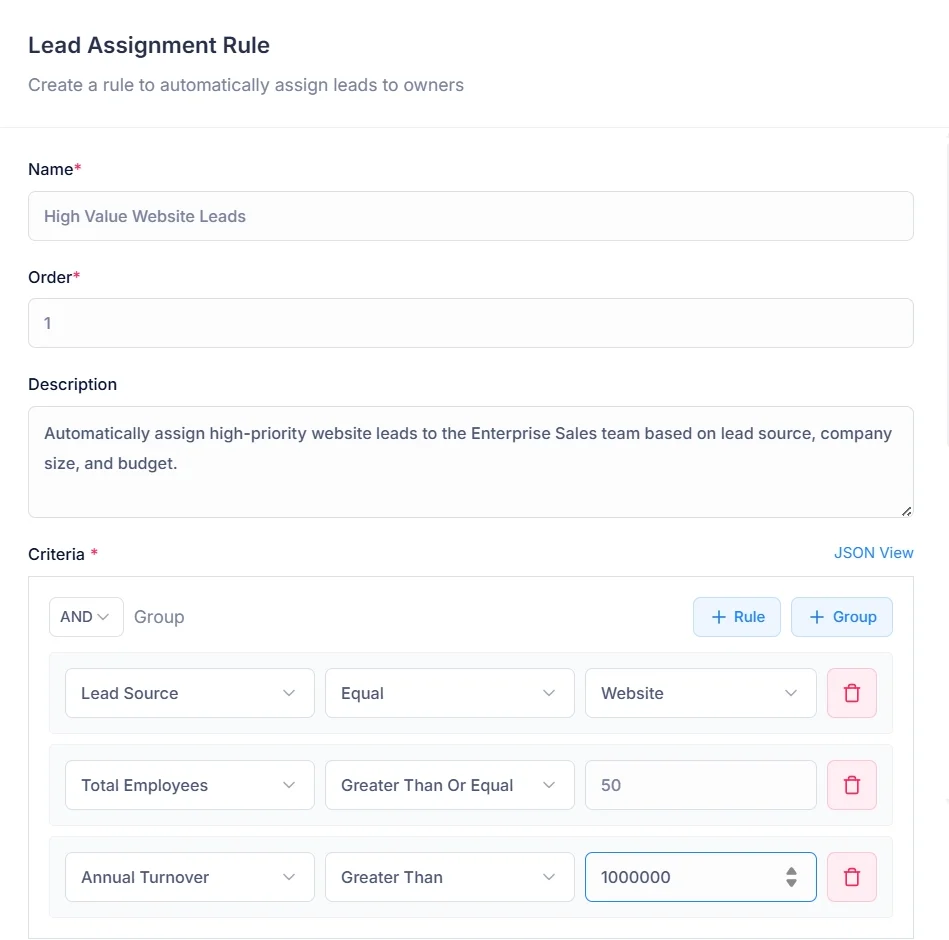
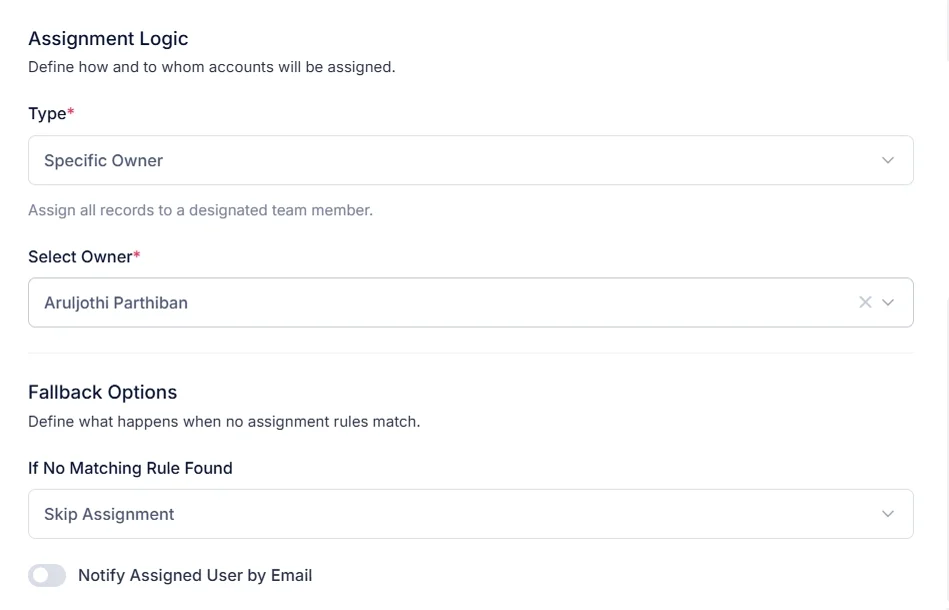
Three assignment strategies
Specific Owner
Always assign to one designated person — great for VIP leads or dedicated territory owners.
Round Robin
Distribute leads evenly across a team, rotating through each member in sequence.
Load Balanced
Assign to the team member with the fewest active unconverted leads — keeps workloads fair.
Trigger actions the moment a prospect moves forward
When a prospect reaches a key point in your pipeline, the right next action happens automatically. The rule fires on the transition and executes the action you've defined. Multiple rules can fire on the same step, and each rule can carry additional criteria for precision.
- Multiple rules can fire on the same step
- Add criteria to each rule for precision targeting
- Actions execute immediately on transition
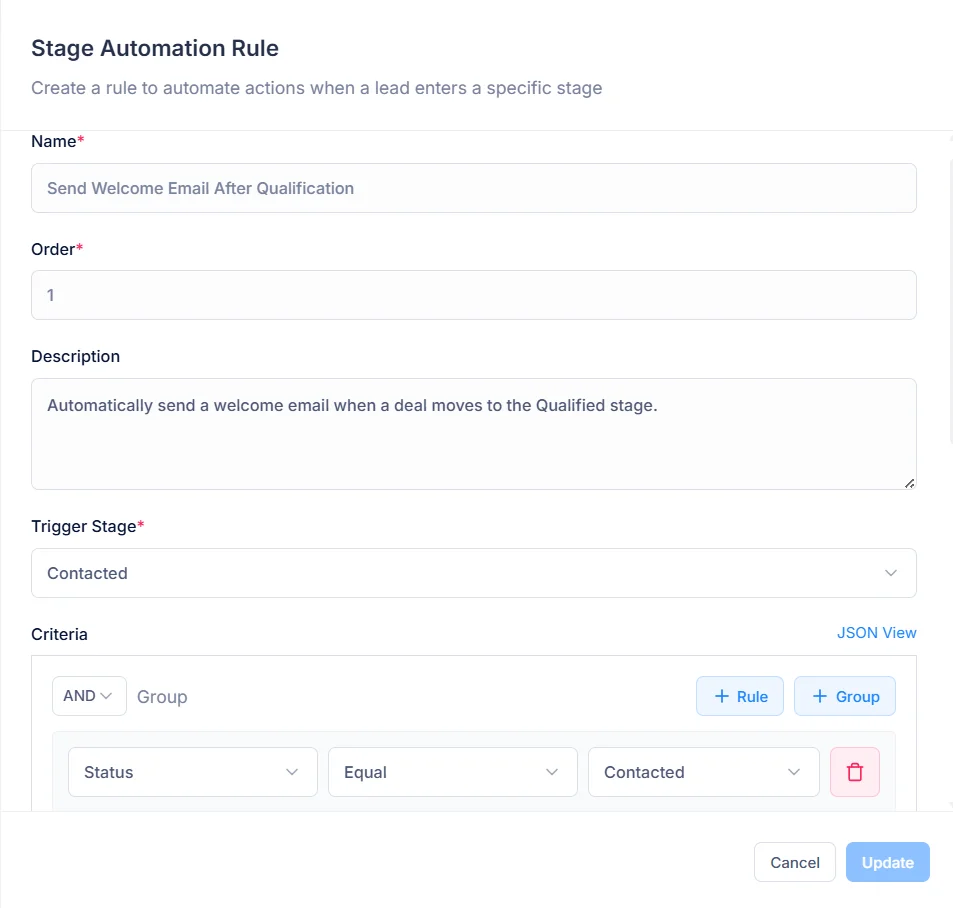
Three action types available
Create a Task
Assign a follow-up task to the record owner or a specific rep, with priority and due date.
Send an Email
Send an email template to the prospect or their owner automatically.
Schedule a Meeting
Create a meeting with the prospect and owner as participants, scheduled relative to the change.
Never let a prospect go cold because someone forgot to follow up
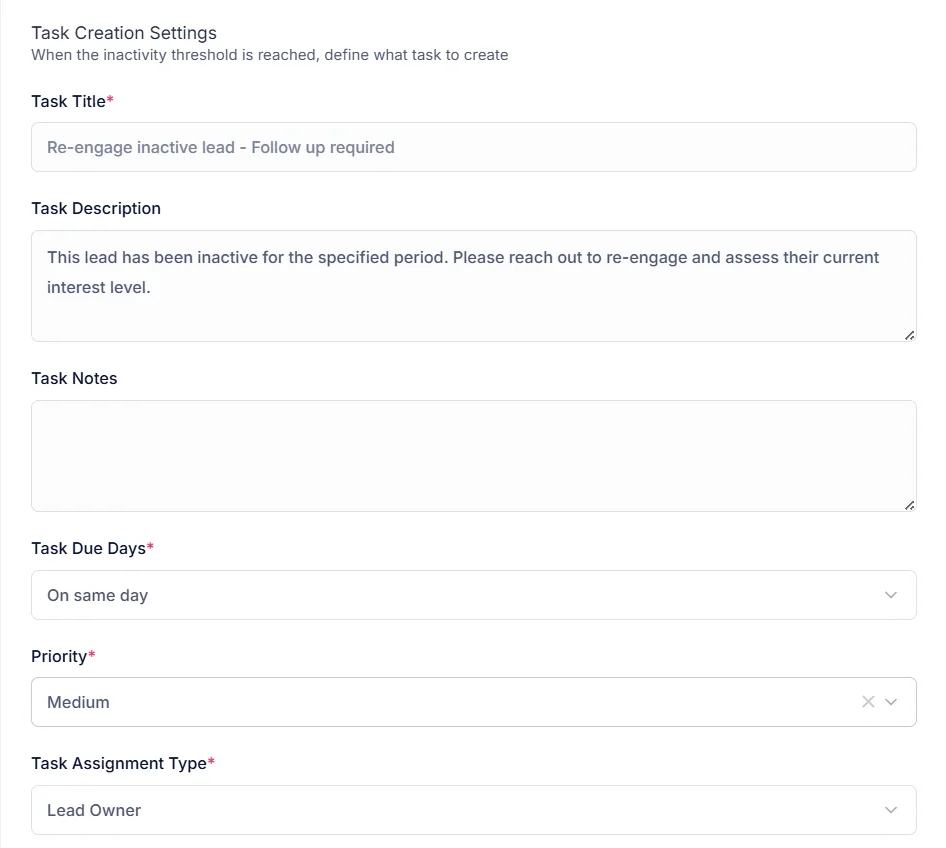
If a record has had no activity for a period you define — no calls, no emails, no meetings — the system automatically creates a task prompting the responsible rep to re-engage. Rules run daily at your office start time. You decide how long the silence threshold is: 7 days, 2 weeks, a month.
- Task assigned to the owner or a specific team member
- Add criteria to target specific segments
- Configurable silence threshold to match your sales cycle
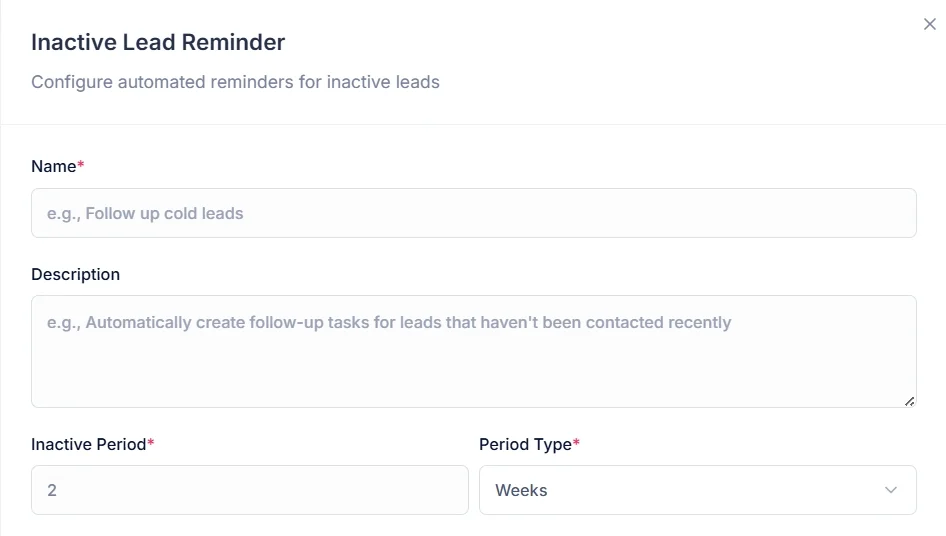
Enforce time limits across your pipeline
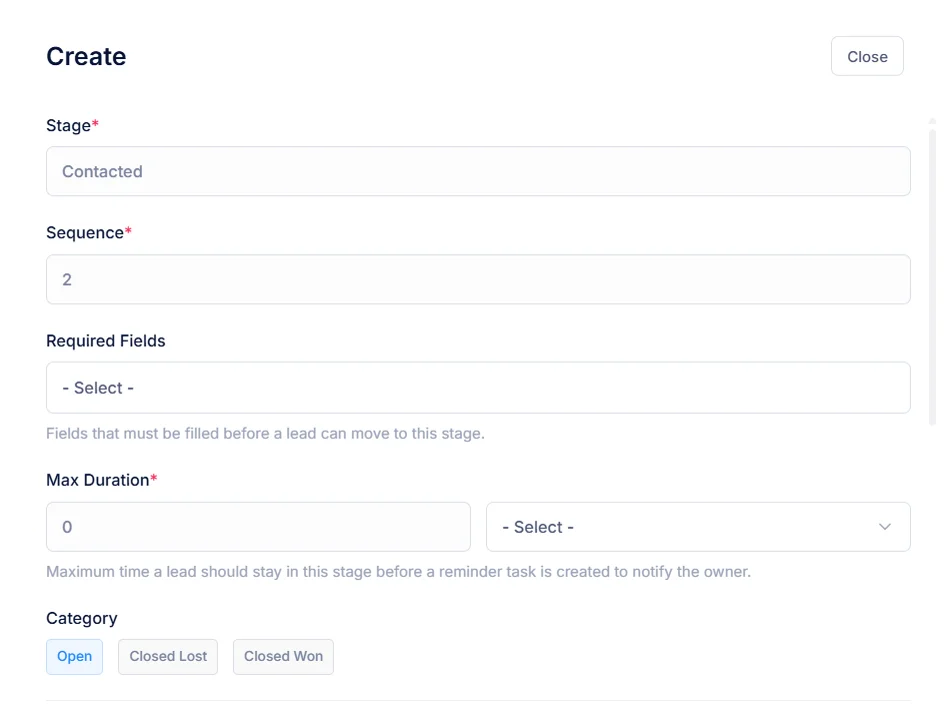
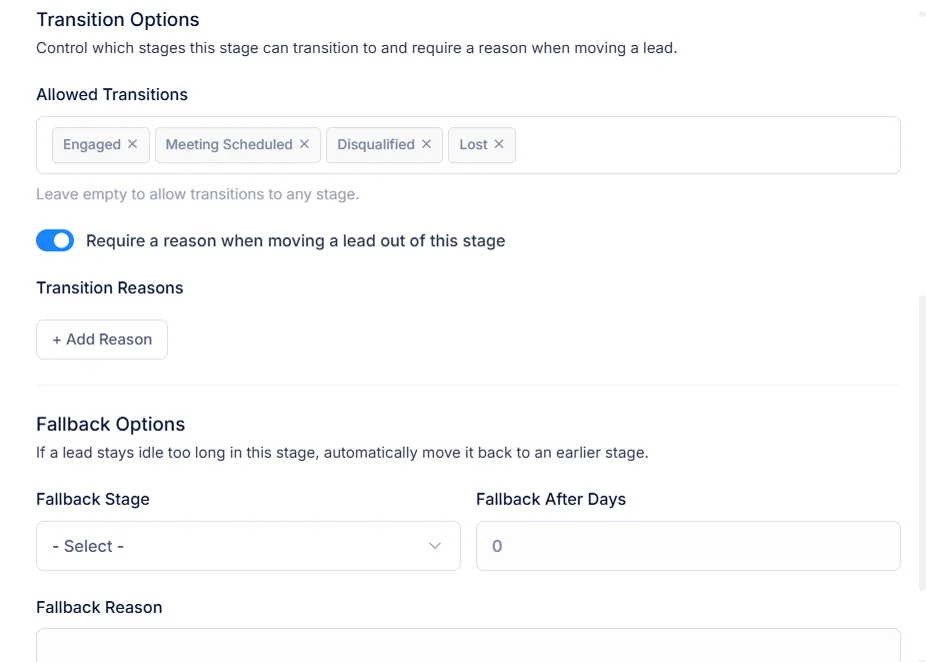
SLA monitoring checks your pipeline every hour. If a record has been sitting in one place longer than your configured maximum, the system creates a high-priority task and emits an alert. Beyond a secondary threshold, it moves automatically to a fallback step — keeping your pipeline accurate and your reports clean.
- Hourly SLA checks across your entire pipeline
- High-priority task created on first breach
- Auto-downgrade to a fallback step after a secondary threshold
Category 2
Deal Automation
An opportunity that's gone quiet is one you're losing. These rules create the reminders that keep your pipeline moving.
Keep opportunities moving. Never let one go quiet.
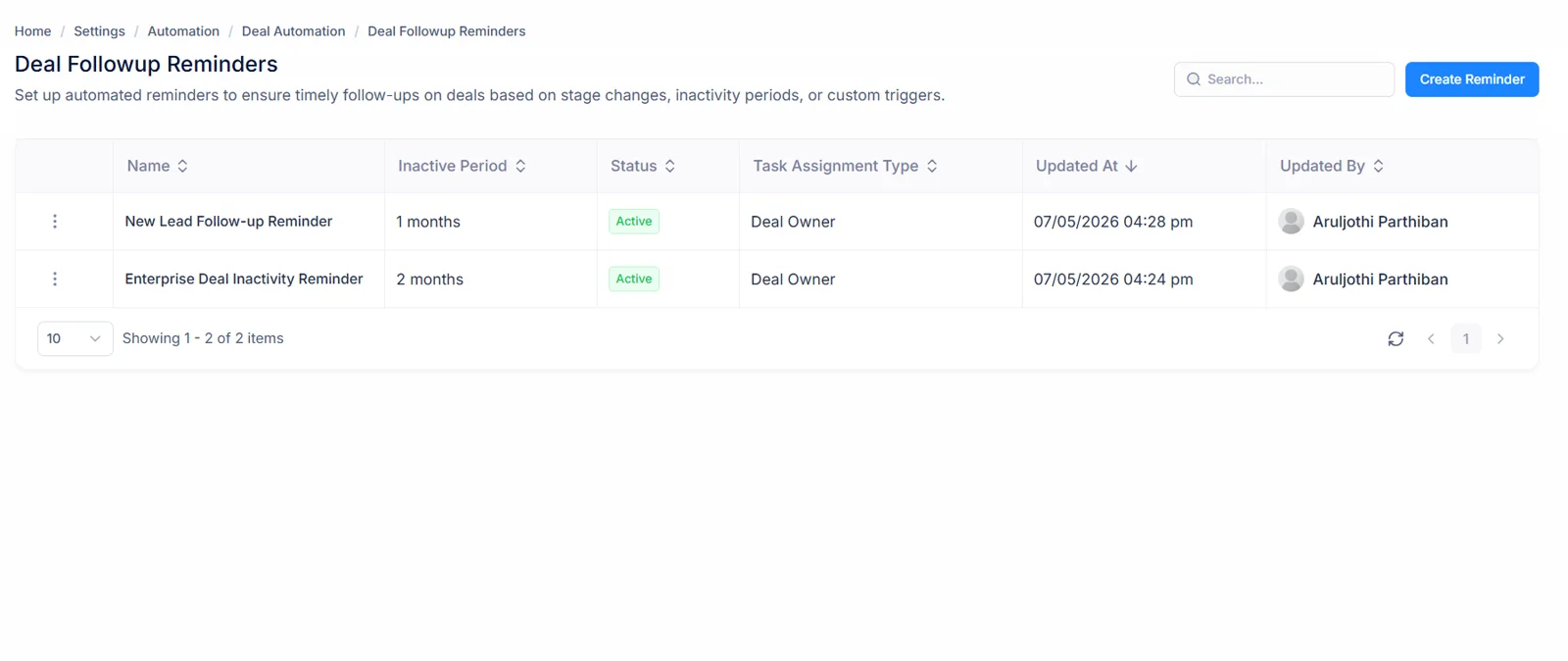
Deal Follow-up Reminder monitors your pipeline for inactivity and automatically creates a task when nothing has happened — calls, emails, meetings — within the time window you set. The task includes a detailed context note explaining exactly why it was created, so the rep picks it up with full context.
- Configure for any segment: high-value, pipeline step, or source
- Task assigned to the owner or a specific rep with chosen priority
- Runs daily at office start time across your entire pipeline
Category 3
Quote Automation
Two automation rules make sure your quotes keep moving — one nudging prospects to respond, one converting accepted quotes into deals without manual work.
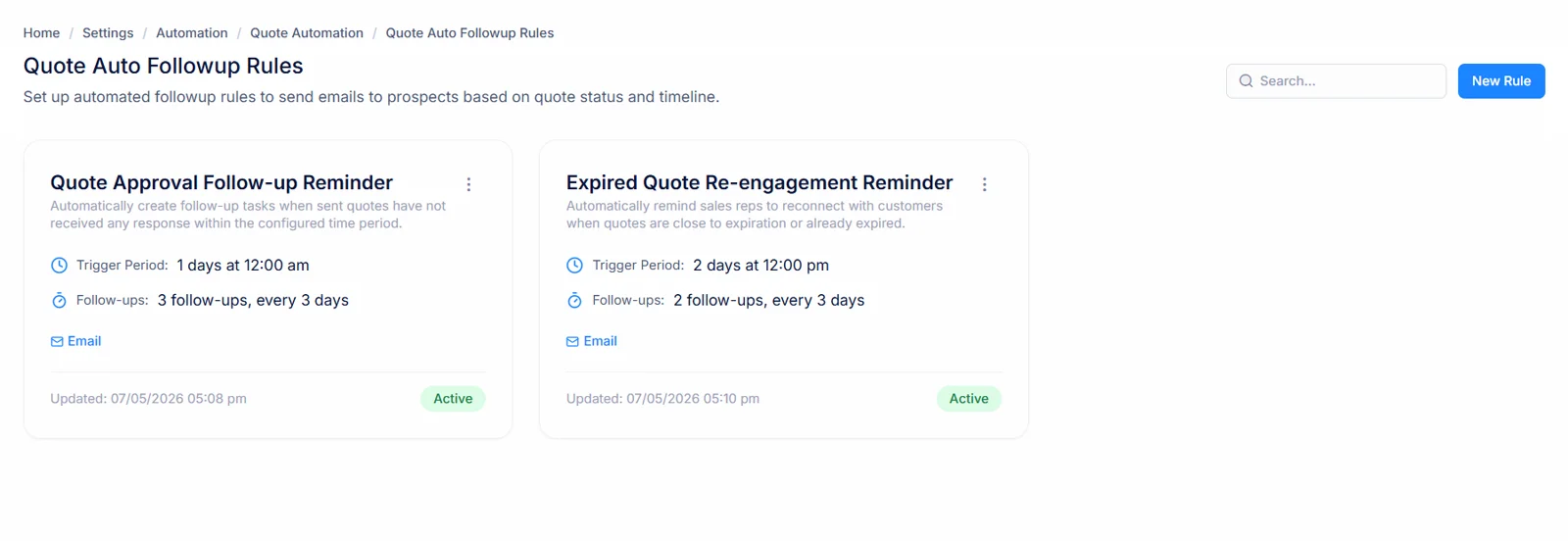
Send the right follow-up at the right time, without anyone having to remember
After a quote is sent, follow-up emails go out automatically on a schedule you define — X days after the quote was sent, at a specific time, using the template you choose. Assign multiple templates in sequence for a first nudge, a second check-in, and a final push. Each email threads back to the original so the conversation stays in context.
- Stop if the prospect has replied or the quote is in a closed status
- Set a cap on maximum follow-up attempts
- Minimum gap between follow-ups prevents over-sending
Turn accepted quotes into deals automatically
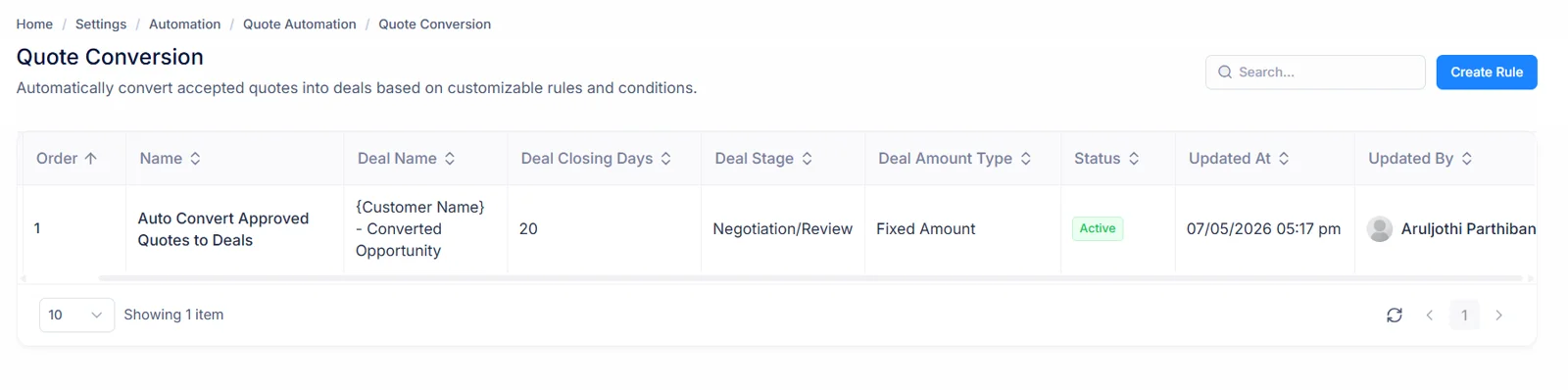
The moment a quote is accepted, the system evaluates your conversion rules and creates an opportunity in the right pipeline step — with the right owner, amount, and details derived from the quote. Configure the name, pipeline step, amount calculation, owner, and closing date. Multiple rules are evaluated in priority order; the first match runs.
- Deal name supports variables like {{account_name}} and {{contact_name}}
- Amount: fixed, percentage of quote total, or custom formula
- Quote is automatically updated to link the new opportunity
The Benefit in Plain Terms
See exactly what changes when routine actions run automatically instead of waiting for someone to remember.
Without Automation
With Automation
New leads sit unassigned until someone notices
Every new prospect is assigned to the right rep instantly
Reps manually trigger follow-up tasks on pipeline changes
Actions fire automatically the moment a record moves
Inactive leads go cold with no alert
Reminder tasks are created automatically after configurable inactivity
The pipeline fills with stale records
SLA alerts flag breaches; auto-downgrade keeps the pipeline clean
Deals go quiet between touchpoints
Reminder tasks are created for inactive deals on a daily schedule
Quotes sit unanswered because no one sent a follow-up
Follow-up emails send automatically on a schedule
Accepted quotes need manual follow-through
Deals are created the moment a quote is accepted
One rule at a time
Each automation type lives in Settings → Automation. Pick the category — Lead, Deal, or Quote — and click New Rule to configure your first automation.
Start with one rule, test it, and expand from there. Most teams start with Lead Assignment and one Lead Stage Automation action, then add the rest as their process matures.
Start automating your
sales process today.
Configure once. Run continuously. Never let a lead go unassigned, a deal go quiet, or a quote go unanswered.
Get Started for FreeAlready using Salesfresh? Sign in to your account
Rules run continuously in the background — no manual triggering needed