
Reach Every Lead and Contact — On Every Channel — Without Leaving Your CRM
Author, target, schedule, and measure broadcast messages across email and website banners — all from inside Salesfresh, using the audience data you already have. SMS and WhatsApp are on the way.
Start exploring with instant access. No payment required.
One Message. Every Channel.
Stop rebuilding the same announcement in several different tools. Write it once in Salesfresh and send it everywhere your audience already is — to their inbox or onto whichever page they are browsing, with one audience plus one schedule behind both. Nothing is copied between tools, so nothing drifts out of step.
Send One Message Across Every Channel at Once
Author your announcement once and deliver it simultaneously via website banner and email, with SMS and WhatsApp coming soon. Each channel uses one shared audience segment plus one schedule — no need to re-configure targeting for each. Emails go out under whoever created it, with replies coming straight back to that person.
Author your message once — deliver across all chosen channels simultaneously
Each channel uses the same audience segment and schedule
Email and website banner in one announcement, with SMS and WhatsApp coming soon
Clone any announcement to reuse a format that performed well
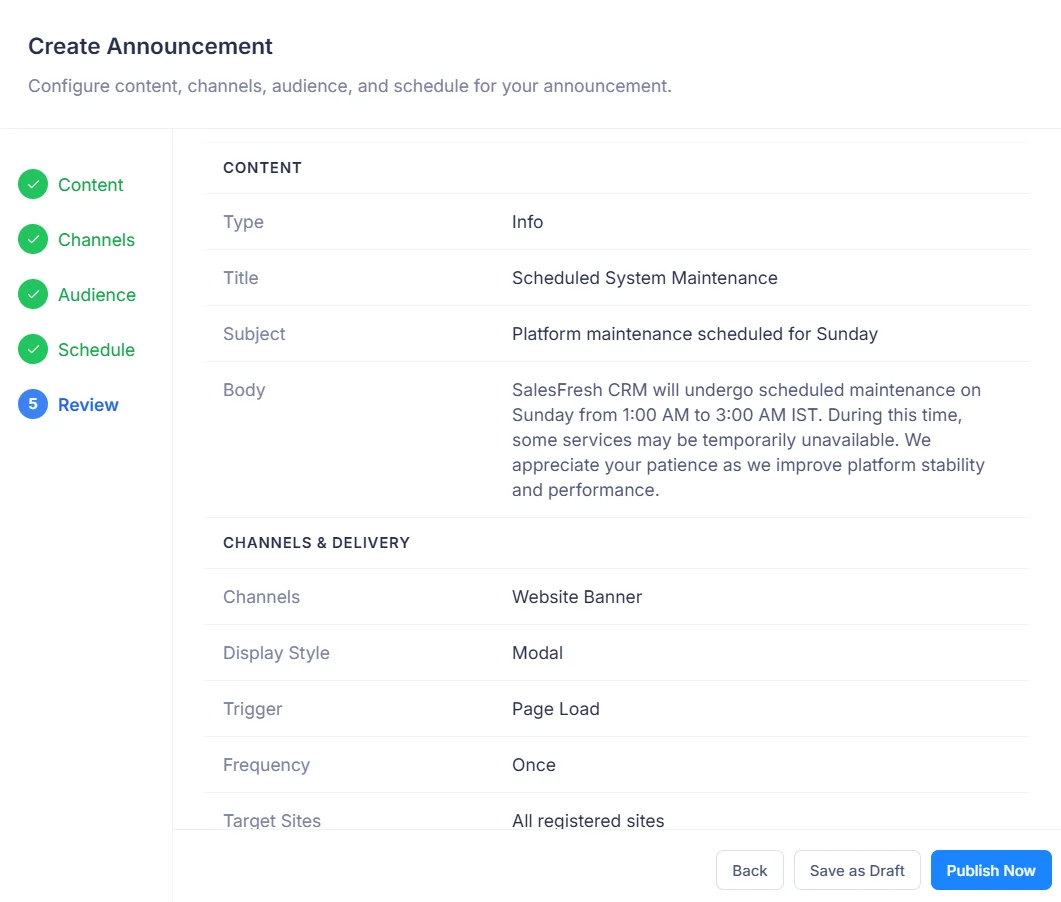
Pick one channel or several for each message. A product update might go to email alone; a maintenance window might appear as a banner on every page while also landing in inboxes. Each message carries a title of up to 100 characters for internal use, plus a subject line of up to 255 that recipients actually see.
🚀 New Feature: Live Chat is Here — Try it now
window.SF_EMBED_KEY = "ek_live_abc123";Show Banners on Your Website — Without Touching Your Code
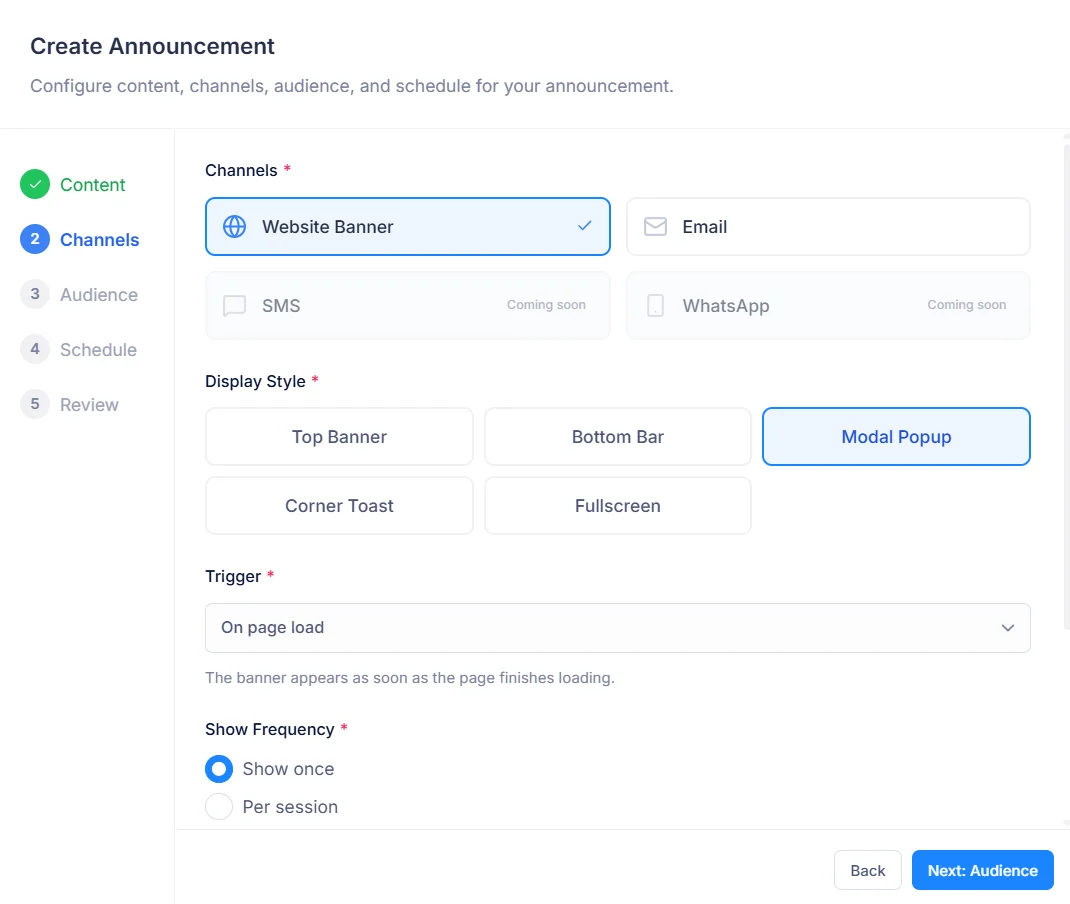
Install a lightweight embed snippet on your website once. From that point on, every announcement you create in Salesfresh can appear as a targeted banner on your site automatically — no code changes needed, no developer dependency, ever again. Choose from a top banner, a bottom bar, a modal, a corner toast or a fullscreen takeover, and decide whether it shows once, once per session, on every visit, or until the visitor acknowledges it.
Install once — no further code changes ever needed
Pass a visitor’s email, lead ID or phone and the widget matches their record
Banner appears at exactly the right moment per your trigger settings
Acknowledge and dismiss events logged back to your CRM in real time
One registered site can hold several domains — production, staging, a regional storefront — all sharing one embed key. Without a valid key, that widget shows nothing at all. Each registered site gets its own key, so a message can be aimed at one site while others stay quiet.
The Right Message to the Right Person at the Right Moment
Because your audience data lives in Salesfresh, targeting is precise, immediate — no export, no sync, no lag. Audiences are worked out from live records when a message goes out, not frozen when you hit publish. Someone who changed stage this morning is already in, or out, by this afternoon.
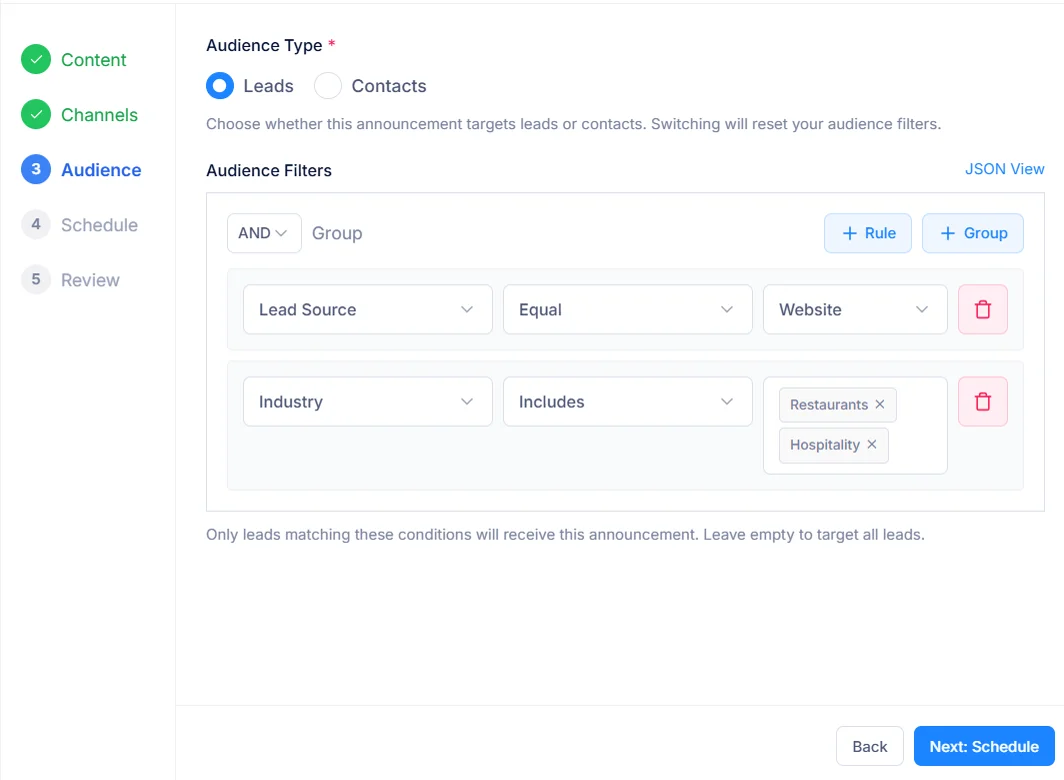
Target the Exact People Who Need to See It
Use Salesfresh's condition builder to define your audience — pick leads or contacts, then combine conditions on their fields, such as stage, status, source or assigned owner. If no filters are set, it reaches everyone. Email skips anybody who has unsubscribed or has no address on file.
Filter on lead or contact fields — stage, status, source, owner and more
Combine conditions with AND / OR logic — the same way you filter anywhere in Salesfresh
Audience re-checked at send time for email and on every page load for banners
Leave filters empty to target every lead or contact in your workspace
On a website, a banner with no filters shows to every visitor, including people widget code cannot identify. Add filters, and it appears only for visitors recognised by email, phone or lead ID who match them — checked afresh on each page they open.
Choose Exactly How and When the Banner Appears
For website banners, decide the precise moment the announcement should show. Catch someone before they leave. Wait until they're engaged. Restrict it to your pricing page only. Every trigger is configurable without touching your website, and an announcement can be limited to particular registered sites or shown on all of them.
On page load — banner appears immediately when the page finishes loading
After a delay — wait a configurable number of seconds before revealing the banner
On scroll — show after visitor scrolls past a set percentage of the page
On exit intent — catch visitors the moment they move to leave the page
On a specific URL — only show on pages matching your pattern, with * as a wildcard
Scroll triggers accept any depth from 1% to 100%; delays start at one second. Pair a trigger with a frequency — once, per session, every visit, or until acknowledged — so a visitor who has already responded is not interrupted by it again.
The Benefit in Plain Terms
See exactly what changes when your broadcast messaging lives inside your CRM, next to the records it is about.
Without Announcements
With Announcements
Export leads → import to email tool → filter there
Filter inside Salesfresh, send from Salesfresh
Separate popup library installed on the website
One embed snippet, banners controlled from your CRM
No record of who acknowledged what or when
Timestamped acknowledgement log per recipient
SMS and WhatsApp require separate tools
Email and banner together, SMS and WhatsApp next
Audience data out of sync by the time you send
Audience pulled fresh from live CRM data at send time
T&C acceptance tracked in a spreadsheet
Built-in mandatory acceptance with full audit trail
Keeping broadcasts beside customer records removes a whole category of mistakes: stale lists, duplicate sends, people emailed after asking to stop. Whoever writes a message sees exactly who it reached, who responded, which deliveries failed — without asking anybody for an export.
Track Every Response, Enforce Every Acceptance
From optional "Got it" buttons to legally binding T&C flows, Announcements gives you full control over how recipients respond — plus a complete audit trail when you need it. Every message moves through five clear stages: Draft, Scheduled, Published, Paused and Completed.
Collect Formal Acknowledgements
Add a button to any announcement — "Got it", "I Accept", "Confirm" — any label you choose. When a visitor clicks it, Salesfresh logs the acknowledgement with a timestamp, IP address, and browser details.
Fully configurable button label per announcement
Optionally link to a full T&C page or landing page
Every acknowledgement timestamped and logged to the recipient record
Button labels run to 50 characters. Add a link, such as a policy page or release notes, so people can read more before they confirm.
Enforce Mandatory T&C Acceptance
Mark an announcement as mandatory and the dismiss button disappears — the visitor must acknowledge before the banner goes away. Give the announcement a version label so you can tell which terms each campaign asked visitors to accept.
Dismiss button hidden — acknowledgement is required
Version label on the announcement (e.g. "Terms v3.2")
Acceptance log retained indefinitely for legal evidence
Version labels run to 50 characters, so “Privacy Policy 2026-09” fits comfortably. Publish a new message for each revision, keeping every acceptance tied to wording people actually saw.
Schedule Ahead or Publish Immediately
Set a future start date and Salesfresh publishes the announcement automatically when the moment arrives. Set an end date and it stops just as automatically. Or publish instantly for time-sensitive messages.
Immediate publish or future-dated scheduling
Auto-complete when end date is reached
Pause and resume any live announcement at any time
An end date must fall after its start date, or saving is refused. A message scheduled for later shows as Scheduled until its moment arrives, then goes live without anybody pressing a button.
Track Every Interaction for Every Recipient
See exactly how your announcement performed: how many were delivered, acknowledged, dismissed or failed. Drill into a full per-recipient list and export it as CSV.
Aggregate metrics: delivered, acknowledged, dismissed, failed
Per-recipient status list with channel breakdown
Export full recipient log as CSV for compliance or follow-up
Each CSV row lists recipient type, recipient, channel, status, any failure reason, acknowledgement time plus IP address — ready for an auditor or a follow-up campaign.
The Right Permissions for Every Role
Announcements integrates with Salesfresh's existing permission system. No one can publish or modify without the right access level. Viewing, creating, editing, deleting, publishing, analytics and export are separate permissions, so you can build roles like these.
Full Control
Create, edit, publish, pause and delete draft announcements. Register and manage sites. Export recipient logs and see all analytics.
Typically one or two people — whoever owns brand voice, legal wording or customer communications.
All permissions
Create and Manage
Create and publish announcements. View analytics and recipient status. Without delete or export, nothing leaves the CRM.
Suits marketing or customer success leads who run campaigns day to day but should not remove records or download recipient data.
Create · Publish · Analytics
View Access
Can see the announcements list and their current status. Cannot create, edit, or publish.
Lets sales reps know what customers have just been told, so nobody is caught off guard on a call.
View only
Site Management Stays Controlled
Registering websites and managing embed keys follows the same announcement permissions, so only people you trust with them can add or change a site. Registering a staging domain as its own site lets you trial a message there before it reaches customers. A site cannot be removed while a scheduled, published or paused announcement still targets it, so a live campaign never loses the page it runs on.
From Embed Snippet to First Acknowledgement in Minutes
No developer dependency beyond the one-time snippet install. No third-party accounts. Just four steps and your first announcement is live. Every message starts as a draft, so you can build it at your own pace, publishing only once it reads right. Writing drafts can even sit with one person while publishing sits with another.
Register Your Website
Go to Settings → Announcements → Sites and register your website. Copy the generated embed snippet and paste it once before the closing </body> tag, passing a signed-in visitor’s email, phone or lead ID so banners can recognise them. One site can list several domains.
Create Your Announcement
Click + Create Announcement. Write your subject and body, choose delivery channels, set a display style plus trigger, then define audience filters. It saves as a draft, so nothing goes out yet.
Set Your Audience & Schedule
Choose leads or contacts and filter on their fields, in any combination. Set a future start date to schedule, or publish immediately for time-sensitive messages. Add an end date to stop it automatically.
Watch the Results Come In
Monitor delivered, acknowledged, dismissed and failed counts from the Analytics view. Export a full recipient list as CSV whenever you need it, failure reasons included.
From first click to published announcement in under ten minutes.
Everything Else Worth Knowing
Short answers to what teams ask before sending their first broadcast.
Which channels can one message use today?
Email plus website banners, either alone or together. SMS or WhatsApp are coming next. Pick whichever mix suits each message; audience, schedule and content stay shared across every channel you choose.
Which display styles can a banner use?
Five: Top Banner, Bottom Bar, Modal, Corner Toast, Fullscreen. Bars suit routine news, a corner toast suits something friendly, while a modal or fullscreen takeover is best kept for terms people must accept.
How often does a banner reappear?
You decide per message: Once, Per Session, Every Visit, or Until Acknowledged. Until Acknowledged keeps showing it to an identified visitor on every visit until they acknowledge or dismiss it.
Who sees a banner with no audience filters?
Everyone browsing that site, including visitors widget code cannot identify. Filters narrow it to recognised visitors only — people identified by email, phone or lead ID who match every condition.
How does a website recognise a visitor?
Pass an email address, phone number or lead ID into its embed snippet when someone is signed in. Widget code looks that person up among leads or contacts, then shows only banners meant for them.
Can a message run on some sites but not others?
Yes. Pick particular registered sites for it, or leave that choice empty to run on all of them. Each site has its own embed key, so aiming a message at one never disturbs another.
What triggers can delay or restrict a banner?
Page Load, a Delay of one second or more, Scroll depth from 1% to 100%, Exit Intent, or a URL Pattern using * as a wildcard — so /pricing* covers every pricing page at once.
Which stages does a message move through?
Draft, Scheduled, Published, Paused, Completed. Publishing a draft with a future start date makes it Scheduled; without one it goes live at once. Only published messages can pause; only published or paused ones can complete.
Can I edit a message after it goes live?
No — only drafts or scheduled messages can be edited, so what people saw always matches what is on record. To change live wording, complete it, clone it, adjust that copy, then publish again.
Can a published message be deleted?
Only drafts can be deleted. Anything that has gone out stays on record with its recipient log intact, which is exactly what makes acknowledgements trustworthy as evidence later.
What does cloning copy?
Content, channels, display style, trigger, frequency, button label plus link, audience, targeted sites. A clone arrives as a draft titled “Copy of …”, ready to adjust without touching its original.
What are content types for?
Each message is labelled Announcement, Info, Warning, Success or Error, signalling its tone at a glance — a scheduled outage reads differently from a feature launch before anybody reads a word.
Which statuses can a recipient have?
Pending, Sent, Delivered, Opened, Seen, Acknowledged, Dismissed, Failed or Received, depending on channel. Filter a recipient list by any of them to find, say, everyone who dismissed a notice without accepting.
What happens when a delivery fails?
Its recipient row is marked Failed with a reason recorded, included in CSV exports, so you can fix an address or follow up another way instead of guessing who missed out.
What does mandatory acceptance change?
Its dismiss control disappears, leaving only an acknowledge button. Visitors must confirm before a banner goes away, while each confirmation is logged with time, IP address plus browser details.
Can one message reach both leads or contacts?
Each message targets one audience type — leads or contacts. To reach both, clone it, switch its audience type, then publish both copies; each keeps a separate recipient log.
What happens once an end date passes?
Banners stop appearing as soon as that date is reached, even if nobody touches it. An end date must fall after its start date; otherwise saving is refused.
Does pausing recall emails already sent?
No. Pausing stops banners from showing, but an email that has landed in an inbox cannot be withdrawn. Proofread subject lines before publishing, since they are what recipients see first.
Who can register or remove a site?
Only people whose role includes announcement permissions. A site targeted by any scheduled, published or paused message cannot be removed until those are completed, protecting live campaigns.
Where does an embed snippet go?
Paste it once, just before a page’s closing body tag, on every page where banners may appear — most sites add it to a shared layout. After that, no further code changes are needed.
What if an embed key is missing or wrong?
Widget code shows nothing at all. Requests without a valid key are refused outright, so a typo means silence rather than a banner appearing somewhere unexpected.
How long can a subject or title be?
Titles run to 100 characters and are for internal use; subjects run to 255 and are what recipients read. Button labels and version labels each allow 50.
Is an acknowledgement linked to a CRM record?
Yes. Each response is logged against its recipient, with time, IP address plus browser details, so evidence points at a real lead or contact rather than an anonymous click.
Can one person write a message while another publishes it?
Yes. Creating, editing, publishing, analytics, export: each is a separate permission, so a marketer can prepare drafts all week while a manager signs off before anything goes out.
Are anonymous website visitors tracked?
No. Unfiltered banners still show to them, but delivery, acknowledgement or dismissal is only logged for visitors identified by email, phone or lead ID — so every row in a recipient log points at a real person.
When is a banner counted as Delivered?
When widget code reports showing it to an identified visitor — someone recognised by email or lead ID. Views by anonymous visitors are never counted, which keeps delivery figures tied to real people.
Do unsubscribed people still get emails?
No. Email skips anybody who has unsubscribed, as well as anyone with no address on file. Banners are unaffected, since a banner only appears while somebody is already browsing.
Who does an email appear to come from?
Whoever created that message. Replies go straight back to them, so a customer answering a product update reaches a real colleague instead of a no-reply mailbox.
How do I judge whether a message worked?
Compare acknowledged against delivered. A high dismissal rate usually points at timing or placement, not wording — try a different trigger or display style before rewriting copy.
Can I trial a banner before customers see it?
Register a staging domain as its own site, target only that site, then publish. Once it looks right, clone it, point that copy at production, publish again.
How do I avoid banner fatigue?
Give each message an end date, limit it to pages where it matters with a URL pattern, choose Once or Per Session over Every Visit. Fewer, better-timed banners earn more acknowledgements.
Can a message target one rep’s accounts?
Yes. Filter on owner, so a rep can tell only their own contacts about a local event or a change in account manager, without touching anybody else’s customers.
Can last quarter’s message be reused?
Clone it. Its copy arrives as a draft with every setting intact; update dates, adjust wording, publish. Its original keeps its own recipient log untouched.
What should an acknowledge link point to?
Whatever someone needs before confirming: full terms, release notes, a booking page. Keep it to one destination; a banner with several links rarely gets any of them clicked.
When should a Modal or Fullscreen style be used?
Rarely — for terms people must accept, or a notice they cannot miss, such as a service outage. Everyday news belongs in a Top Banner, Bottom Bar or Corner Toast, which let visitors carry on browsing.
Is an audience fixed once a message is published?
No. Email audiences are worked out when sending begins; banner audiences are re-checked on each page load. Someone who joins a segment later still sees a live banner meant for it.
Can several sites share one message?
Yes. Select as many registered sites as you like, or none to cover all of them. Each keeps its own embed key, yet one recipient log collects responses from every site together.
Can a scheduled message still change?
Yes. Drafts or scheduled messages stay fully editable until they go live, so a date, audience or wording can shift right up to launch. Once published, wording locks.
Can a completed message be restarted?
No — Completed is final, keeping its record fixed. To run it again, clone it; that copy starts as a fresh draft with a recipient log of its own.
What happens to a banner while paused?
It disappears from every site straight away, since only published messages are served to visitors. Resume it later to bring it back exactly as it was.
Do banners respect a future start date?
Yes. A banner never appears before its start date or after its end date, whatever its status says, so a scheduled launch cannot leak early.
Can one visitor receive an email plus a banner?
Yes, when a message uses both channels. An email reaches someone’s inbox; a banner greets them next time they browse while signed in — two touches from one piece of work.
What if an identified visitor is not in our CRM?
Filtered banners stay hidden from them, since there is no record to match. Unfiltered banners still show, because those are meant for everyone on a site.
Which details can identify a visitor?
An email address, a phone number or a lead ID. Pass whichever one a signed-in page already knows; email is usually simplest, since most customer portals hold it.
What does exit intent mean in practice?
It fires when a visitor’s pointer heads toward closing a tab or leaving a page. It suits last-chance offers or feedback prompts better than urgent notices, which deserve Page Load.
How specific can a URL pattern be?
As specific as you need. /pricing matches one page, /blog/* matches every post, while /help/*/billing* narrows things to billing articles inside any help category.
Can old messages be found quickly?
Yes. Search by title or subject, or filter by stage — Draft, Scheduled, Published, Paused, Completed — to find what is live right now or what ran last quarter.
Which fields can audience filters use?
Any lead or contact field our condition builder offers — stage, status, source, owner, among others — combined with AND or OR, exactly as filters work elsewhere in this CRM.
Should one message cover several topics?
Rarely. Two separate messages, each with its own button label plus trigger, give cleaner results: you can see which one people acknowledged, instead of guessing what a single click meant.
How many domains can one site hold?
As many as it needs, with at least one required. Each domain can run to 255 characters, while a site name of up to 100 characters keeps them recognisable in settings.
Do people who join a segment later get an email?
Email goes to whoever matches when sending begins. Anyone who qualifies afterwards still sees a live banner meant for that segment, since banners are re-checked on every page load.
Are responses from both channels kept together?
Yes. One recipient log covers every channel a message used, with a channel column on each row, so email opens sit beside banner acknowledgements in a single view.
How quickly does pausing reach a website?
On a visitor’s next page load. Only published messages are ever served to a site, so a paused or completed one stops appearing as soon as pages reload.
Do we still need a separate email platform?
Not for broadcasts to leads or contacts. Messages are written, targeted, sent, tracked inside this CRM, so there is no list to export or sync before each campaign.
Who can see results?
Anyone whose role includes analytics permission. Exporting recipient data is a separate permission again, so results can be shared widely while downloads stay restricted.
Can a site be renamed or given new domains?
Yes, at any time. Its embed key stays exactly as it was, so a snippet already installed keeps working after a rebrand or a move to a new domain.
Can a recipient list be searched?
Yes. Search it for a particular person, or filter by status to pull out everyone who acknowledged, dismissed or failed — useful before chasing a handful of missing acceptances by phone.
Is an IP address kept for every acknowledgement?
Yes. Each acknowledgement stores its time plus IP address, with browser details recorded alongside. Time plus IP appear in CSV exports for anyone needing evidence later.
Does a snippet need updating when messages change?
Never. Content, targeting, timing all live in this CRM; a snippet only identifies a site plus its visitor, so new campaigns need no website release at all.
What makes a message people actually read?
One idea, one action. Keep subjects under about 60 characters, put a single clear button label on it, then choose a trigger that respects what somebody came to do — exit intent rather than an instant modal, for example.
How should a terms update be rolled out?
Publish it as mandatory with a version label, target signed-in customers, pick Until Acknowledged, then watch its acknowledged count climb. Export that log once complete for your compliance file.
Can a banner welcome only new trial users?
Yes. Target leads or contacts whose status or stage marks them as new, identify signed-in visitors through its snippet, then choose Once so it greets each person a single time.
Start for free · No credit card needed
Start your first
announcement today.
One embed snippet. Email and website banners. Every recipient tracked. Your audience data is already in Salesfresh — the only thing left is the message. Start with a draft, refine it at leisure, then publish when it reads right.
Already using Salesfresh? Sign in here